本文是《Real-Time Cameras: A Guide for Game Designers and Developers》的阅读笔记,放在此备份供参阅。
Part 1: Core Concepts
- 第一章:介绍了游戏应用与其中的相机系统。
- 第二章:讲述游戏相机的基础概念与发展。
- 第三章:介绍电影摄影的基础知识与应用。
Chapter 1: Game Overview
一个典型的游戏引擎(Game Engine)应当包括:
- 资源管理系统(Resource Management)
- 玩家控制(Player Control)
- 物理模拟(Physics Simulation)
- 游戏对象逻辑(Game Object Logic)
- 图形用户界面(Graphical User Interface)
- 相机与视口管理(Camera and Viewport Management)
- 网络交流(Network Communication)
- 人工智能(AI)
- 游戏事件管理(Game Event Management)
- 渲染(Rendering)
- 对象间交流(Inter-Object Communication)
- 音频(Audio)
- 任务管理(Task Management)
- ……
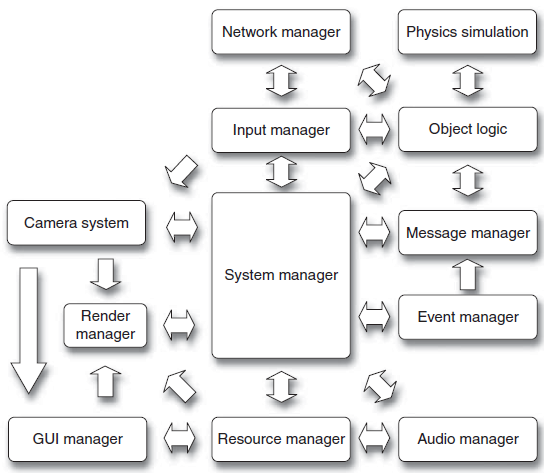
游戏的每个系统都有相对固定的更新顺序,如下图所示:
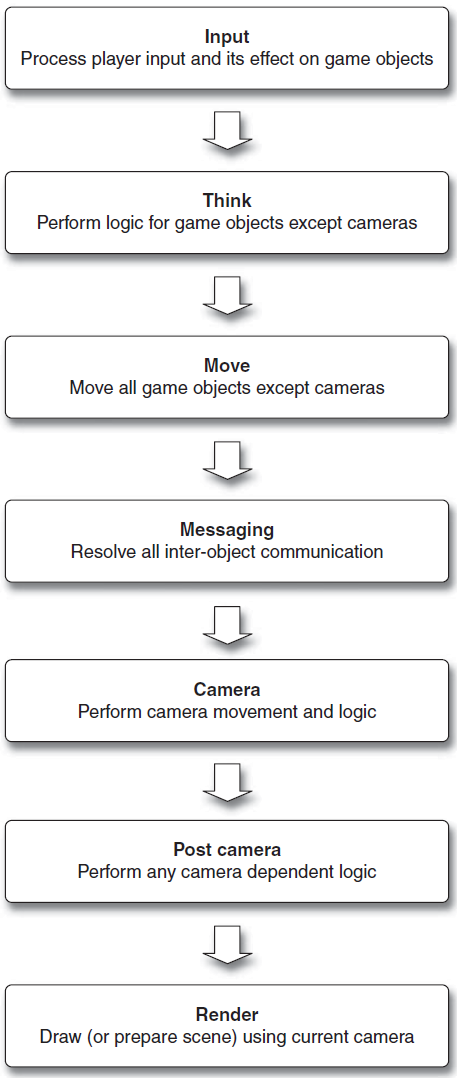
对于每个步骤的介绍如下:
- Input:通常是每帧更新一次,但一些游戏也会每帧更新若干次,从而精准反应玩家输入。
- Think:大部分游戏逻辑得到更新,包括玩家输入、AI、游戏事件生成等。
- Move:更新物理模拟、碰撞检测等内容。
- Messaging:用于在游戏对象、游戏系统之间传递信息,比如新游戏对象的激活、开门、敌人死亡、资源加载完成、动画事件、碰撞等等。Messaging并不是一定会在Update Loop中出现,可能会在消息发出的瞬间被处理,或者延迟处理。Messaging系统有利于不同系统之间的解耦,简化游戏录像逻辑。Messaging本质上是一种保证不同时间点游戏事件同步的技术。
- Camera:主要包含以下步骤:
- 移除无用的camera
- 激活需要的camera
- 决定哪个camera用于渲染
- 更新当前激活的相机
- 更新主相机
- 基于主相机更新玩家control reference frame
- 构建transformation matrices用于渲染,包括特效如shaking, FOV等
- Post-Camera:更新依赖于相机的物体
- Render:有时候一个camera view也会被用于另一个camera view的生成过程中
对于相机而言,Occam's Razor法则适用:最简单的相机解决方案通常是最好的。
相机系统的作用包括:
- 管理活跃相机,保证其逻辑正常
- 控制相机增删
- 支持相机参数动态调整
- 为玩家操控提供参考帧(reference frames)
- 处理所有非交互式电影片段
- 管理并更新视口
- 获取frustum信息以展示view
- 提供可选的debug能力
角色控制与角色移动之间的关系被称为控制参考帧(control reference frame)。
Chapter 2: Camera Fundamentals
Real-World Cameras
真实世界的相机大概包含以下关键要素:
- Lens type
- Capture method
- Film stock
- Capture rate
- Exposure of film
- Projection method
- Aspect ratio
真实世界相机的一些特点:
- 缺乏交互性
- 预先决定的机位
- 相机镜头
- 场景切换
- 胶片曝光
- 后处理特效
游戏相机的一些特点:
- 模拟真实世界相机的功能
- 不需要相机实体
- 动态变化
- 允许游戏世界的不同投影
- 可变的光照与渲染
- 更多样的转场
- 允许特殊效果
一些专有名词:
- Game system: 管理相机、应用相机、控制相机行为、生成用于渲染的信息、控制参考帧
- Game camera: 抽象的游戏实体
- Presentation style: 指将游戏世界投影到屏幕空间的方法
- Camera behavior: 一人称/三人称相机,影院式/交互式相机
- Look-at position: 相机朝向的位置
- Desired position: 相机移动的位置
- Orientation: 相机朝向
- Desired orientation: 相机的目标朝向
- Rotation: 朝向的变化量
- View frustum: 游戏世界的可视空间
- Viewport: 呈现在显示设备上的一种数据结构
- Field of view: View frustum的上下/左右边界的夹角
- Aspect ratio: 长宽比,对于standard definition television (SDTV)来说,是4:3,对high-definition television (HDTV)是16:9。对电影投影中使用最多的是1.85 (CinemaScope)和2.35 (anamorphic)
- Refresh or frame rate: 刷新率
- Refresh and motion blur: 刷新模糊指显示设备刷新率不能与计算机的输出同步,运动模糊是因为物体运动快于曝光时间
- Display tearing: 显示撕裂
- Player character: 玩家在游戏中控制的物体
- Target object: 被看向的物体
- Interpolation: 插值
- Projection: 投影
- Parallax: 视差
- Transitions: 转场,包括过程化转换、插值、瞬时切换、清除、过渡等等
- Camera constraints: 相机约束
- Motion constraints: 运动约束,如距离、相对位置、路径、速度、加速度等等
- Orientation constraints: 通常用于第一人称相机
Camera Presentation Styles
Presentation style 通常被划分为正交(2D)或者透视(3D)渲染,有时也会使用2.5D
Camera Behaviors
主要有三种相机行为:
- Cinematic cameras: 非交互的、玩家不可控的相机,包括cutscene和real-time cinematic sequences
- First person cameras: 视野比TP游戏小,使玩家难以全面捕捉空间与环境信息,跳跃也更加困难。在实现FP相机时,建议把相机与任务的头部分开,同时使相机的朝向独立于玩家的朝向
- Third person cameras: 允许更大的视野,适用于环境导向型游戏,但存在world navigation与collision avoidance两个问题
此外,相机也可以分为predictive和reactive两类: - Reactive: 根据游戏对象的变化而变化 - Predictive: 根据当前游戏物体预测最佳的相机位置和朝向
Path finding solutions: - 全局路径搜索:搜索环境中的一条路径,能够保持美学质量 - 局部路径搜索:以某种具体的物体类型为核心进行搜索 - 基于目标的搜索:在各种约束下搜索路径
View Generation
视图生成步骤:
- 游戏中每个活跃的物体更新内部状态
- 相机更新位置、朝向等信息
- 对游戏中待生成的每个view:
- 决定相机的位置和朝向
- 决定显示设备上的viewport
- 决定游戏世界中的frustum
- 给定frustum,决定哪些物体被剔除
- 对每个待渲染的物体:
- 变换物体
- 应用光照着色
- 2D投影
- 光栅化
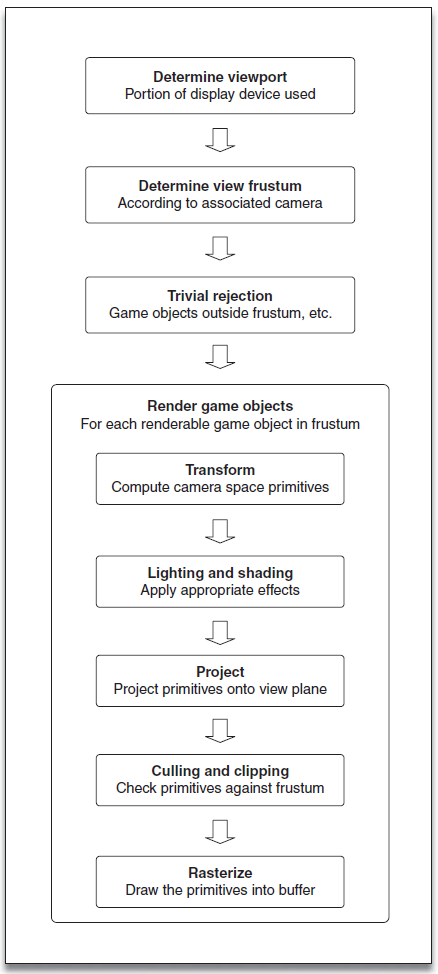
在上述步骤中,与相机系统直接相关的有:view frustum, view transform和projection transform
Player Controls
A control reference frame refers to a relationship between changes to the controller input and how it affects movement or other aspects of player control.
在FP游戏中,control reference frame直接对应了玩家角色面朝的方向,且通常只能绕up axis旋转。在TP游戏中,control reference frame基于相机与玩家的相对位置。
Control reference frame需要始终反应玩家的意图!
Chapter 3: Cinematography
Nomenclature
电影学中的一些专有名词:
- Dolly: 指平行于地面的移动,dollying in是向前推进,dollying out是向后推进,crab left是向左移动,crab right是向右移动
- Pan/Yaw: 绕着camera up轴的旋转
- Tilt/Pitch: 绕着camera right轴的旋转
- Tracking: 跟着物体移动
- Depth of field: 景深
- Color fade: 颜色渐变
- Lens flare: 镜头眩光
- Cut-away shot: 切换到另一个镜头用于强调原场景中的某个元素
- Insert shot: 切换到场景中的细节部分,比如人物特写
- Jump cut: 瞬间切换
- 180 degree rule/line of action: 二人镜头应该让相机保持在同一侧
- Point of view shot: 第一视角镜头
- Crane shot: 第三人称视角
- Reaction shot: 拍摄人物反应的镜头
- Reverse shot: 与前一个镜头角度相反,但仍遵循180度法则
- 30 degree rule: 当使用jump cut时,新镜头与上个镜头的角度差应该大于30度,否则会让观众认为是场景的物体发生了移动而非相机
- Forced perspective: 强制透视指一系列技术让观众产生错误的视觉效果,如大小、位置关系
Dynamically Generated Movies/Replay Cameras
为了实现回放,可以记录初始游戏状态和玩家操作,然后模拟行为。一些回放系统还支持观测者视角。
有三种形式的回放相机:reproduction, scripted, dynamically generated:
- Reproduction cameras/keyframed cameras: 在固定的时间间隔记录位置和朝向信息,实现简单但可能依赖于其他非keyframed游戏事件
- Scripted cameras:
是可交互与预定义的结合。Replay相机的位置可以采用下述的形式:
- Discrete camera behaviors: 此类相机perform jump cuts或者预定义相机位置之间的插值
- Path-based motion: 使用设计师预定义的相机路径
- Slaved motion: 根据特定物体设置相机位置 类似地,相机的朝向(甚至FOV)可以采用如下的形式:
- Fixed orientations: 固定朝向
- Pre-defined orientations: 预定义朝向
- Object tracking: 跟踪游戏物体调整朝向
- Object framing: 保证游戏物体保持与显示设备一致的相对距离,此时物体的显示大小可以通过改变FOV调整
- Dynamically generated cameras:
在回放的时候动态生成相机,如死亡视角、高亮操作等等
- 死亡视角相机:可以通过一个围绕角色的stationary相机实现,或者使用一些预定义的相机位置/朝向
- 重生相机:当玩家进入/重进游戏时播放的相机
一些常用的相机特效:
- Reorientation changes: 引入朝向误差,模拟人类持相机的行为,但要注意摇晃的幅度
- Camera shake: 相机抖动通常在渲染过程中实现而非游戏世界中,因为这不会改变相机的实际位置,注意在第三人称游戏中应当控制相机抖动的幅度和频率
- Roll: 用于营造失控的感觉,比如用在赛车游戏中
- FOV/DOF: 注意DOF不要频繁使用
Scripting
Scripting通常指设计师手动指定相机的位置和朝向,要么在编辑器中进行编辑,要么使用Maya等工具编辑后直接导入
一个典型的scripting system应当包括:
- 调整相机位置和朝向
- 转场
- 相机插值
- FOV变化
Scripting system最好还支持编辑时预览,尽管非常困难
Editing
编辑就是把所有的shot重新组织、拼接的过程,主要包含以下内容:
- Shot selection: 镜头选择
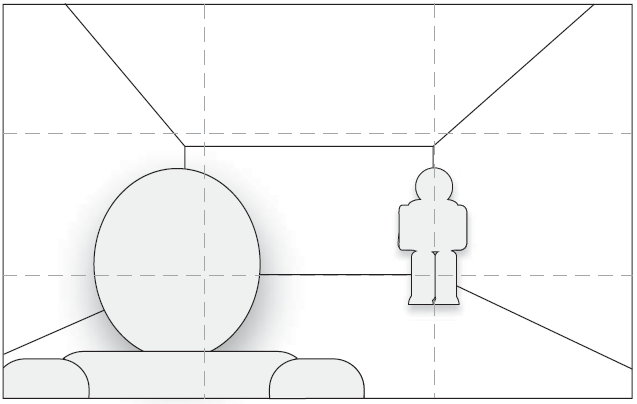
- Framing/composition: 电影业通常对镜头的摆放有非常具体的标准以达到特定的情感效果,即使镜头离物体的距离固定,物体在屏幕中的位置也会极大影响呈现的效果,通常遵循三分法则(rule of thirds)
- Transitions: 有几种常见的转场方式:
- Jump cut: 遵循30度法则
- Cross fade or dissolve: 此类转场可以降低渲染性能要求
- Iris transition: 以屏幕一点为圆心向四周展开
- Wipe(s): 擦拭转场
- Viewport transitions: 视口转场
Tools
如果电影镜头使用游戏引擎进行渲染,即用常规游戏环境制作镜头,则最好让编辑器支持直接控制cinematic sequences,包括:
- 直接对相机位置和朝向的控制
- 通过另一个物体控制相机
- 控制相机之间变化
- 通过相机触发游戏事件
- 镜头的转场
- 控制FOV
- 即时预览
- 额外的编辑和debug工具
上述属性都可以通过一条曲线完成(类似Unity),横坐标是elapsed time,纵坐标是具体值
Part 2: Design Principles
Chapter 4: Camera Design
Interactive 2D Camera Systems
2D游戏通常使用tile map,每个tile都是一个小图片,且使用hash存储,因此极大节省内存
2D相机的主要功能之一是让角色一直位于屏幕可视范围,比如可以使用scrolling,即让背景做相对运动。下面是一些常见的scrolling类型:
- Continuous: 背景的scrolling随着游戏连续进行
- Character-relative: 相机的运动与角色的运动同步
- Directional lag: 期望的相机位置基于角色运动的方向
- Burst: 期望的相机位置只有当角色到达某个位置或距离时才变化
- Screen-relative: 只有在角色超出预定义的边界时相机才开始移动
- Region-based: 当角色超过相对于世界的边界时相机才开始移动
有时候相机的位置要独立于角色位置。对共用一个viewport的多人游戏来说,所有角色的位置共同决定了相机的位置。解决方案:
- 允许相机zoom out
- 限制玩家移动
- 分屏
- 允许玩家在屏幕外移动
- 传送玩家
Cinematic 2D Camera Systems
2D cinamatic camera system的一些典型特征包括:
- Viewport panning control: 控制运动路径
- Zoom in/out: 放大缩小
- Object tracking: 目标跟踪
- Keep an object within screen bounds or other arbitrary viewport-based constraint: 带有限制的移动
Interactive 3D Camera Systems
交互式3D相机系统的难点在于提供一个上下文合适的视角,包括艺术性与游戏性,特征包括:
- 渲染投影类型(透视、正交)
- 决定相机期望位置(navigation)
- 相机移动的方式
- 决定相机期望朝向
- 相机旋转的方式
- 相机其他属性的动态改变(FOV, etc)
- 相机插值
- Fail-safe handling
- 多视口/分屏
Cinematic 3D Camera Systems
当设计3D cinematic camera system的时候有几个有用的建议:
- Duplicate controls and functionality from modeling packages: 复用现有建模包中的功能,让艺术家能够用得舒服、更有效率
- Develop a common terminology: 尽可能用标准的专业术语
- Consider pre-rendering cinematic sequences: 用游戏引擎渲染sequence
- Distinguish non-interactive sequences from regular game play: 要让玩家意识到在播放cinematic sequences时不能再操纵角色了,比如调整aspect ratio
- Allow an early out after viewing scene once: 让观众有机会跳过cinematic sequence
2.5D Camera Systems
2.5D相机系统有自身的优势,比如让游戏玩家更容易理解和接受游戏
Display Devices
让游戏分辨率适应显示分辨率的方法:
- Resize: 通过render buffer和viewport匹配显示设备的分辨率
- Pan and scan: 裁剪
- Stretch: 伸缩
Camera Design process
首先,游戏的整体体验/玩法需要制定下来,然后再制定相机的宏观设计框架。相机设计的总体流程是:
- Examine high-level design goals: 明确在游戏的不同部分相机有何相同之处,是否需要单个representation style,玩家有怎样的体验
- Evaluate player character abilities: 玩家怎么移动、怎么与环境交互
- Determine scope of environments: 游戏场景是怎样的,要提前根据场景做camera prototyping
- Define base camera behaviors: 尽快确定相机的基础功能
- Determine area-specific requirements: 明确特殊区域
- Technical evaluation of cameras: 关注处理器开销、内存开销、脚本能力、Debug能力
在相机设计的时候可以问一些问题,这有助于我们更好地设计:
- Player abilities and controls
- 角色怎么移动的?加速度是什么?是否能跳/飞?
- 角色的移动能力是否最终确定了?
- 相机与玩家的关系是怎样的?
- 是否应该保持与玩家朝向相对固定的朝向?
- 玩家想要看到什么?
- 相机应该关注角色还是角色前的某个点?
- 是否有必须可视的部分?
- 除了角色之外是否还有其他物体必须可视?
- 相机的朝向是否需要改变?
- 玩家角色怎样被控制?
- Environmental concerns: 场景设计应该围绕玩法和相机限制
- 角色在怎样的场景中移动?开放还是封闭,宽敞还是狭窄?
- 场景是否影响相机的位置和朝向?
- 相机是否应该被放在场景外?如是,如果在常规玩法中切换?
- 相机是否会在动态变化的场景中跟随玩家?受到阻挡怎么办?
- 相机是否应当避免复杂物体?
- 相机是否应当限制在具体的路径或表面?
- 哪种presentation style更好?
- 在场景中相机插值是否还生效?
- 是否有必要给相机加上特定的碰撞体?
- Technical concerns
- 是否有技术限制?包括渲染性能问题等
- 如果相机会穿透物体,是否支持透明化?
- 是否需要fail-safes以处理未预料的意外情况,比如关门?
- 是否允许操纵相机?
- 场景是否可能遮挡玩家而无法解决?此时场景是否需要进行改变?
- 是否支持相机插值?如何避免插值间的遮挡?
对于相机的要求、限制应该在项目早期就明确,除非是个别例外,并且要避免在项目开展后大改相机系统。因此,要在项目商讨环节把需求都明确清楚
团队中的camera designer不仅需要负责相机表现,而且也需要负责大部分情况下的相机解决方案。Lead camera designer需要具备美学sense,包括游戏内容的呈现和玩家操作、感知的表现,此外,他还需要推动团队提高认知
Camera Design Guidelines
一些相机设计的建议:
- Attempt to keep the player character in view (3rd person cameras)
- Prevent the camera passing through (or close to) game objects or physical environmental features
- Do not require the player to manipulate the camera simply to play the game -- unless it is a design requirement
- Allow camera manupulation when possible or dictated by game design requirements
- Minimize unintentional camera motion whenever possible
- Ensure camera motion is smooth
- Limit the reorientation speed of the camera
- Limited roll should be allowed in most regular game cameras
- Do not allow the camera to pass outside the game world
- Retain the camera position with respect to the player when instantly moving th camera to a new position (3rd person cameras)
- Do not focus directly on the player character when it is moving
- Retain control reference frame after rapid or instantaneous camera motion
- Avoid enclosed spaces with complex geometry (3rd person cameras)
Chapter 5: Camera Solutions
Game Genre Camera Solutions
- FPS游戏:目标是提供沉浸式的体验
- 位置:一般与玩家视角同步,但并不是玩家眼睛的位置,因为武器、手臂等必要元素通常不能从眼睛位置可视
- 朝向:通常与人眼可视方式一样,即free-look,有时候可帮助玩家自动调整垂直方向的朝向
- 武器或手臂位置:武器与手臂通常可见
- 与外部观测的不同:多人游戏中其他玩家看到的角色可能不同
- 与三人称之间的切换:常用jump cut实现切换
- Zoom effects
- Lack of peripheral vision
- Aiming position
- Motion sickness
- Camera shaking
- Cmaera bob: 角色运动时相机的轻微移动
- Idle wandering
- Scale: 人物在高速移动时往往会scale 尽管相机和人物之间保持相对距离,但是相机也对影响人物移动的因素相当敏感,比如在复杂的地形上,角色可能被垂直提高一段距离,这通常不到一秒钟的时间,但是仍然会对相机产生影响,导致glitch现象,这可以通过增加垂直方向的damping解决,这只有在角色穿越崎岖地表时才生效。注意一人称的damping值要比三人称小
- Character/action adventure游戏:可以根据角色的技能决定相机的行为,比如大致分为两类:地面与飞行
- Stealth: 相机会随着使用物品或武器而变化
- 3D platform: 主要分为两种形式:free form与pre-determined
- free-form: 相机的位置与距离可以由玩家操控
- pre-determined: 严重依赖于特定的Game play,同时也要兼顾相机的效果
- RPG: 常用三人称相机
- Scrolling
- Sports: TV-style presentation may be very desired
- Single-participants sports: 相机只需要focus on玩家或者单个物体
- Two or four-participant sports: 联机or分屏
- Team sports: 预留一个control command标识当前正在控制哪个角色以及哪些角色可以被控制
- Court and indoor sports: 对球类运动而言,难点在于追踪及可视球;对桌类运动而言,要提供整个桌面的视野并简化玩家操作
- Outdoor sports: 对于场地运动,可以提供能够自主操作的相机;自由运动;轨道运动
- Abstract sports
- Racing games: 可提供额外的视角以观测其他人的位置,增大FOV可以制造物体快速通过玩家的感觉
- Ground vehicles
- RTS
- Flight simulation: 一个重要的方面是是否允许相机随着飞机一起roll
- Realistic flight models: 此类游戏通常从驾驶舱或飞机后侧观察
- Non-realistic flight models
- Artificial horizon: 可以用仪器监控飞机的pitch或banking
- Sensation of motion: 可以用云层或航迹云增强飞机的速度感;航天器可以用小的残骸增强速度感;也可以通过音效、FOV等方式
- Adventure: present a very cinematic experience to the player
- Puzzle/party games/board games
- Fighting/close combat: 场景一般很简单以便于相机摆放,需要一些相机移动突出角色的操作
Multi-Player Camera Solutions
多人共享屏幕时,相机设计会有很大难度,有时候可以通过alternate players解决,但多数情况下并不适用。一般来说可以有两种解决方法:
- 分屏
- 单屏包含所有玩家
下面是对相关技术的介绍:
- Single-screen techniques: 格斗游戏、合作游戏中常见
- 相机的位置很难确定
- 通常相机位置固定在一个离游戏世界表面相对的高度,而与玩家移动无关
- 相机位置可能导致朝向的迅速变化
- Split-screen techniques
- 每个玩家的分屏区域一样大
- 根据活跃玩家动态分屏
- 为了提升性能,尽量让所有玩家都处于同一个环境中
- 尽量减少玩家获取的信息
- 避免把重要的物体放在设备屏幕边缘
- Transitioning from full-screen to split-screen
- 保持相机相对距离相同
- UI元素要重新排布
- FOV要根据aspect ratio重新调整
- Transitioning from split-screen to full-screen
- 玩家移动地足够近的时候
- UI元素要等transition完成时再移动
- 相机相对位置保持不变
- FOV调整
Gamera Scripting
What is Meant by Scripting
定义与控制物体加偶和的过程被称为scripting,在游戏中,指控制游戏事件发生的事件与物体之间的交互。Scripting允许设计师在没有程序员介入的情况下完成迭代
Types of Scripting
我们希望构建一个与游戏类型无关的scripting系统,主要由两个方面组成:scripting language和event messaging
Scripting languages
- Text-based scripting languages: 包括pre-compiled和interpreted两类
- General-purpose programming languages: 编程语言
- Custom scripting languages
- Finite state machines
- Visual scripting languages
Event messaging
Event messaging要求定义不同物体之间的关系。典型的能够发送消息的事件包括:
- 关卡开始
- 物体加载
- 游戏暂停
- 进入或退出volume
- 玩家受到伤害
- 物体到达路径终点
- 玩家状态改变
能够被事件发送的典型消息包括:
- Start
- Stop
- Activate object
- Delete object
- Query state
Script Objects
用于定义物体的属性和行为
Scriptable game hints
Game hints are script objects that provide one possible type of runtime mechanism by which designers can override player properties, game controls or camera properties according to events
- Camera hints: 改变相机的属性或移动,可以被重载的相机属性包括:
- 相机行为
- 位置朝向
- 相对距离
- 看向点
- 移动速度
- FOV
- Player hints
- Prevent motion of the player
- Relocate player position
- Change player movement characteristics
- Flags to indicate special kinds of game play
- Control hints
- Disable specific controls or sets of player controls
- Specify the control reference time and the time to interpolate to that new reference time
很多时候事件需要有先后顺序,一个sequenced event manager可以用来定义事件的先后顺序。
Camera Scripting
Camera scripting methods
- Pre-defined camera scripting
- Dynamic camera scripting: 只调整需要的相机属性
DCamera control
- Third person scripting: 用专门的script objects去调整FOV、Focal Length,filter or rendering effects, fog distance等
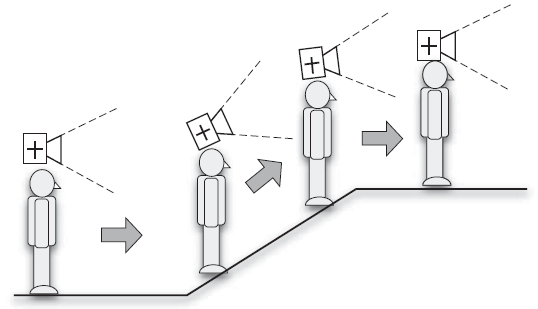
- First person scripting: 有一些情况也需要对FP相机进行动态控制,比如
- Traversing up or down ramps or other significantly sloped surfaces:
在上下坡的时候线相机要和坡度一致
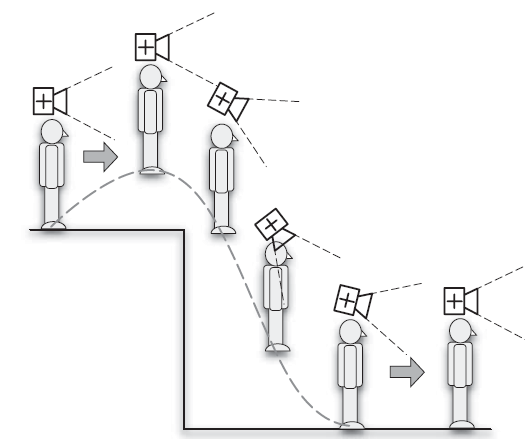
- Jumping: 在高距离跳跃时,能够对准落脚点的方向,但幅度不宜过大
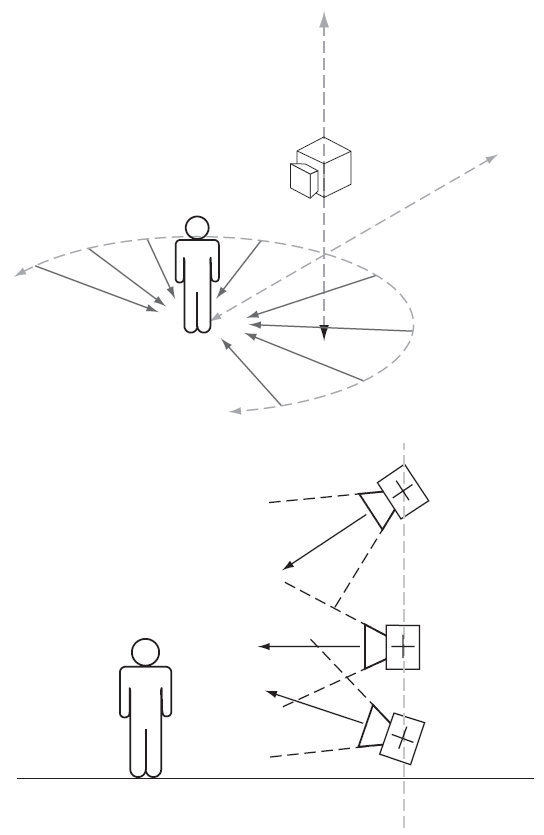
- View locking: 锁定目标时相机要朝向目标点
- Traversing up or down ramps or other significantly sloped surfaces:
在上下坡的时候线相机要和坡度一致
- Non-interactive movie scripting: 最常用的就是位置和朝向的scripting
一些经验法则:
- Apply Occam's Razor: 使用最简单scripting方案,这便于随时修改
- Allow for different ways that the camera event may be triggered: 比如有时候只用trigger volume可能不够
- Allow previewing of camera motion and orientation: 支持预览
- Assess camera scripting requirements early in the design process
- Make the scripting development cycle as efficient as possible: 提高预览和扩展能力
- Mimic the behaviors of the tools used by artists where possible: 降低艺术家(设计师)的学习成本
- Allow for game play changes: camera scripting system: 游戏玩法改变时能够轻松地修改camera
Scripting Tools
World editor support
必须支持script objects的放置与操作,而且还要支持message passing, state transition, event trigger和其他物体间的关系
Communication between target platform and development PC
要获得运行物体的状态
Messaging/event logging
对消息和事件进行记录
Object properties debugging
当游戏运行时要动态检查物体的属性
Replay
最简单的方法是内置video recording
Console window
支持打印文本消息,通过GM指令查看想要的文本消息
Scripting Debugging
常见的debugging方法:
- Script statement execution/filter: 对任意给定的script,展示每个状态执行的历史记录
- Debug message logging: 单独展示日志
- Message filtering: 增加过滤功能以更好地debug
- Object state: 展示物体的状态
- FSM state changes: 展示当前的state和历史state
- Animation state and event management: 记录当前的动画状态和插值状态,记录事件
Part 3: Camera Engineering
Chapter 7: Position and Orientation
Coordinate Schemes
有几种不同的坐标空间:
- World Space: 从世界空间到相机空间再到屏幕空间
- Camera Space: 以相机为原点
- Screen Space: Camera Space通过正交变换而来
- Local Space: 以角色为原点
- Object Relative: 相机为原点,三个轴根据某个物体到相机的位置而定
Desired Position
在相机移动的过程中需要关注与目标点的距离
First person camera positioning
大多数情况下,相机的desired position就是角色眼睛的位置,此时增加一点dvertical amping会有用。在玩家遇到崎岖地形或与物体碰撞时,需要smooth out轻微的相机运动
Third person camera positioning
有三种策略决定相机位置:
- Automated: 相机完全自动化
- Player control: 交由玩家操作相机,但要让环境始终保持在视野中
- Hybrid: 交给玩家部分自主权
Desired Position Determination Methods
相机位置应该独立于朝向,尽管后者常常依赖于前者。下面是一些决定desired position的方法
Stationary
主要有两种stationary cameras: fixed position 和 dynamic fixed position:
- Fixed position: 相机位置固定但可以自由调整朝向,通常限制了朝向的范围。但此类相机会使目标离相机太远或者丢失视野
- Dynamic fixed position: 通常由其他活跃的相机决定,中间由jump cut或interpolation决定
Slaved/tracking
相机的offset可以采取以下的几种形式:
- World-relative offset: 在世界坐标内保持相对距离
1
Vec3 desiredPosition = GetTargetObject()->GetPosition() + mOffset;
- World-relative angular offset: 在世界坐标中通过角度定义相对距离
1
2
3
4
5
Vec3 offset(0.0f, cosf(pitch) * distance, sinf(pitch) * distance);
// construct a rotation matrix around the world up-axis
Mat3 rotation = Mat3::ZRotation(yaw);
mOffset = rotation * offset;
Vec3 desiredPosition = GetTargetObject()->GetPosition() + mOffset; - World object relative:
根据主物体和另一个物体之间的距离决定相机位置,这种方法可以帮助处理人物在相机和另一物体中间的情况
1
2
3
4
Mat3 rotation = Mat3::LookAt(GetTargetObject()->GetPosition().DropZ(), mWorldPosition.DropZ());
// note that the reference frame is often 2D, but is not required to be
mOffset = rotation * offset;
Vec3 desiredPosition = GetTargetObject()->GetPosition() + mOffset; - Local offset: 与world relative
offset类似,只不过offset被转换到了局部空间
1
2
3
Mat3 rotation = mScriptObject->GetMatrix(); // based on the orientation of the script object
mOffset = rotation * offset;
Vec3 desiredPosition = GetTargetObject()->GetPosition() + mOffset; - Local angualar offset: 类似world-relative angular
offset,不过offset被转换到了局部空间
1
2
3
4
Vec3 offset(0.0f, cosf(pitch) * distance, sinf(pitch) * distance);
Mat3 rotation = mScriptObject->GetMatrix();
mOffset = rotation * offset;
Vec3 desiredPosition = GetTargetObject()->GetPosition() + mOffset; - Character-relative offset: 在局部坐标内根据角色的朝向决定相机的位置,在三人称相机中最为常用,被称为“追背相机 (chase camera)”, 一般不会变化Roll
- Character-relative angular offset: 在局部坐标内根据角色朝向和三个旋转角度、距离决定相机位置,通常会限制相机旋转速度的变化率
- Object-relative offset:
不考虑目前物体的朝向,而仅考虑elevation和distance,the vector from the
target object toward the current camera position defines the coordinate
space used to calculate the desired position,相机的朝向通常由玩家操纵
1
2
3
4
5
Mat3 rotation = Mat3::LookAt(GetPosition().DropZ(), GetTargetObject()->GetPosition().DropZ(), mWorldPosition);
// only elevation (here pitch) and distance are required
Vec3 offset(0.0f, cosf(pitch) * distance, sinf(pitch) * distance);
mOffset = rotation * offset;
Vec3 desiredPosition = GetTargetObject()->GetPosition() + mOffset;
Path
有几种不同类型的路径:
- Linear: 直线路径
- Circular/elliptical/spiral: 环状路径
1
2
X = a * cos(theta);
Y = b * sin(theta); - Spline: 通常一系列control points定义
下面是决定路径位置的方法:
- Non-interactive situations: 在movie sequences中通常由一个时间到位置的映射决定
- The position of the player character relative to another object
- Player position relative to a defined path
- A specified distance away from the closest position on the path to the player: 改方法需要注意相机移动的平滑性
Splines. 可以用brute
force的方法去计算spline的长度,代码如下 1
2
3
4
5
6
7
8
9
10
11
12
13
14
15
16
17float length(0.0f);
for (int i = 0; i < controlPoints.Size(); ++i)
{
Vec3 pathPosition = EvaluateSegment(i, 0.0f);
// start of i'th segment
controlPoints[i].mLength = length;
// save length at the control point
for (int j = 1; i < kMaxSegmentSlices; ++j)
// includes next control point
{
Vec3 newPosition = EvaluateSegment(i, j/kMaxSegmentSlices);
Vec3 delta = newPosition - pathPosition;
length += delta.Magnitude();
// add the "length" of this slice
pathPosition = newPosition;
}
} // length now holds the approximate total length
一种更快且准确的方法是用多项式逼近
Mapping functions. 最简单的是从时间到长度的线性映射,此时相机的速度不变,导致abrupt开始或结束。一种常见的方法是使用一个二维spline曲线(Hermite curves),用户可以定义控制点和切线控制曲线的形状
Surface constrained
在一些情况下,相机可能限制在一个隐式的平面上,比如一个flat平面,一个椭球、圆柱等等,该平面的大小和朝向可能是动态的
下面是一些常见的surface类型:
- Sphere: 容易受gimbal lock影响
- Plane
- Cylinder
- Cone
- Extruded spline plane
- Spline cylinder
Volume constrained
相机与圆柱体的碰撞检测:
1 | Vec3 direction = currentPosition - cylinder.GetPosition(); |
Framing
该方法在屏幕空间上保持目标角色的位置,这可以通过移动相机、修改FOV、伸缩viewport等方法实现
Object-framing relative
该方法不仅考虑物体在屏幕空间中的小,而且也考虑它和另一个物体之间的相对距离,一些因素包括:
- Object screen size
- Multiple objects must be kept on screen
- Distance between objects
- Relative position to other objects
- Relative position to the screen (not rendered size)
- Orientation with respect to the camera
- Distance aiming/ranged weapons
Axis rotational/spindle
相机围绕游戏世界中的一个轴旋转、平移,适用于玩家需要围着一个物体导航的情况,或限制在一个圆柱物体的情况
一些影响相机位置的因素:
- Angular offset relative to the reference vector or the axis origin
- Axial offset relative to the current player positionn or the axis origin
- Radial offset relative to the spindle axis or current player radius
此外,我们也可以改变相机的朝向:
- Look at the spindle axis along a projected vector from the current camera position
- Look away from the spindle along a projected vector that passes through the camera position as above
- Apply an angular offset either toward or away from the spindle relative to the target object
玩家位置相对于spindle axis的半径可以作为mapping function的输入,当玩家移动半径更小时,相机移动得更高
Common Position Problems
- 期望位置和一个物体碰撞,或者太近以至于物体穿透相机的近平面
- 期望位置离环境中的边界物体太近以至于有环境外的视野
- 期望位置离目标对象太远,玩家没有好的视野
- 环境复杂相机不能提供好的视野
Orientation
旋转有四种表示方法:欧拉角、变换矩阵、轴角和四元数
Desired Orientation Determination Methods
Constant orientation
朝向不变,但是位置可以移动。可以变式为constant elevation cameras,即只有pitch可以改变
这种相机可以用在:
- Player controlled remote cameras
- Dynamic positioning of replay cameras
- Dynamic positioning of caemras for non-interactive game play sequences
Tracking a target object or position
相机达到期望朝向的方法取决于目标物体的移动和相机的重朝向速度,此类相机一般保持固定的pitch
Look-at offset
许多三人称游戏使用一个固定的look-at offset
Locked look-at position
玩家的朝向也会随便改变
Target object position prediction
Object framing
一个很好的例子是格斗游戏,双方玩家都希望自己和对方都能呈现在屏幕上,当玩家距离增加的时候,相机要么拉远,要么增大FOV,但是频繁切换FOV通常不可取
回放相机通常会从不同的视角呈现玩家行为
Idle wandering
A semi-random camera reorientation while the player character is idle
Automated orientation control
在没有玩家操作的情况下自动帮助相机转向:
- Automated control over camera pitch when the player is jumping: 从玩家起跳时开始相机可以向下看
- Automated pitch control when traversing environmental features: This is applied to present a view facing up or down a ramp, staircase or other incline as appropriate so that players have a better view of what they are moving toward, 在有洞穴或悬崖的地方,相机应该自动看向以给予提示
- Automated pitch control during combat or interactions: 自动调整pitch以提示可交互的物体
- Automated reorientation of the player or a camera toward a target position: 锁定到目标物体
- Repositioning and reorientation of the camera to face the same direction as the player character
- Transitions from first to third person cameras: 要保证当相机移动地充分远的时候才渲染物体,避免穿帮,此时可通过fade角色解决此问题
- Transitions from third to first person cameras: 可通过cut transition实现
Reorientation Methods
Applying rotations
有几种方法去应用旋转:
- Constant angular velocity: 匀速变动旋转角,但是开始和结束会有突变
- Acceleration and deceleration: 应用加速度与减速度
- Angular velocity damping: 用damp使开始结尾更皮规划
- Free-look damping: 用bump和其他的ease functions防止因noise导致的相机朝向变动
- Twist reduction
Reorientation lag
通常我们希望相机朝向的变化能有一些延迟(lag),同时保持平滑
很多游戏没有任何延迟,这有两个影响:第一,相机直接看向角色会导致玩家不能提前看见角色的移动,第二,相机非常依赖角色的移动,任何小的扰动就会影响相机表现
因此需要使小的移动没有影响,并且使用damp。当插值的时候,可以限制每帧允许的旋转角度。此外,lag还可以通过用springs或feedback controller实现
Offsets
一个常被忽略的点是look-at position和target object之间的关系。如果直接看向角色,那么就容易丢失玩家想要看的东西。可以用一些视觉提示帮助玩家瞄准目标对象,比如highlight敌人,或者lock-on to the target object
Smoothing and damping
常用的平滑方法是limit the angular velocity of the camera proportionally to the angle between the current and desired orientations,这可以表示为一个简单的三角函数:
1 | Real32 const kDampingAngle(30.0f * gkRadiansPerDegree); |
始终记住我们有两个矛盾的要求:平滑移动和保持角色合理视角
Springs and PID controllers
In practice, tuning the characteristics of the controller to achieve this behavior can be time-consuming but very worthwhile
Free-Look
First person free-look
很多一人称游戏采用circle strafing技术允许玩家free-look,有些游戏也只允许垂直方向的朝向变化,当然也要限制最大角度
Third person free-look
用一个圆锥体围绕look-at点,并使用一个弹簧在没有输入指令的时候令相机能够回到初始位置
Free-look orientation determination
决定free-look朝向通常有两种方法:self-centering和non-centering
- Self-centering free-look: 玩家输入会让相机朝向改变,通常把遥感值映射为相机朝向的速度
- Non-centering free-look: 在没有玩家输入时相机会保持现在的朝向
Common orientation problems
一些常见的相机朝向的问题:
- Gimbal lock: 当相机forward与世界up axis平行时发生,要么不让相机平行于up axis,要么用四元数构造变换矩阵
- Vertical twist: 当使用三人称相机时,如果相机朝向接近平行于up axis则会出现这个问题,表现为相机快速围绕up axis旋转,常发生于相机在墙角的情况,此时可以限制相机围绕up axis的旋转速度,或者禁止相机朝向改变直到相机离玩家足够远
- Roll: 飞行模拟游戏会经常使用roll
- Orientation noise: 使用high-pass filter移除不想要的朝向变化
- Rapid orientation changes: 当允许玩家快速移动/改变朝向,或玩家在相机下方或上方移动时,相机的朝向就会快速改变,带给玩家糟糕的体验
- Frustum culling of the player character: 三人称游戏必须首先考虑frame玩家,切通常相机直接看向玩家前进的方向,但也要让玩家保持在view frustum中
Chapter 8: Navigation and Occulusion
Dynamic determination of how the camera should reach its desired position is referred to here as navigation
The Cemera as an AI Game Object
需要假定环境是封闭的,即有碰撞表面
Navigation Techniques
相机的寻路需要考虑环境限制
Dynamic navigation techniques
主要包括以下方法:
- Ray casting:
用射线决定是否存在遮挡物体,但是可能会有效率问题,此外,可以增加射线覆盖更大区域。另一种方法是使用ray-casting
hysteresis,即在多个update中累积ray
cast信息,并生成一个可能碰撞的概率图,从而减少每次更新的ray
cast数量。Ray
cast可以用于帮助相机移动。要对物体进行分类以区别哪些需要ray casting
1
2
3
4
5
6
7For all ray casts
if ray cast successful
No influence applied
if ray cast fails
Scale influence factor by distance of ray cast collision from target
Add influence to desired camera position
End - Volume projection: 该方法把一个volume从相机位置投影到目标位置,用来确定相机的移动是否合法
- Sphere/cylinder collisions: 碰撞体的半径应该比近平面距离略大,理论上,碰撞体应该完全包含近平面frustum的四个顶点。在第一人称游戏中,可以不用给相机加碰撞体,因为一般有角色碰撞体即可,但是也要保证近平面被角色碰撞体包围
- Dynamic path finding: High-level solution负责volume之间的整体移动,low-level solution负责避免碰撞。相机AI不同之处在于移动往往很短,因此更要关注low-level的需求
- Dynamic path generation: 不同于path finding,path generation使用的是游戏中动态生成的信息,所以生成的path可能会动态改变
- Visibility and rendering solutions: 这种技术首先决定相机据目标物体的位置,基于一些其他限制,得到可能的相机位置点,对于每个可能的位置,令相机朝向角色,就可以看当前视角是否存在遮挡。决定好位置吼,就可以计算一条移动路径,但是也要注意路径中的遮挡和碰撞
- Colliders:
在相机周围添加collider,每个collider都会发射射线,如果有遮挡出现,则移动相机位置
1
2
3
4
5
6
7
8
9
10
11stl::vector<Vec3> influence;
// might be useful as a class
for (int i = 0; i < colliders.size(); ++i)
{
influence.push_back(colliders[i].offset * colliders[i].GetWeighting());
// the weighting depends on line of sight and/or
// other factors such as the relative collider position
}
// will need to get an average or similar
return GetCentriod(influence);
Pre-defined navigation techniques
一些常见的pre-defined navigation技术:
- Pre-defined paths: 预先做好路径,根据玩家操作在路径上移动和朝向
- Path motion behaviors: 有几种方法去限制相机的移动
- Constrained path camera: 相机被固定在path上以避免碰撞
- Follow path camera: 相机固定在path上,但移动方式可以有多种方式
- Pre-defined volumes
- Attractors/repulsors: 相机会被其他pre-defined的位置、区域、物体所吸引/排斥,吸引力/排斥力的大小取决于相机离该物体的距离和朝向。在合适的时候用attractors/repulsors可以帮助相机避免穿模和在狭窄地区顺利通过,而不需要hand-scripted
- Flow fields: Flow fields是向量的稀疏数列,通常稀疏地分布在2D平面或者3D Volume内。当相机穿过flow field时,离相机近的向量会对相机朝向的方向施加一个力。Flow field常用于一个额外的因子而不是单个因素
- Influence maps: 类似flow field,但是通过目标对象离influence map的相对距离决定而非camera本身,influence map中的每个点都是相机的可选位置
- Potential fields: 基于electrostatic forces,即对一个物体施加的力的效果取决于发力点和目标物体之间的距离,类似attractors/repulsors
Occulision
Occulusion determination
- Ray casting: 通常使用三个部分进行遮挡检测——头部、躯体和脚部
- Volume casting
- Rendering techniques:
- Flat-shading using identifiers as color values: 待进行遮挡检测的物体使用flat shading和一个标识颜色,环境物体使用不同的颜色渲染,然后可以通过display buffer检测物体的遮挡部分
- Z-buffer analysis: 直接用depth buffer进行检测
- Rendering hardware occulusion queries
Occulusion prediction methodologies
可以用一个predictive相机预测遮挡
Line of Sight
Resolving line of sight problems
可能有时候相机不能快速移动保持对目标物体的LOS,下面是一些可能的解决方案:
- Prevention: 手动调整相机位置让它避免出现loss of LOS
- Graphical changes: 可以把遮挡物体透明掉或去掉,也可以着重突出角色(如描边、改变颜色、增加indicator)
- Finding a desirable position: 可以以角色为中心旋转,或者使用visibility octree信息,一旦一个位置被发现,则直接把相机relocate到该位置
- Teleportation/jump cut: 可以把相机沿着LOS的方向移动,直到没有遮挡(注意要考虑相机的近平面位置与collision volume)
- Retaining control orientation: 相机移动后注意保持相同的retaining control orientation
Path generation
该方法生成一条路径,相机沿着路径移动直到遮挡消失,生成的路径不仅要避免碰撞,并且也要符合美学要求:
- Follow character movement: 记录玩家移动的路径并让相机沿着路径移动
- Ledge avoidance:
玩家从悬崖边缘下落时相机可能因为无法穿透物体而出现问题,解决方案可能有:
- Pre-defined scripting solutions for all ledge situations
- Use pre-defined solutions for difficult to resolve cases, especially in confined spaces: 可以用stationary cameras或者spline paths
- Teleport the camera to a new position if LOS fails due to the ground being between the camera and its target: 这可能需要检测剪玩家的高度
- Use player movement hysteresis to provide an approximate path taken by the player character or target object
- Interrogate the surrounding geometry to dynamically choose a path based on the last position at which the player was visible to the camera: 该位置给出了关于ledge的位置信息用于camera path,但要保证相机不能离物体太近,也不能让相机垂直朝向
- Vertical column avoidance: Predictive cameras一般能解决该问题
- Pre-computed solutions
Avoiding loss of LOS
如果不能避免loss of LOS,我们可以采取一些方法进行弥补:
- Instant movement: 有时候很实用
- Fade out the obscuring geometry or objects: 会降低玩家沉浸感
- Do not render obscuring gheometry or objects at all: 可以用一个timer,只有时间到了才取消渲染
- Render a graphical representation regardless of occlusion
- Visibility pre-computation
Fail-safes
Fail-safe检测可以分为三类:
- Per-update: 在一些情况下必须在每个update进行fail-safe检测
- Geometry interpenetration of the camera near plane: 可以用一个足够大的collision volume避免
- An invalid (non-normalized) camera transformation matrix: 此时可以orthonormalize或者reconstruct矩阵,或者可以回到上次正确的旋转矩阵
- The camera is external to the game world
- Excessive rotation required aounrd the world up-axis in one update: 限制旋转角度
- Frequent: 有时候每隔几次update进行一次fail-safe检测
- LOS to garte object extremities
- Distance from desired position
- Infrequent: 每隔几秒检测一次
- Significant occlusion of player character (3rd person view only)
- Camera distance from target is too far: 会让目标看起来太小
一旦触发fail-safe condition,最好是立刻将相机移动到新的safe position,通常是jump cut。另一个方法是把相机移动回过去的已知点直到满足条件
Chapter 9: Motion and Collision
Camera Movement Sequence
我们可以按照下述过程移动相机:
- Determine the desired position
- Constrain the desired position accordingly
- Generate a prospective movement toward the desired position
- Test to see if the prosepctive movement will cause collision (optional)
- Resolve the collision (optional)
- Generate and validate an alternative movement (optional if first move fails)
- Move the camera to the new position
Character motion
首先看看人物移动会怎样影响第一人称和第三人称相机
- First person cameras:
注意相机位置通常不是眼睛位置,因此要注意fov和aspect
ratio。有时候玩家跨越世界物体时可能造成traversal
jitter,因此可以增加vertical damping
1
2
3
4
5
6
7
8
9
10
11
12
13
14
15
16
17
18
19
20
21
22
23// A typical damping scheme for aviuding unwanted noise in the verticasl
// motion of the camera is to simply limit the amount allowed per update.
float const kMaxZMotionPerSecond (0.25f);
// desired maximum motion
float zMotion = newPosition.GetZ () - oldPosition.GetZ ();
float const maxZMotion = kMaxZMotionPerSecond * deltaTime;
zMotion = Math::Limit (zMotion, maxZMotion);
newPosition.SetZ (oldPosition.GetZ () + zMotion);
// The smoothing is relatively harsh: the amount of vertical motion applied
// is constant and thus will possibly have discontinuities.
// An alternative is to use a critically damped using spring or PID controller.
float const zMotion = newPosition.GetZ () - oldPosition.GetZ ();
verticalSpring.SetLength (AbsF(zMotion));
// update the spring length
// Here the target spring length is zero, and need not
// be set each time. Typically the spring length is unsigned,
// so that must be dealt with.
float const newZMotion = verticalSpring.Update (deltaTime);
if (zMotion > 0.0f)
newPosition.SetZ (newPosition.GetZ() - newZMotion);
else
newPosition.SetZ (newPosition.GetZ() + newZMotion); - Third person cameras: 必须解决相机加速小于角色的问题(motion lag),和相机减速小于角色的问题(overshooting)
Movement methods
一些移动相机的方法包括:
- Instantaneous motion: 直接把相机移动到期望的位置,但要注意:
- 可能也要改变朝向
- 可能需要检测新的位置是否离环境物体太近、没有在物体内
- 尽可能保持control reference frame
- 尽可能把所有该类型的变换定义为一个函数
- 如果出现多普勒效应,则应限制相机移动的最大速度
- Locked
- Proportional controller: 该方法在目标也移动的时候表现不好
1
2
3
4
5
6
7
8
9
10
11
12
13
14
15
16
17
18Vec3 const deltaPosition = desiredPosition - currentPosition;
// the distance at which velocity damping is applied
float const kDampDistance (5.0f);
float const K = Math::Limit (deltaPosition.Magnitude() / kDampDistance, 1.0f);
// Limit constant to 0..1 based on distance
Vec3 const cameraVelocity = deltaPosition.AsNormalized () * K;
Vec3 const newPosition = currentPosition + cameraVelocity * deltaTime;
// We can help solve the problem of the camera being left behind by adding a
// portion of the target object's velocity into the original equation.
Vec3 targetVelocity = (desiredPosition - previousDesiredPosition) / deltaTime;
Vec3 = cameraVelocity = (deltaPosition.AsNormalized () * K * deltaTime) + (targetVeclocity * T);
// To have smooth motion we need to accelerate the camera over time
// with a limiter to provide some degree of lag in the motion.
float const acceleration = Math::Limit ( (desiredVelocity - currentVelocity), kMaxAcceleration);
Vec3 const currentVelocity += acceleration * deltaTime;
Vec3 const desiredPosition = currentPosition + (currentVelocity * deltaTime); - Physical simulations
- Springs: 当目标物体朝相机移动或突然停止时,相机可能出现overshooting问题,我们希望critical damping,即无论目标物体怎么动,都不会出现overshooting
- PID controllers: proportional integral derivative (PID)
controllers,把feedback应用到控制器中减少当前值和期望值的错误量
1
2
3
4
5// The usage of PID controller
Vec3 const currentDelta = currentPosition - desiredPosition;
float const currentDistance = currentDelta.Magnitude ();
float const newDistance = PIDController.Update (desiredDistance, currentDistance, deltaTime);
Vec3 const currentPosition = desiredPosition + (currentDelta.AsNormalized () * newDistance); - Circular movement: 相机的运动由reference
point到当前位置和期望位置之间的夹角决定,因此需要计算其角速度,有两个方法计算:
- Constant angular velocity: 不管半径多大,以固定的角速度旋转
- Constant linear velocity: 保持固定线性速度
1
2
3
4
5
6
7
8
9
10
11
12
13
14
15
16
17
18
19
20
21
22
23
24
25
26// A typical implementation of moving a camera by constant angular velocity might be:
Vec3 cameraBearing = Vec3 (currentPosition - referencePoint);
Vec3 desiredBearing = Vec3 (desiredPosition - referencePoint);
float const radius = cameraBearing.Magnitude ();
cameraBearing.Normalize ();
desiredBearing.Normalize ();
float const angularMotion = angularVelocity * deltaTime;
// rads/update
Quat const q = Quat::ShortestRotationArcClamped (cameraBearing, desiredBearing, angularMotion);
Vec3 const newBearing = q * cameraBearing;
// rotate the original bearing
Vec3 const newPosition = referencePoint + (newBearing * radius);
// An implementation of constant linear velocity might be:
Vec3 cameraBearing = Vec3 (currentPosition - referencePoint);
Vec3 desiredBearing = Vec3 (desiredPosition - referencePoint);
float const radius = cameraBearing.Magnitude ();
cameraBearing.Normalize ();
desiredBearing.Normalize ();
float const arcLength = linearVelocity * deltaTime;
float const angularMotion = acosf (arcLength / radius);
// units/update
Quat const q = Quat::ShortestRotationArcClamped (cameraBearing, desiredBearing, angularMotion);
Vec3 const newBearing = q * cameraBearing;
// rotate the original bearing
Vec3 const newPosition = referencePoint + (newBearing * radius);
- Interpolation: 考虑在两个相机的速度之间插值,为了避免discontinuity,要让加速度匹配而不仅仅是速度
Smoothing and damping techniques
Damping方法通常要用ease functions,把一个输入值(0到1之间)映射到相同区间,只不过是非线性映射且开始和结尾的导数为零
- Motion damping: 可以通过添加vertical damping减少颠簸感
- Motion filters: 用一个低通滤波过滤噪音 下面是一种改进的方法(使用finite impulese response and infinite impulse response filters):
1
2
3
4
5
6Vec3 const movementDelta = newPosition - currentPosition;
if (movementDelta.Magnitude () > kMovementThreshold) {
currentPosition = newPosition;
} else {
// ignoring small changes may cause the camera never to move at all!
}1
2
3
4
5
6Vec3 const movementDelta = newPosition - currentPosition;
if (!close_enough (movementDelta, Vec3::Zero ())) {
float distance = movementDelta.Magnitude ();
distance = mMovementFilter.Update (distance);
currentPosition += movementDelta.AsNormazlied () * distance;
}
Motion constraints
一般有下述几种相机约束:
Vertical motion constraint: 用于避免不想要的图形效果如穿模,比如避免水面穿帮可以用下面的代码:
显然,上述代码的问题在于相机在进入水面后会出现不连续移动,但这无法避免,但可以用特效过渡1
2
3
4
5
6float const kMinimumZDistance (0.1f);
float const zDistance (currentPosition.GetZ () - waterPlane.GetZ ());
if (fabs (zDistance) < kMinimumZDistance)
{
currentPosition.SetZ (waterPlane.GetZ () + Math::Sign (zDistance) * kMinimumZDistance);
}Render geometry proximity: 用collision volume解决
Distance constraints: 可以让相机和玩家保持固定的距离或最小/最大距离,但是可能会有问题
1
2
3
4
5Vec3 const unconstrainedOffset = currentPosition - desiredPosition;
float const currentDistance = inverseDirection.Magnitude ();
float const newDistance = Math::Clamp (kMinDistance, currentDistance, kMaxDistance);
Vec3 const newOffset = unconstrainedOffset.AsNormalized () * newDistance;
currentPosition = desiredPosition + newOffset;Planaer constraints
1
2
3
4
5
6
7CPlane const plane (normal, constant);
Vec3 cameraPosition (GetCurrentPosition ());
float const planeDistance = Vec3::Dot (plane.GetNormal (), cameraPosition) - plane.GetConstant ();
if (planeDistance < kMinDistance)
{
cameraPosition += plane.GetNormal () * (planeDistance - kMinDistance);
}Surface constraints
Volume constraints
Player camera control
一个原则: > The player should be not REQUIRED to manipulate the camera simply to play the game, unless explicitly dictated by the game design.
If camera-relative, the sheer act of moving the camera changes the control reference frame and "pulls the rug out from under the player's feet". Sadly, some games seem to treat this behavior as acceptable. It is not. Changing the control reference frame without player knowledge is counter to good game play practice.
- Maunipulation of the camera position:
有时候允许玩家直接操纵相机,分为2D和3D相机
- 2D相机: 2D游戏通常会限制相机的移动以防看到游戏外的场景
- 3D相机: 在不同相机之间切换可以使用插值或jump cut
- Observer cameras: 提供观察者相机,即可以随意自由移动的相机
- Camera motion validation: 一些游戏不允许操纵相机位置
- Positional control constraints: Character-relative相机通常保持在玩家身后的一定区域内,一般不会让相机面朝角色。相机移动要尽可能平滑和慢以避免player disorientation
Camera position control schemes
主要有两种方法决定相机位置:
- Character-relative: 类似unity的free-look相机,但需要加一些限制,比如相机的移动范围是一个cylindrical而不是整个球面、相机在人物朝向的身后一定范围内。一些相机允许半自动的移动,比如移动向一个危险区域时
- World-relative: 此时相机的朝向和玩家朝向没关系,比如RTS、运动、3D平台游戏中的相机
Manipulation of camera orientation
- First person cameras
- Third person cameras:
Automated camera positioning and orientation
除了cinematic sequences之外,也有一些情况会需要相机自动改变位置和朝向:
- In response to player controller usage: 玩家自由选择视角
- In response to game play requirements: 在三人称游戏中,有时候我们想保证某个物体一直在视野内,有时候,会通过相机给玩家辅助(比如在跳跃时增加pitch)
Debug camera control
该相机需要在不影响游戏的情况完全由用户操作,同时,如果能在降低游戏运行速度的情况能以正常速度操作debugging camera,则会非常有利于debug
Camera Collisions
The importance of camera collisions
Camera collision可能引起的问题:
- The collision prevents the camera from moving to its desired position
- Discontinuous motion may be caused by collisions
- Occulusion of the target object
- Camera near plane intersects with geometry
Collision determination
- Object collisions
- Environmental collisions: 有两种数据——render mesh和collision mesh
- Collision primitives: 通常来说,相机会被表示为球体用于碰撞检测
Collision geometry design
下面是一些设计场景的tips:
- Avoid tightly confined spaces
- Allow sufficient space for the camera
- Steep steps
- Ledges/overhangs
- Low ceilings
- Doorways: 第一,玩家可能移动太快以至于门在玩家和相机之间关闭,此时可以让门保持开启直到相机穿过;第二,玩家可能沿着门缝移动并导致相机无法跟随玩家,此时可以让相机沿着门缝的轴移动;第三,玩家可能站在门缝里,此时要避免相机因玩家旋转而与物体相交
- Use the simplest collision mesh possible
- Separate collision mesh for the camera
- Chamfer all corners: 为此可以让相机沿着collision表面滑动
Collision resolution
当我们检测到发生碰撞时,就需要决定相机怎么办,可以有以下几种策略:
- Do not move: 此时如果人物移动就可能会有问题
- Partial move: 尝试向期望方向移动,如果还是有碰撞则不动
- Alternative movement: 改变相机的移动方向
- Jump cut: 重新计算desired position并立即切换过去
Disabling collision detection
有时候我们不需要相机的碰撞检测。比如第一人称和第三人称视角的切换、path-based cameras。总之取决于期望的相机效果
Avoiding camera collisions
可以动态生成一条相机跟随的路径,或者统一采用半透明的方式。在三人称游戏中,当玩家在墙角或无法移动的地区时,相机可能和角色碰撞,此时可以切换到第一人称中,或者旋转相机调整相机位置
- Future position of player
- Predicting potential collisions
- Collision prediction
- Object repulsion
- Movement toward the camera
Chapter 10: Camera Mathematics
摄像机的一些数学:
- Camera position
- Offset within the local space of an object
- Angular offsets relative to game objects
- Valid position determination
- Spline curves
- Camera orientation
- Representation
- Look-at
- Shortest rotation arc
- Roll removal
- Twist reduction
- Determining angles between desired orientations
- Camera motion
- Proximity
- Damping functions
- Springs
- Interpolation
- Rendering
- Camera space/world space/screen space conversions
- FOV conversion
- Frustum construction
- Perspective projection
- Orthographic projection
- Isometric projection
- Axonometric projection
- General camera math
- Digital filters
- Spline curves
- Interpolation
- Camera math problems and fixes
- Floating-point accuracy and precision
- Epsilon usage
- Base conversion
Common Mathematical Techniques
Look-at
此时通过一个旋转矩阵或四元数把当前的相机朝向变换到新的朝向
1 | Mat4 const Mat4::LookAt (Vec3 const& source, Vec3 const& dest, Vec3 const& worldUpVector) |
注意到上面的变换矩阵是把世界空间中的点变换到相机在(0,0)点的位置
Roll removal
为了移除roll,我们需要重新计算view transform的right axis同时保持当前的forward vector,然后可以通过叉乘决定up vector
Twist reduction
在三人称相机中,当物体在相机上方或者下方的时候,可能导致相机快速旋转。一个方法是检测相机绕着forward vector旋转的速度,但是只有在forward vector几乎在和world up axis平行的时候
World space to screen space conversion
取决于projection算法
- Orthographic projection 如果viewport是显示设备的子集,或者viewport涉及缩放,则必须考虑这些因素:
1
2uint32 const ScreenX = ObjectX - ViewportX; // assumes top left corner is (0,0)
uint32 const ScreenY = ViewPortY - ObjectY; // depends on the direction of +Y1
2uint32 const ScreenX = Viewport.ScreenX + (ObjectX - Viewport.WorldX);
uint32 const ScreenY = Viewport.ScreenY + (Viewport.WorldY - ObjectY); - Isometric projection
1
2uint32 const ScreenX = (ObjectX - Viewport.WorldX) * 2;
uint32 const ScreenY = Viewport.WorldY - ObjectY; - Perspective projection
Screen space to camera/world space conversion
通常来说,神都会被设置为相机的近平面,或者一个特定的距离相机的距离
1 | Vec3 const ConvertToWorldSpace (Mat4 const& cameraTransform, Vec3 const& screenPosition) |
FOV conversion
考虑把HFOV转化为VFOV,假设我们知道了近平面距离和aspect ratio,与HFOV
我们定义变量alpha和beta:
1
2
3
4alpha = HFOV / 2
beta = VFOV / 2
tan (alpha) = (viewport width / 2) / near plane distance
tan (beta) = (viewport height / 2) / near plane distance
从而有:
1 | tan (alpha) * near plane distance = viewport width / 2 |
进而有:
1 | (viewport width / 2) * tan (beta) = (viewport height / 2) * tan (alpha) |
所以,只要知道了aspect ratio和其中一个FOV,就可以求出另一个FOV
Quaternions
四元数的好处在于可以很方便地插值,且没有Gimbal Lock问题。
Bump and Ease Functions
Bump和ease functions都用来保证开始和结束的平滑,ease函数分为ease-in和ease-out函数,ease-in函数也叫damping函数。下面讨论几个简单的函数来生成S型曲线
Exponentials
使用简单的三次函数: 1
float exp = 3t^2 - 2t^3;
Proportional
Proportional ease
function使用当前值和期望值之间的差值作为输入,常用一个damping range:
1
2
3
4
5
6float deltaValue = desiredValue - currentValue;
if (fabs(deltaValue) < kRange>)
{
float factor = Math::Limit (deltaValue / kRange, 1.f);
currentValue += kSpeed * factor * deltaTime;
}
Proportional damping
function实现简单且高效,但是可能不如其他方法平滑。另一种方法是根据经过的时间计算factor:
1
2
3float const dampingFactor (1.0f - elapsedTime / totalTime);
interpolant += (destinationValue - interpolant) * dampingFactor * deltaTime;
return interpolant;
Spherical linear interpolation
球面线性插值
Transcendentals
用三角函数:
1 | angle = (pi * time factor) - (pi / 2); // in radians, -pi/2 ... pi/2 |
Springs
当实现相机移动的时候我们常常碰到相机overshoot的问题,这是因为目标在不断移动,阻止相机足够快地改变方向、速度以避免被目标对象自身抢占位置,但同时我们也不想相机过快移动,这就导致了矛盾
此时我们可以使用弹簧方案,基于下述的方程:
1
2
3
4
5
6Vec3 deltaPosition = desiredPosition - currentPosition;
Vec3 movementDirection = deltaPosition.AsNormalized ();
float extension = deltaPosition.Magnitude ();
float force = -kSpringConstant * extension; // for a unit mass, this is acceleration, F = ma
Vec3 newVelocity = currentVelocity + (movementDirection * force);
new Position = currentPosition + (currentVelocity * deltaTime);
弹簧方案的一个问题是设置弹簧的弹性常量,并且会出现震荡现象,这可以用两种思路解决:
- 使用damped spring,控制施加的力使得弹簧接近但永远不会超过目标
- 使用feedback controller
Digital Filters
在控制器输入或相机移动中,我们想要移除小的震荡,此时可用滤波器
Low pass
低通滤波让低频信号通过,而过滤高频信号
High pass
与低通滤波相反
Band
移除某个频率范围之外的信号
Finite impulse response
有限脉冲响应滤波在计算当前值的时候结合之前的输入值,因为易于实现,所以与IIR滤波相比更倾向于FIR滤波
History buffer中的每一项都有一个对应的滤波系数,对应了该项目的影响有多大,即改变对输入值的响应度
1 | static float const firCoefficients[] = |
Infinite impulse response
不同于FIR,IIR也加入了之前的输出值
1 | float CIIRFilter::Initialize (void) |
Spline Curves
Spline由一系列控制点和对应的tangent vector控制,每个segment通常由两个控制点组成,每个控制点有1~2个切线向量。相邻两个segment之间共享的控制点叫做joint
Camera spline usage
相机Spline的通常用法是定义一条路径,再用一个evaluation函数将时间映射到路径上的位置。二维spline通常用来表示物体的属性,三维spline通常用来表示空间位置
Cubic polynomials
三次多项式可以表示为:
有时候需要给定
Spline types
下面介绍几种不同的spline types:
- Linear: 一系列直线,用下面的代码计算位置
1
2
3
4Vec3 const Linear (Vec3 const & a, Vec3 const & b, float const time)
{
return a + ((1.f - time) * Vec3 (b - a));
} - Piecewise Hermite:
Hermite曲线要求两个控制前和两个切线,每个控制点一条切线。我们也可以为每个控制点引入两条切线——in-tangent和out-tangent,很多动画系统用这种方法
1
2
3
4
5
6
7
8
9
10
11
12
13
14
15
16
17
18
19
20const Vec3 Hermit (Vec3 const & a, Vec3 const & b, Vec3 const & startTangent, Vec3 const & endTangent, float const time)
{
if (u <= 0.0f)
return a;
else if (u >= 1.0f)
return b;
float const t2 (time * time);
float const t3 (t2 * time);
// Calculate basis functions
float const a0 = (t3 * 2.0f) - (3 * t2) + 1.0f;
float const a1 = (-2.0f * t3) + (3.0f * t2);
float const b0 = t3 - (2.0f * t2) + u;
float const b1 = t3 - t2;
// Use cubic basis functions with points and tangents
Vec3 const result ((a0 * a) + (a1 * b) + (b0 * startTangent) + (b1 * endTangent));
return result;
} - Catmull-Rom: Catmull-Rom spline
C1连续、局部控制,但是并不位于控制点形成的convex hull中
1
2
3
4
5
6
7
8
9
10
11
12
13
14
15
16Vec3 const CatmullRom (Vec3 const & a, Vec3 const & b, Vec3 const & c, Vec3 const & d, float const time)
{
if (time <= 0.0f)
return b;
if (time >= 1.0f)
return c;
float const t2 = time * time;
float const t3 = t2 * time;
Vec3 const result = (a * (-0.5f * t3 + t2 - 0.5f * time) +
b * (1.5f * t3 - 2.5f * t2 + 1.0f) +
c * (1.5f * t3 + 2.0f * t2 + 0.5f * time) +
d * (0.5f * t3 - 0.5f * t2));
return result;
} - Rounded Catmull-Rom: 能够决定两个控制点中间曲线的速度
1
2
3
4
5
6
7
8
9
10
11
12
13
14
15
16
17
18
19
20
21
22
23
24
25
26
27
28
29
30
31
32
33
34Vec3 const RoundedCatmullRom (Vec3 const & a, Vec3 const & b, Vec3 const & c, Vec3 const & d, float const time)
{
if (time <= 0.0f)
return b;
if (time >= 1.0f)
return c;
// find velocities at b and c
Vec3 const cb = c - b;
if (!cb.IsNormalizable ())
return b;
Vec3 ab = a - b;
if (!ab.IsNormalizable ())
ab = Vec3 (0, 1, 0);
Vec3 bVelocity = cb.AsNormalized () - ab.AsNormalized ();
if (bVelocity.IsNormalizable ())
bVelocity.Normalize ();
else
bVelocity.Vec3 (0, 1, 0);
Vec3 dc = d - c;
if (!dc.IsNormalizable ())
dc = Vec3 (0, 1, 0);
Vec3 bc = -cb;
Vec3 cVelocity = dc.AsNormalized () - bc.AsNormalized ();
if (cVelocity.IsNormalizable ())
cVelocity.Normalize ();
else
bVelocity = Vec3 (0, 1, 0);
float const cbDistance = cb.Magnitude ();
return CatmullRom (b, c, bVelocity * cbDistance, cVelocity * cbDistance, time);
} - Kochanek-Bartels splines: KB spline是CR
spline的扩展,因为引入了其他的参数来控制spline的曲率。有三个参数:
- Bias: 控制每个tangent的方向,-1使曲线提早buckle,+1使曲线buckle到末尾
- Tension: 控制每个tangent vector的长度, +1导致更紧的曲线,-1导致更圆的曲线,如果大于+1则产生环
- Continuity:
控制tangents之间的角度,-1使曲线向里buckel,+1使边角朝向相反方向
如果所有参数都为零,则退化为CR spline
1
2
3
4
5
6
7
8
9
10
11
12Vec3 const KBSpline (Vec3 const & a, Vec3 const & b, Vec3 const & c, Vec3 const & d, float const time,
float const tension, float const continuity, float const bias)
{
// tension, continuity ans bias defined per segment
Vec3 const ab = Vec3 (b - a).AsNormalized ();
Vec3 const cd = Vec3 (d - c).AsNormalized ();
Vec3 const inTangent = ((1.f - tension) * (1.f - continuity) * (1.f + bias)) * 0.5f * ab +
((1.f - tension) * (1.f + continuity) * (1.f - bias)) * 0.5f * cd;
Vec3 const outTangent = ((1.f - tension) * (1.f + continuity) * (1.f + bias)) * 0.5f * ab +
((1.f - tension) * (1.f - continuity) * (1.f - bias)) * 0.5f * cd;
return PiecewiseHermite (b, c, inTangent, outTangent, time);
}
- Bézier: 二次贝塞尔曲线方程为
1 | Vec3 const QuadraticBezier (Vec3 const & a, Vec3 const & b, Vec3 const & c, float const time) |
三次贝塞尔曲线方程为:
1 | Vec3 const CubicBezier (Vec3 const & a, Vec3 const & b, Vec3 const & c, Vec3 const & d, float const time) |
- Uniform cubic B-spline: B spline是一种泛化的Bezier spline,一个好处是它有local control,即:每个控制点只会影响整个曲线的一小部分,它使用下述的blending function
1 | Vec3 const BSpline (Vec3 const & a, Vec3 const & b, Vec3 const & c, Vec3 const & d, float const time) |
- Non-uniform rational B-spline
Continuity
C0是位置连续,C1是速度连续,C2是加速度连续。所以C1或更高的连续会在视觉上效果更好,C2或更高的连续会有更平滑的移动
Spline definitions
为了充分地定义spline curve,我们需要几个机制:
- 一个能够在游戏世界放置控制点的编辑器,甚至可以在游戏运行的时候生成
- Spline evaluation type
- 跨国spline的总的时间或一个映射函数
- 一个可视化展示spline curve的界面,随参数改变动态变化
Spline evaluation
可以预先计算整个spline的长度,然后用一个线性长度作为spline上的位置。如果再搭配速度damping则会产生比较平滑的效果
Control point generation
- 单个控制点:总是返回这个点
- 两个控制点:要提供额外的tangent信息,否则无法确定曲线
- 三个控制点:可以外推第四个控制点
Parameterized arc length
积分法
Total spline length
总长度是各个spline弧长度的和,往往采用数值方法近似曲线长度
Closest position
计算spline上离某个位置最近的点往往很有用,但问题是可能有多个解,这时候就需要对这些解做个排序,比如考虑相机的前一个位置或者LOS,或者相机的角速度
1 | Determine the nornal at each end of the segment and by using similar triangles |
Spline editing
开发能够编辑spline的工具
Interpolation
线性插值在一对数据点中生成新数据,piecewise插值则是由几个连续的数据点去生成。相机朝向往往用非线性插值
Camera Property Interpolation
Position interpolation
位置插值应该是基于当前的位置和目标位置,用这个距离相比于原来的距离
1 | Vec3 interpFactor = CMath::Clamp (0.0f, interpTimer/maxInterpTime, 1.0f); |
Orientation interpolation
朝向插值通常不涉及roll,即使需要考虑roll,也会单独处理
由于小的朝向改变会引起巨大的视觉变化,所以一定要确保朝向插值的平滑。线性插值并不保证对象一定在视野里。如果朝向改变很大,要限制角速度,或者使用jump cut。朝向插值也要保证路径最短
- Orientation interpolation by angle: NLerp, Slerp, Squad。基于角度的插值的一个缺点是:相机可能会看得远离目标物体,取决于变化的速度。这可能发生在原相机和目标相机都看向同一点,此时在插值的过程中相机会偏离目标点
- Orientation interpolation by target position: 可以用基于目标位置的插值保证目标始终在视野内,但此时朝向速度的变化非常重要
- Orientation interpolation characteristics: 当前朝向和期望朝向之间的角度要随着插值越来越小,可以通过两个方法实现:(1)反向计算从目标朝向到当前朝向;(2)保证当前插值角小于等于前一步插值角,如果因为目标朝向改变导致角度增大,则使用前一个插值相机的朝向,一旦插值相机朝向接近目标朝向,则把朝向锁定
- Roll interpolation: 用最短方向插值roll,但一般来说roll只用于短时间的相机效果
FOV interpolation
如果没有其他渲染效果,那么只改变FOV就显得很突兀,快速的FOV改变会让玩家不适,这时候一个jump cut反而更好。zoom in也是通过FOV实现的
1 | float targetFOV = GetTargetFOV (); |
Viewport Interpolation
改变显示设备的大小,通常用于cinematic sequences和regular game play之间的转换。比如从2.35:1到1.33:1
Player Control Interpolation
First person cameras
control interpolation通常用于从一个第一人称control reference frame变化到一个fixed control reference frame比如object orbiting
Third person cameras
在很多情况下,我们要保证如果相机出现巨大移动,则玩家控制不会马上改变
一个问题是如何处理玩家移动比相机移动快的问题,而且玩家绕着相机垂直轴的任何移动会导致相机绕着该轴的快速转动
Interpolation Choices
首先要问现有的数据是kay value还是control values;第二,要考虑插值方法的效率和效果;第三,要考虑插值结果的平滑性;最后,也要考虑不同插值方法需要的数据量
Linear interpolation
线性插值只需要三个参数:source value, destination value和interpolation method
Destination value往往会随时间改变,我们就需要考虑到destination value的变化率,当插值的变化率不匹配目标值的变化率时,不连续就会发生
插值方法需要考虑是否要用固定的时间完成插值。不考虑变化率会在开始和结束时产生不连续现象
Piecewise interpolation
通常有多于两个数据点进行插值,一种策略是把它们视为独立的interpolation
segments: 1
2
3
4
5
6
7
8
9
10
11
12
13
14
15
16bool foundTime (false);
for (int i = 0; i < valueTimes.Size() - 1; ++i)
{
if (valueTimes[i+1] > time)
{
float timeDelta = valueTimes[i+1] - valueTimes[i];
timeFactor = (time - valueTimes[i]);
segment = i;
source = values[i];
destination = values[i+1];
foundTime = true;
break;
}
}
if (foundTime)
return Interpolate (source, destination, timeFactor);
此外,也可以在每对数据点中假设均匀时间区间,但会有比较大的问题
Methods of Interpolation
Linear time interpolation
1 | Interpolated value = source + ((destination - source) * t) |
Parametric functions
比如ease函数
Spherical linear interpolation
用于角的插值
Potential Interpolation Problems
Aesthetic problems
一些视觉上的问题包括:
- Geometry interpenetration
- Discontinuities
- Interpolation noise
- Target object framing
- Large orientation changes
- Large interpolation distances
Mathematical problems
数学上的问题一般是由浮点误差导致的:
- Co-linear (or exactly opposed) orientation
- Coincident positions: 0为除数
- Floating-point inaccuracy
Interruption of Interpolation
有可能在一个插值过程中触发了另一个插值,这时候可以从当前值开始直接开始新的插值
Transitions
Position during transitions
Orientation during transitions
有两种方法在transition的过程中控制插值相机的朝向,如果source和des相机没有reorienting,那么简单的线性插值或slerp可以处理得很好,但如果有一个或者两个都reorient就会有问题。一个方法是计算从目标值到当前值之间得剩余量(比如角度),如果新的插值大于当前值,则忽略
Camera Math Problems
Floating-point precision
相机系统一般用单精度浮点数,所以不能表示很大的数
Epsilon usage
要根据用途改变epsilon的值
Compiler differences
编译器也有不同
Hardware FPU differences
Vector normalization
Matrix concatenation floating-point drift
在应用旋转矩阵后,正交化该矩阵以保证浮点精确度
Periodic Camera Mathematical Fixes
最好在渲染之前检查当前的相机变换是不是正确的,包括:
- 变换矩阵的每个元素不包含异常值,比如NaN
- 变换矩阵的每个向量都是单位向量
- Up-vector和游戏内的Up-vector一致
- 必要时移除roll
- 必要时限制相机快速的reorientation
如果矩阵不能被修复,则使用上一帧的矩阵;记得多正交化矩阵
Chapter 11: Implementation
Game Engine Architecture
Game update loop
大多数相机逻辑都要在其他逻辑之后执行,典型的执行顺序是:
- Process input
- Process pre-logic on game objects
- Process main logic (AI, etc.) on game objects
- Move game objects and resolve collisions
- Process all camera logic
- Process post-camera logic for objects (such as dependencies on camera position, orientation, etc.)
- Process all viewport logic
- Render scene for each viewport
Game system managers
一些管理系统包括:
- Camera manager: 跟踪所有的相机,传递输入、确保每个都得到正确更新
- Object manager: 管理游戏中的每个对象,保证逻辑处理顺序正确
- Message manager
- Audio manager: 通过它控制音效的变化
- Input manager: 将输入信息传递给所有需要的游戏对象
Delta time
现在游戏通常将逻辑层与渲染层分开,这有利于CPU处理和GPU渲染,游戏逻辑可能以固定的速率更新,也可能以动态的速度更新,从而,相邻两次更新的时间间隔不一定一致,经过的时间就称为delta time
Input processing
很多相机需要把输入值传递给它们,这通常由相机管理器实
Camera System Architecture
Viewport manager
主要工作是包含所有在场景内需要渲染的东西,处理控制器输入、渲染、masking、buffer管理、aspect ratio等等,能够被其他游戏系统用于访问关于当前活跃相机的相机系统。数据结构是:
1 | class CViewportManager |
在定义了显示媒介之后,我们需要描述投影,因此VM需要:
- Accessors for viewports
- Render all viewports
- Input handler
- Create a new viewport
- Activate or deactivate an existing viewport
- Delete an existing viewport
- Transition (morph) between two viewports
- Change viewport properties
- Assign an active camera for a viewport
每个Viewport都控制了所有需要渲染的信息,比如相机、控制器输入、surface locatio and size、渲染模式等等,甚至还包含了用于多种输出设备渲染需要的信息
VM还处理不同viewport之间的过渡,通常用于玩家在菜单界面、暂停时,或者画中画。Transition可能包括:
- Cut
- Wipe
- Cross fade
- Morphing
Render manager
从当前的viewports和cameras获取数据并渲染,此外会移除frustum外的的物体,决定渲染顺序,应用后处理
Camera manager
CM的主要责任是扮演所有相机的控制器,生成相机新实例、处理转场、插值、优先级、控制器输入、replay modes和时间控制
CM有Update函数,处理步骤是:
- 决定哪个相机需要开始或结束
- 更新活动相机的逻辑(插值相机最后)
- 传递控制器输入
- 更新audio系统的位置和速度信息
- 设置渲染环境
Camera update loop
相机一般是下面的更新逻辑:
- Updating active cameras
- Update camera scripting
- Input processing
- Pre-think logic
- Think ordering
- Cinematic camera deferral: 一般来说,cinematic cameras会在一个update loop的最开始start,而在update loop的最后结束
- Post-think logic
- Update audio logic
- Debug camera
- Render setup
Hint manager
每个CM都有一个与之关联的camera hint manager (CHM)
Shake manager
相机震动一般发生在渲染阶段而不是实际移动相机,因为这可能导致相机穿过物体。Shake transform在局部相机空间中计算应用在渲染之前
相机震动有三个组件:
- Sine wave
- Amplitude mapping: 把时间映射为每个axis上的振幅
- Random noise
Game Cameras
Inherited camera behaviors
可以用下面的层级去实现相机类:
- Actor
- Camera
- Third Person
- Slaved
- Observer
- Path
- Surface
- Stationary
- Transition
- Interpolation
- Debug
- First Person
Component-based camera behaviors
不用类继承的方式,另一种方法是使用component-based相机。任何相机的属性都可以拆分为一些可交换的组件,称为behavior,这些behavior能够在运行时组合或交换以产生很多相机变体。一些behavior包括:
- Determination of the desired position of the camera
- Movement toward the desired position including both collision determination and response
- Orientation determination
- Rotation toward a desired orientation
- Interpolation
- Field of view
- The rendering effects to apply to this particular camera's view
尽管单个component从设计上讲是独立的,但是可能某个特定的component,比如orientation,依赖于其他component的状态,所以需要有特定的component更新顺序
Cinematic cameras
通常会把cinematic camera与game camera分开考虑,有自己独立的viewport
Debug camera
只用于render
Scripting System Implementation
Camera script objects
有时候需要动态改变相机行为,这就是scripting,一些script objects包括:
- Camera hints: camera hints通常只是简单的data repositories,并不要求实际逻辑,除了活跃状态的更新
- Trigger volumes
- Rendering/lighting effects: 一些渲染效果可以通过给相机发消息实现,或者相机检验游戏状态,或者激活带有特殊效果的相机
- Message replay: 引入relay可以使只有一个script object更新
- Sequenced event timer: 定义多个游戏事件,它们按照特定的顺序和时间间隔发生
- Generic path: 只用一个script object定义path且能够evaluate
Ordering of scripting logic
如果scripting logic引起任何需要发送的消息,则它们会立即发送给接收者,但是可能此时接收者已经执行了自己的逻辑,所以要等到下个update时才能做出对当前消息的反应,可以把message cache
Messaging
当事件发生时,需要通知其他游戏物体事件的发生,这一般用messaging system实现。实际的消息只包含了与该事件有关的信息,比如发送消息的物体、消息本身、其他可能触发该消息的物体
比如当玩家进入trigger volume时,会让对应的script object发送一个enter消息、是谁发送的消息
Prioritization
可用一个整数代表优先级,也可以用属性表示优先级,比如和玩家之间的距离
Interpolation
可以用一个专门的interpolation camera管理相机插值
Performance Considerations
Amortization
一般用于缓存几个update内的中间值,但相机移动需要立即执行。在采用amortization之前,需要考虑哪些属性不需要每次update都更新,哪些属性需要立即更新
Preprocessing
大多数的相机CPU消耗都用于ray casting或碰撞检测,预处理,如沿着特定轨道的相机移动,可以减少CPU开销
Tools Support
World editor
大多数常用的属性都以易用的界面实现,比如camera path definition, camera hint placement,property editing, pre-defined macros of script objects:
- Placement/orientation of cameras
- Camera property editing
- View from the camera while manupulating
- Editing in-game then transferring data back
- Limit properties shown to those appropriate for behavior
- Paths -- automatic waypoint dropping and connections
- Volumes: this is the ability to define 3D regions for various camera-related functionality
- Surfaces: defining surfaces for cameras to move on, for example
- Links to target objects: identifying target objects for particular cameras
- Control of position/orientation/roll/fov over time (spline editor)
- Evaluation of target object or interpolant derivation over time: shows where an object will be located over time in case it has an impact on the camera behavior
Camera collision mesh
Camera有自己的collision geometry会更方便,因为可以允许动态改变
Camera Debugging Techniques
Interactive debugging
Interactive debugging包括:
- Internal property interrogation: 直接看相机数据
- Separate debugging camera: 维护一个单独的debug camera,只在开发环境中使用。当使用debug camera时,支持某些行为很有用,包括:把角色放置在当前相机位置、展示当前相机位置、从当前相机位置投射射线决定环境属性、暂停游戏运行允许操纵debug camera、捕捉当前渲染buffer并导出
- Control of the update rate of the game: 改变游戏的更新率,尤其是单词更新
- General camera state: 跟踪一些相机的事项,包括:state information (active, interpolating, under player control, etc.), script messaging, changes to active camera hints/game cameras, occlusion state and the amount of time occluded, fail-safe activation, invalid camera properties including the validity of the transformation matrix
- Visual representation of camera properties: 可视化相机的一些属性,比如用wireframe sphere or cube展示相机移动,相机朝向、期望看向点、期望朝向
- Property hysteresis: 有时候需要查看相机属性的历史记录,比如camera position (known as breadcrumbs), camera orientation (display orientation changes as points on the surface of a unit sphere)
- Movement constraints: movement path drawing, based on spline curve evaluations and represented by an approximation of line segments; movement surface drawing
- Line of sight: 沿着forward画线,同时用颜色标记状态,比如红色表示受到阻挡,还可以显示阻挡物体的材质,比如stone, ceiling等等
- Behavior-specific rendering
- Script debugging: script statment execution/filtering, debug message logging, messaging filtering, object state
Data logging
注意logging对游戏性能的影响,一个优化是cache日志信息直到某个不影响游戏性能的时间点
在获取log之后,除了直接阅读文本之外,还可以采用可视化的手段,把数据导入游戏复盘相机数据