Technical reference for the CCS debug tools introduced alongside showdebug camera. See User Guide → Debugging for a workflow-oriented introduction.
Runtime Previewer¶
The Runtime Previewer is an editor-only SEditorViewport dock tab registered by the Camera Type Asset editor. Open it from Window -> Runtime Previewer. It is created lazily, so projects that never open the tab pay no Slate or preview-scene cost.
The tab consumes the same runtime camera binding as the editor toolbar Debug picker. During PIE, the toolkit polls the bound camera's SnapshotDebugState(), resolves the owning player camera manager and controlled pawn, then sends a compact preview payload to the viewport. The preview payload contains final camera pose, FOV, context name, active-camera flag, subject transform, and pawn velocity.
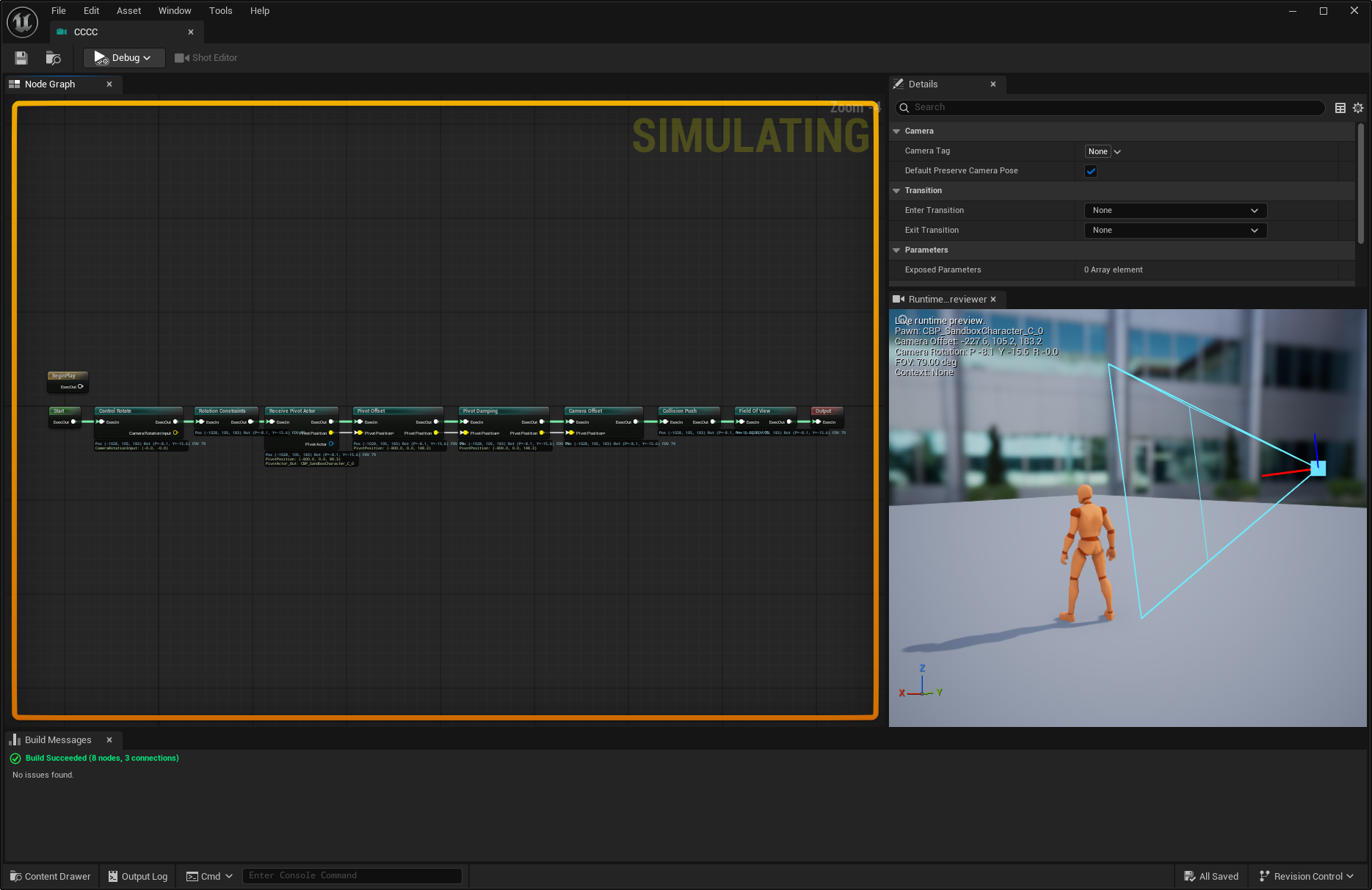
The viewport owns an FAdvancedPreviewScene and an editor-only observer camera. It draws the controlled pawn near the preview origin, mirrors skeletal pose into a transient preview proxy when a compatible skeletal mesh exists, falls back to static/fallback mesh proxies otherwise, and draws the runtime camera marker, frustum, and movement direction in subject-relative space. Mouse input only manipulates the observer view; it never writes back to the PIE pawn or runtime camera.
Empty states are explicit:
| Status | Meaning |
|---|---|
NoPIE |
PIE/SIE is not running. |
NoCamera |
No matching camera is selected or the selected camera has no valid snapshot yet. |
NoPawn |
The bound runtime camera cannot resolve a controlled pawn. |
Live |
Pawn proxy and camera relation are updating from the bound runtime camera. |
The widget releases preview actors before its preview scene is destroyed. Runtime Previewer code lives in the editor module and is not present in cooked builds.
Runtime Graph Inspector¶
The Camera Type Asset editor registers an editor-only Runtime Debug tab and augments graph-node tooltips while PIE is running. Both surfaces use the same AComposableCameraCameraBase::SnapshotDebugState() pull path as the Runtime Previewer binding.
Snapshot entries are keyed by NodeIndex, matching the editor graph node index. This lets the editor map runtime state back to graph nodes without name lookup. Each entry includes:
| Field | Purpose |
|---|---|
NodeDisplayName |
Human-readable runtime node label. |
NodeIndex |
Index in the type asset's NodeTemplates array. |
bWasTicked |
Whether the node ticked in the captured frame. |
PoseAfterNode |
Cumulative pose immediately after the node completed. |
ParameterValues |
Formatted runtime values for declared pins and editable node properties. |
OutputPinValues |
Formatted output-pin values from the runtime data block. |
The graph overlay uses this data to distinguish active and idle nodes and to populate hover cards. Modifier-owned fields intentionally report the runtime property value after modifier application, because checked modifier properties outrank pin auto-resolution during the activation.
The Runtime Debug tab can focus the selected node from the hover card. Pinned hover cards detach from Slate's reusable tooltip host and remain visible as independent inspectors until closed.
Runtime graph inspection is editor-only and is not compiled into cooked builds.
Debug Panel (FComposableCameraDebugPanel)¶
Activation¶
CCS.Debug.Panel 1      ← enable
CCS.Debug.Panel 0      ← disable (default)
Optional patch cards are controlled separately with CCS.Debug.Panel.Patches 1; leave it at 0 when patch overlays are not relevant.
Implemented by FComposableCameraDebugPanel. Renders via UDebugDrawService's "Game" channel as a static delegate registered at module startup (FComposableCameraSystemModule::StartupModule). While disabled the draw function reads the CVar and early-outs immediately — no meaningful cost.
Available in Debug, Development, and Test builds. Stripped entirely in Shipping (#if !UE_BUILD_SHIPPING).
Regions¶
The panel paints the core camera state top-to-bottom, then the systems currently affecting it. All data comes from BuildDebugSnapshot calls on the context stack, director, patch manager, and Sequencer component - the same pipeline that backs showdebug camera and the dump commands.
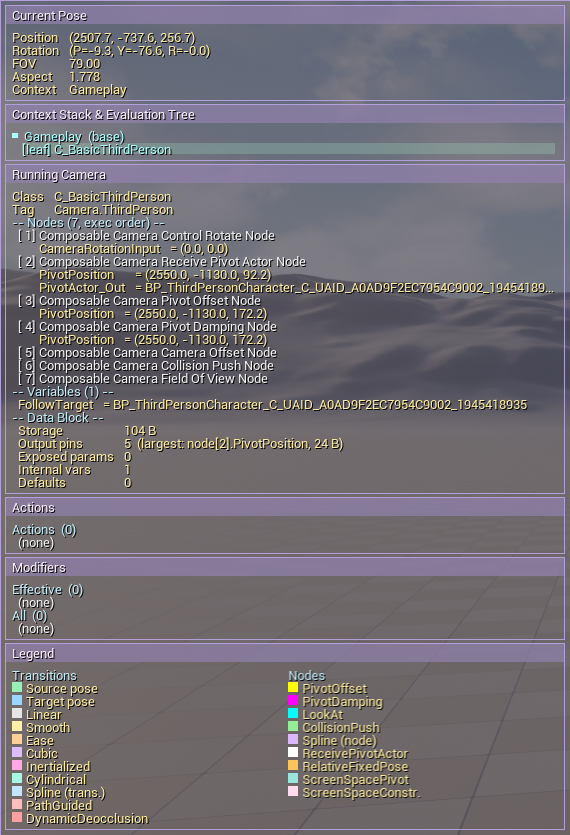
Current Pose¶
The PCM's final output this frame, rendered in a two-column, four-group layout.
| Column | Groups |
|---|---|
| Left | Transform — Position, Rotation (P/Y/R), Forward vector Context — active context name |
| Right | Projection — Mode, FOV (annotated (from Nmm) when the pose is in FocalLength dual-mode), Aspect, Ortho Width / Near / Far (orthographic only)Physical — see below |
Physical group data sources¶
The Physical group has three rendering modes depending on what's available:
| Condition | Header | Fields shown |
|---|---|---|
PhysicalCameraBlendWeight > 0 |
-- Physical -- |
Aperture, FocusDistance, ISO, ShutterSpeed, Sensor W/H read from FComposableCameraPose discrete slots |
PhysicalCameraBlendWeight == 0 and a UCineCameraComponent is found on PCM->GetViewTarget() |
-- Physical (CineCamera) -- |
CurrentFocalLength, CurrentAperture, CurrentFocusDistance, Filmback.Sensor*, PostProcessSettings.CameraISO / CameraShutterSpeed read directly from the CineCamera. ISO and Shutter show auto when their bOverride_* gate is false. |
| Neither | -- Physical -- |
Status: off |
The CineCamera fallback exists because UComposableCameraViewTargetProxyNode (used in the Sequencer LS path) writes only transform + FOV + PostProcess into the pose — it never populates the discrete Aperture / Focus / ISO / Shutter / Sensor slots. Without the fallback, the Physical group showed Status: off in LS mode even when the CineCamera had real DoF and exposure settings.
Below the numeric fields: a pose-history sparkline backed by FComposableCameraPoseHistoryEntry ring buffer (120 entries, ~48 B each, ~6 KB total per PCM). The ring buffer records GameTime from UWorld::GetTimeSeconds, so it pauses with the game during Time Dilation / pause — the timeline stays coherent when scrubbing history during a paused PIE session. Context-switch markers are vertical lines drawn wherever ContextName changes between adjacent entries.
Context Stack & Evaluation Tree¶
A live tree rendered from FComposableCameraContextStackSnapshot. Contexts appear in stack order (base at bottom, active at top). Each context expands its director's evaluation tree, flattened DFS pre-order via FComposableCameraTreeNodeSnapshot.
Tree-node fields used by the renderer:
| Field | Purpose |
|---|---|
Kind |
Selects label prefix: [Leaf], [RefLeaf], [Transition] |
Depth |
Controls indent (2 spaces per level) |
bIsLastSibling |
Drives connector glyph: └─ (last) vs ├─ (middle) |
AncestorLastFlagsBitmask |
Drives whether a vertical stem │ is drawn at each ancestor column |
bIsDominantLeaf |
Highlighted leaf — the one that remains when all transitions collapse |
bInReferencedSubtree |
Dimmer color — this node belongs to a referenced source director's tree |
TransitionProgress |
Progress bar and percentage label on transition rows |
BlendCurveSamples |
25-sample sparkline of GetBlendWeightAt(i/24) — shows the curve shape and how far the blend has advanced |
Reference leaves (ReferenceLeaf kind) inline their referenced director's subtree. The root of that subtree has bIsReferencedRoot = true, which suppresses the [from]/[to] role prefix that would otherwise appear at that boundary (the RefLeaf is a leaf in the outer tree, not a transition parent, so the usual depth-based role inference does not apply).
Running Camera¶
The active context's Director::RunningCamera, if any.
| Sub-section | Contents |
|---|---|
| Header | Camera class name and tag (CameraTag). Transient cameras show (transient, X.Xs / Y.Ys). |
| Nodes | Every node in FullExecChain order. Each row shows the node class name and, for each output pin in the runtime data block, the pin name and its current value formatted via ComposableCameraDebug::AppendTypedValue. |
| Parameters | Every entry in ExposedParameterOffsets. (unresolved) if the offset is missing — indicates a sync bug between the type asset and the runtime data block. |
| Variables | Every entry in InternalVariableOffsets, with type looked up from the type asset's combined internal + exposed variable declarations. |
| Data Block | Memory summary: total bytes, output-pin count, exposed-parameter count, internal-variable count, default-value count. |
Camera Actions¶
Structured card view for each entry in PCM::CameraActions. The source set has no stable iteration order, so the snapshot is sorted by execution phase, identity, then object path before drawing.
| Field | Purpose |
|---|---|
| Phase badge | PRE CAMERA, PRE NODE, POST NODE, or POST CAMERA, with phase color. |
| Identity | Action class plus (current) for current-camera scoped actions or (persistent) for persistent actions. |
| Target | Node target for node-scoped phases. Missing node targets are shown with problem coloring; execution semantics do not change. |
| Expiration | Instant, duration progress, Manual, and/or Condition summary. |
Modifiers¶
Structured target-node groups for the current modifier manager. The header reports active effective entries and registered candidates.
Each group is an exact node class. Candidate rows show asset identity, compact camera-tag-query scope, priority, Reactivate or In-Place apply mode, and the Enter / Replace / Exit blend source. Status labels explain priority and eligibility directly:
| Status | Meaning |
|---|---|
ACTIVE |
Candidate is selected for every authored property it can own. |
PARTIAL |
Candidate won only some authored properties; another asset owns overlapping properties. |
UNSUPPORTED |
Candidate is selected but cannot run, for example a Custom Modifier Class in in-place mode. |
SHADOWED |
Camera tag query matched, but another candidate won priority or registration order. |
FILTERED |
Camera tag query did not match the current camera's tag container. |
NO NODE |
The running camera has no exact target node class. |
DESTROYED |
The stored asset or modifier pointer is stale/null. |
Use this region to diagnose modifier selection without switching to showdebug camera: it shows active, partial, filtered, shadowed, and unsupported candidates in one place.
Patches¶
Optional region controlled by CCS.Debug.Panel.Patches. It combines Blueprint-library patches from the active director's PatchManager with Sequencer patch-track overlays from the current Level Sequence component.
Each patch is drawn as a lifecycle-colored card:
| Field | Purpose |
|---|---|
| Phase | ENTERING, ACTIVE, EXITING, or EXPIRED. |
| Identity | Patch asset name, source (BP or SEQ), layer, and host hint where available. |
| Alpha | Current patch contribution. |
| Time | Enter, active-duration, or exit progress when that timing channel is meaningful. |
| Expiration | Duration, manual, and condition expiration channels for active patches. |
Warnings (FComposableCameraLogCapture)¶
Log entries captured by FComposableCameraLogCapture, an FOutputDevice registered with GLog at module startup.
What is captured: any log line emitted on LogComposableCameraSystem or LogComposableCameraSystemEditor at Warning verbosity or worse (Warning, Error, Fatal). Log, Display, Verbose, and VeryVerbose are filtered out at capture time.
Ring buffer: 16 entries maximum (FComposableCameraLogCapture::MaxCapturedEntries). Older entries are evicted when the buffer is full.
Deduplication: if the same (Category, Verbosity, Message) triple fires again before the next eviction, the existing entry's RepeatCount is incremented instead of inserting a duplicate. The panel renders "(×N)" when N > 1.
Thread safety: Serialize (the capture hook) can be called from any thread. The ring buffer is guarded by a FCriticalSection; game-thread reads and worker-thread writes serialize cleanly. The lock is held only long enough to update a small fixed-size array.
Build gating: Install / Uninstall / GetRecentEntries are all #if !UE_BUILD_SHIPPING. Shipping builds pay zero cost — no output device registered, no ring buffer allocated, no lock.
Viewport Debug (FComposableCameraViewportDebug)¶
Activation¶
CCS.Debug.Viewport 1                      ← master switch (frustum + per-node gizmos)
CCS.Debug.Viewport 0                      ← off (default)
CCS.Debug.Viewport.AlwaysShow 1           ← force frustum even while possessing
CCS.Debug.Viewport.Nodes.All 1           ← OR-enable all node gizmos
CCS.Debug.Viewport.Transitions.All 1     ← OR-enable all transition gizmos
The Debug Panel's bottom Legend uses the same shared color metadata as the 3D gizmos, but it is not just a raw palette dump. Rows must pass both checks:
- the matching per-node/per-transition CVar is enabled, or the corresponding
*.AllCVar is enabled; - the entry is relevant to the current frame: node rows must match a node class on the current running camera, and transition rows must match an active
InnerTransitionin the active context tree.
Universal Source pose and Target pose swatches appear only when at least one relevant transition row can draw. With CCS.Debug.Viewport.Nodes.All 1, a simple camera therefore shows only the debug-capable node types it actually contains, not every node color known to the plugin.
Per-node gizmos (all default 0):
| CVar | Node |
|---|---|
CCS.Debug.Viewport.PivotOffset |
PivotOffsetNode |
CCS.Debug.Viewport.LookAt |
LookAtNode |
CCS.Debug.Viewport.CollisionPush |
CollisionPushNode |
CCS.Debug.Viewport.Spline |
SplineNode |
CCS.Debug.Viewport.PivotDamping |
PivotDampingNode |
CCS.Debug.Viewport.PivotLookAhead |
PivotLookAheadNode |
CCS.Debug.Viewport.LockOnAimPoint |
LockOnAimPointNode |
Per-transition gizmos (all default 0):
| CVar | Transition |
|---|---|
CCS.Debug.Viewport.Transitions.CompositionPreserving |
CompositionPreservingTransition |
Rendering pathway¶
Implemented by FComposableCameraViewportDebug. Draws via FTSTicker::GetCoreTicker() delegate, not UDebugDrawService. The ticker fires every frame regardless of which viewport is active; DrawDebug* calls go to the world's LineBatcher, which is rendered by every viewport drawing that world. This is the reason gizmos appear in the editor viewport during F8 eject — UDebugDrawService's "Game" hook does not fire from the editor viewport, which was the blocking issue that motivated the switch to the ticker + line batcher.
Frustum auto-hide¶
The frustum (drawn at the near plane) occludes the scene when the player is viewing through the camera. Auto-hide logic:
- In editor builds: frustum only fires when
GEditor->bIsSimulatingInEditoris true (F8 eject / Simulate mode). - In non-editor builds: frustum always fires when the master CVar is on.
CCS.Debug.Viewport.AlwaysShow 1: bypasses the auto-hide in editor builds.
ShouldShowAllNodeGizmos / ShouldShowAllTransitionGizmos¶
FComposableCameraViewportDebug::ShouldShowAllNodeGizmos() returns true when CCS.Debug.Viewport.Nodes.All is non-zero. Node callsite idiom:
if (CVarShowMyNodeGizmo.GetValueOnGameThread() == 0 &&
    !FComposableCameraViewportDebug::ShouldShowAllNodeGizmos())
{
    return;
}
OR semantics: either the per-node CVar or the All CVar enables the gizmo. No subtraction; users wanting granularity should leave All off.
DrawSolidDebugSphere¶
Canonical sphere gizmo helper used by every CCS node and transition debug override.
FComposableCameraViewportDebug::DrawSolidDebugSphere(
    World,
    Center,
    Radius,
    Color,          // A is overridden by Alpha param
    Alpha,          // default 100 (≈ 39 %)
    Segments,       // default 12; clamped [4, 32]
    DepthPriority); // 0 = depth-tested; 1 (SDPG_Foreground) = above geometry
All CCS callsites pass SDPG_Foreground so the marker is always visible. The "Solid" name is a historical artifact — the helper renders translucent wireframe rather than a filled mesh, because the engine's hardcoded DebugMeshMaterial depth-tests regardless of DepthPriority, which caused geometry to clip spheres in earlier iterations.
Adding a gizmo to a new node¶
Four steps, ~15 lines total:
- Override
DrawNodeDebug(FComposableCameraDebugDrawSink&, bool bViewerIsOutsideCamera)in the concrete node class, guarded#if !UE_BUILD_SHIPPING. - Declare
static TAutoConsoleVariable<int32> CVarShowMyGizmo(TEXT("CCS.Debug.Viewport.MyNode"), 0, ...)in the node's.cpp. - Early-out at the top of
DrawNodeDebugusing the ShouldShowAll OR idiom above. - Emit primitives through the draw sink with the node's resolved runtime state.
The bViewerIsOutsideCamera parameter is true during F8 eject / Simulate, false during possessed play. Use it to gate gizmos that sit at the camera's own position — drawing a self-collision sphere at the camera origin is only meaningful when the viewer is outside the camera.
Build gating¶
All viewport debug cost is #if !UE_BUILD_SHIPPING. The FTSTicker delegate body compiles to nothing in Shipping builds. Initialize() / Shutdown() and all helper functions are no-ops.
Rewind Debugger Trace Playback¶
CCS editor builds register a Rewind Debugger extension and a trace analyzer/provider pair. When a Rewind recording starts, the extension toggles the ComposableCameraSystemChannel trace channel on; when recording stops, it toggles the channel off. Non-editor, Test, and Shipping targets compile the CCS Rewind trace writer path out.
Two trace streams are written:
| Stream | Source | Contents |
|---|---|---|
| Active camera | Player camera manager | Rendered camera pose, view target, camera component, player controller, pawn, and source kind. This is the authoritative historical camera pose. |
| CCS evaluation | Gameplay PCM or UComposableCameraLevelSequenceComponent |
CCS pose, camera type asset, context name, projection status, source object identity, and serialized debug primitives. This is the authoritative source for CCS node and transition gizmos. |
During playback, the extension queries the selected Rewind target, finds the active-camera frame for the current trace time, then attaches a compatible CCS evaluation frame. Gameplay playback matches the same PCM/player identity; Level Sequence playback matches the LS source object/view-target path. Native non-CCS camera frames can still show the active camera pose but have no CCS gizmos.
Recorded primitives are emitted through FComposableCameraDebugDrawSink during evaluation. The capture sink forces all 3D node and transition gizmos, so Rewind playback can show useful history even when live CCS.Debug.Viewport.<Node> CVars were disabled while recording. The live sink keeps normal CVar behavior.
Primitive playback uses the same color constants and legend metadata as live viewport debug. Sphere labels are recorded as short FName values and drawn through the Rewind Canvas pass, not as persistent HUD debug strings, so scrubbing does not leave stale labels behind.
Shot Zone Overlay (FComposableCameraShotZoneOverlay)¶
A 2D screen-space framing-zone overlay introduced in V2.2 that mirrors the Shot Editor's framing-zone preview in PIE, Game, and Sequencer-scrub viewports. For every active UComposableCameraCompositionFramingNode whose Aim.AimZones or Placement.PlacementZones has bEnabled == true, the overlay draws:
- translucent dead-zone and soft-zone rectangles centered on the configured
ScreenPosition, - the resolved anchor disc (equivalent to the Shot Editor's §D.4.1 preview), and
- the projection marker.
Activation¶
CCS.Debug.Viewport.ShotZones 1   ← enable framing-zone overlay
CCS.Debug.Viewport.ShotZones 0   ← disable (default)
This CVar is independent of the 3D-gizmo master switch (CCS.Debug.Viewport). The two groups address different diagnostic needs — 3D world-space gizmos vs. 2D screen-space framing zones — and do not entangle.
Rendering pathway¶
Uses UDebugDrawService::Register("Game" / "Editor", ...) with the same dual-channel + per-(frame, FCanvas*) dedup pattern as FComposableCameraDebugPanel, so the overlay survives the F8 eject viewport swap and doesn't double-draw when one viewport transiently has both ShowFlags set.
The source of truth for "which Shots are currently active" is UComposableCameraCompositionFramingNode::GetActiveInstances(). Both the PCM gameplay path and the LS Component path register to this registry (both run the same node), so the overlay shows all active framing Shots regardless of how the camera is being driven.
Build gating¶
All overlay cost is #if !UE_BUILD_SHIPPING. Initialize() / Shutdown() are no-ops in Shipping. Module-owned lifecycle: FComposableCameraSystemModule::StartupModule calls Initialize; ShutdownModule calls Shutdown.
Dump Commands (CCS.Dump.*)¶
Implemented in ComposableCameraDebugDumpCommands.cpp. All commands are registered as FAutoConsoleCommandWithWorldAndArgs at static init time and stripped in Shipping (#if !UE_BUILD_SHIPPING).
Output route: UE_LOG(LogComposableCameraSystem, Display, ...) + FPlatformApplicationMisc::ClipboardCopy(...). The Display verbosity level means the dump appears in Output Log by default, regardless of LogComposableCameraSystem's configured verbosity.
PCM resolution¶
All three commands share the same PCM resolution order:
- The command-context
UWorld(the World the console was invoked from during PIE). - Scan
GEngine->GetWorldContexts()for the firstPIEorGameworld with a CCS PCM.
If no PCM is found, the command emits a Warning and returns. This means invoking a dump command from the main editor console before PIE starts will warn rather than crash.
CCS.Dump.Stack¶
No arguments. Dumps UComposableCameraContextStack::BuildDebugSnapshot as indented plain text.
Output structure:
Context Stack (depth: N, pending destroy: M)
-> [N-1] ContextName [active]
      Running Camera: CameraName
      Last Pose: pos=(X, Y, Z)  rot=(P, Y, R)  FOV: F
      Evaluation Tree:
        [Leaf] CameraName
   [N-2] ContextName
      ...
[pending] ContextNameCCS.Dump.Tree¶
No arguments. Dumps the active director's BuildDebugSnapshot — running camera, last pose, and the flattened evaluation tree for the active context only.
CCS.Dump.Camera [tag]¶
| Form | Target |
|---|---|
CCS.Dump.Camera |
Active context's Director::GetRunningCamera() |
CCS.Dump.Camera <tag> |
First live context whose running camera's CameraTag matches tag (case-insensitive) |
Source-side cameras that are the source (Left) of a mid-transition blend are not included in the scan — they live inside evaluation-tree leaves, not on Director::RunningCamera. This is acceptable for the diagnostic use case; active transitions are visible in CCS.Dump.Stack and CCS.Dump.Tree.
Output structure:
Camera: ActorName
  Class: ClassName
  Tag:   Gameplay.ThirdPerson.Follow
  Pose:  pos=(X, Y, Z)  rot=(P, Y, R)  fov=F
  Lifetime: E / Ts          ← transient cameras only
  Nodes (N, exec order):
    [1] NodeClassName
           PinName              = value
           ...
  Parameters (N):
    ParameterName              = value
    ...
  Variables (N):
    VariableName               = value
    ...
  Data Block: B B (P pins, Q params, R vars, S defaults)
Pin values are formatted via ComposableCameraDebug::AppendOutputPinValue, the same formatter used by the Debug Panel and showdebug camera. (unresolved) means the pin has no offset in the runtime data block — a sync issue between the type asset and the runtime.
Editor Dump Command (CCS.Editor.Dump.Graph)¶
Editor-only command (stripped in Shipping). Available in the editor Output Log console when at least one Camera Type Asset editor is open.
CCS.Editor.Dump.GraphIterates every currently-open Camera Type Asset editor via UAssetEditorSubsystem::GetAllEditedAssets() and dumps the full graph state for each asset to LogComposableCameraSystemEditor at Display verbosity and copies the output to the system clipboard.
Contents of each dump:
| Section | What is captured |
|---|---|
| Node templates | Class, position, bEnabled, pin declarations |
| Compute templates | Class, position |
| Pin connections | All FComposableCameraPinConnection entries |
| Exec chains | ExecutionOrder, FullExecChain, ComputeExecutionOrder, ComputeFullExecChain |
| Exposed parameters | Name, type, default value string |
| Internal / exposed variables | Name, type, initial value |
| Variable node records | Per-variable-node GUID mapping + wired pins |
| Default transitions | DefaultEnterTransition / DefaultExitTransition references |
Primary use case: "graph doesn't save correctly" bug reports. The before/after dump is greppable and diffable, so users can paste it into a GitHub issue without attaching the .uasset binary.
See also¶
- User Guide → Debugging — workflow guide for all four debug surfaces
- ShowDebug reference — section-by-section breakdown of
showdebug camera - Custom Nodes — how to add
DrawNodeDebugto a new node - Profiling & Performance — using debug tools alongside Unreal Insights