The Context Stack is Tier 1: it decides which mode the player is in, and lets modes stack on top of each other without destroying what's below.
A context is a named slot — typically something like Gameplay, Cutscene, or UI. Each context owns its own Director, which in turn owns its own Evaluation Tree. The stack itself is LIFO: only the top context is evaluated each frame; contexts below it are suspended.
Context names are configured, not free-form
Context names are FNames and must be declared in Project Settings → ComposableCameraSystem → Context Names. The first entry in that list is the base context — typically Gameplay — and is initialized automatically before any actor's BeginPlay.
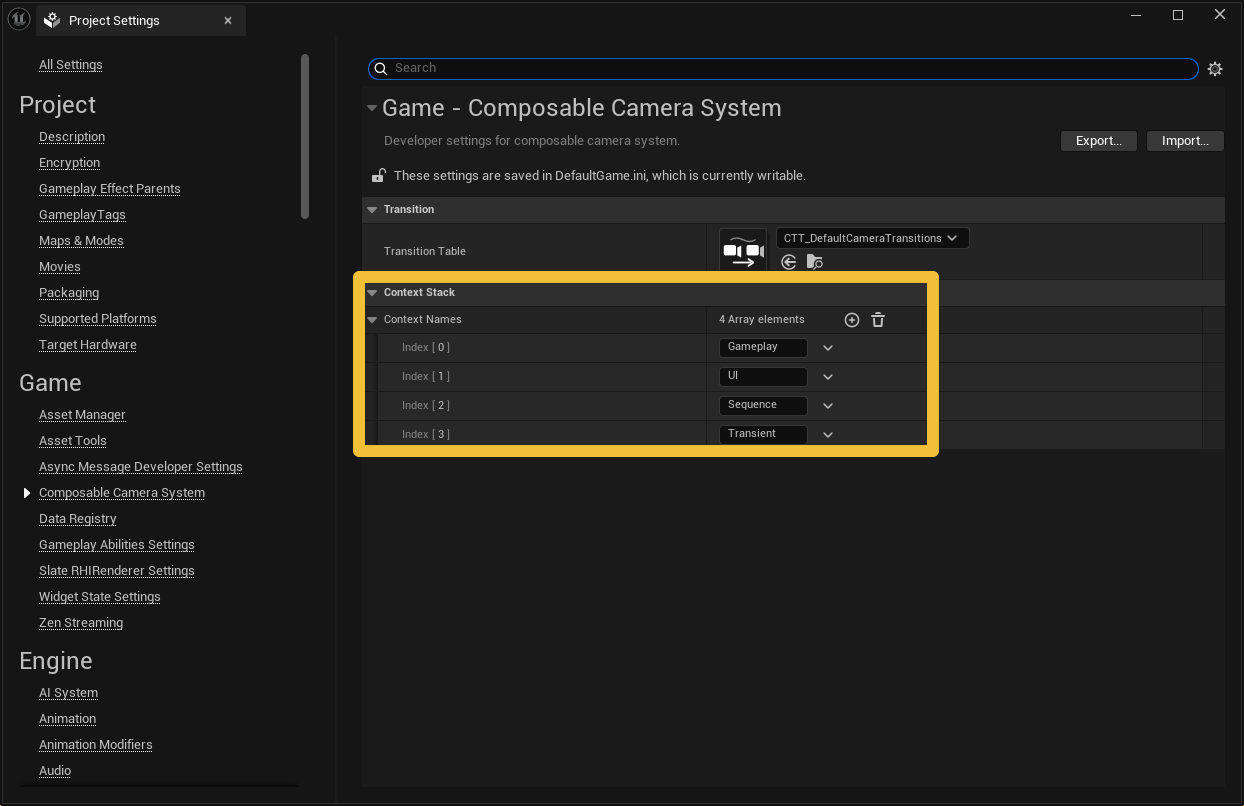 Using a name that isn't in the list at runtime is an error. In Blueprint, the
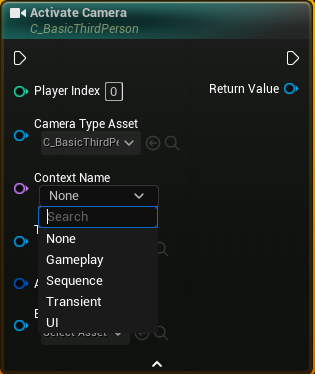
 Activate Camera node and related helpers show a dropdown sourced from this list to prevent typos.
Push, pop, and "ensure"
Contexts are manipulated by the system, not by user code directly. When gameplay code activates a camera in a named context (via the K2 node's Context Name pin), the PCM internally calls EnsureContext(ContextName):
- If the context doesn't exist on the stack → create a new entry with a fresh Director and push it on top.
- If the context does exist but isn't on top → move it to the top. Position matters: only the top context is evaluated.
- If the context is already on top → return its Director unchanged.
'Ensure' means 'move to top'
A surprisingly common bug is assuming that "the context exists" is the same as "the context is active". In this system it isn't — the stack's position is load-bearing. EnsureContext specifically includes the move-to-top step so that issuing a gameplay camera activation while a cutscene is on top doesn't silently queue behind the cutscene.
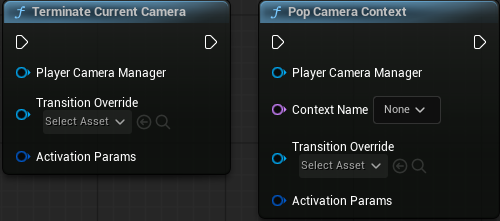
Popping works through TerminateCurrentCamera, PopCameraContext(Name), or automatic pop (below). When the popped context is the current top, the PCM doesn't immediately throw it away — it sets up an inter-context transition first, described below.
 The base context is protected: it cannot be popped. This guarantees there is always a camera to fall back to.
Transient cameras auto-pop
Cameras can be flagged bIsTransient with a fixed LifeTime. When a transient camera's RemainingLifeTime hits zero, IsFinished() returns true, and the context stack's Evaluate detects this on the next frame and automatically pops the context.
Transient cameras always live in their own context. The system refuses to share a context between a persistent camera and a transient one, because the transient camera expiring would otherwise destroy the persistent camera chain underneath it. In practice this means one-shot cameras (a brief reaction shot, a damage-cam, a quick over-the-shoulder glance) each push a dedicated context and pop it when they expire.
Inter-context transitions: why the old context keeps evaluating
The most important detail of the Context Stack is what happens when you pop a cutscene back to gameplay, with a transition.
If the stack just snapped back to the gameplay pose at the moment of the pop, the transition would blend from a frozen frame — which is jarring when the cutscene camera was still moving. Instead, the system resumes the underlying context with a reference leaf pointing at the outgoing Director:
- The gameplay context's Director activates a new camera with
ActivateNewCameraWithReferenceSource. - Its Evaluation Tree gets a new inner node whose:
- left child is a reference leaf pointing at the cutscene's Director (which keeps evaluating live),
- right child is a leaf for the resumed gameplay camera,
- transition is the blend you requested.
- The cutscene's stack entry moves to a
PendingDestroyEntrieslist — it stays alive, but not on the main stack. - Each frame, the reference leaf calls the cutscene Director's
Evaluate(), so the cutscene camera keeps animating as the player sees the blend. - When the transition finishes,
CollapseFinishedTransitionsreplaces the inner node with just the gameplay leaf, the reference leaf is discarded (it doesn't own any cameras, so there's nothing to clean up), and the cutscene entry inPendingDestroyEntriesis destroyed via itsOnTransitionFinishesDelegate.
The consequence is that any transition type — LinearTransition, InertializedTransition, SplineTransition, custom ones — works identically across context boundaries and within a single context. Transitions never know whether their left input comes from a leaf or a reference leaf; they only see two poses.
When you actually interact with the stack
For most users, contexts are an implementation detail exposed through the Context Name pin on Activate Camera:
- Leave it empty to activate in the current top context. This is the common case.
- Set it to a declared name to push (or move-to-top) that context as part of the activation.
Explicit pop calls are rare — transient cameras auto-pop, and TerminateCurrentCamera handles the "end this cutscene now" case. Power users can also call PopCameraContext(Name) to target a specific context by name: if it's the active top, the previous context resumes with the same optional transition as Terminate; if it's buried below the top, it's removed immediately with no transition (there was no blend to perform — it wasn't the one the player was seeing).
In summary
The Context Stack gives you:
- Named, declarative modes with their own Director and Evaluation Tree.
- Non-destructive layering — pushing does not invalidate what's below.
- Seamless pop-back transitions, because the outgoing context keeps evaluating live through a reference leaf until the blend finishes.
- Automatic cleanup of one-shot cameras via the transient auto-pop mechanism.
Next: how one context produces a single pose each frame, by walking its Evaluation Tree.