The camera type asset editor is a bespoke UEdGraph — it looks like Unreal's Blueprint graph but runs on a custom schema with custom nodes, custom pin rules, and a custom sync/rebuild pipeline. This page is the visual tour.
Layout
Opening a UComposableCameraTypeAsset lands you in a three-pane layout:
Canvas — drag nodes here,
wire exec pins, wire data pins"] Details["Details
Selected node's properties.
When nothing is selected, shows
the type asset — exposed parameters,
internal variables, exposed variables,
default transition."] end Build["Build Messages
Validation warnings / errors from the most recent build"] Top --- Build classDef pane fill:#f5f7fa,stroke:#4a69bb,stroke-width:1.5px; classDef buildpane fill:#fff4e6,stroke:#d97706; class Graph,Details pane; class Build buildpane; style Top fill:none,stroke:none
There is intentionally no separate Parameters tab. Exposed parameters, internal variables, and the default transition all live on the type asset, so they're editable directly in the Details panel whenever graph selection is empty. Clicking any node overwrites that view with the selected node's properties; clicking the empty canvas brings the asset view back.
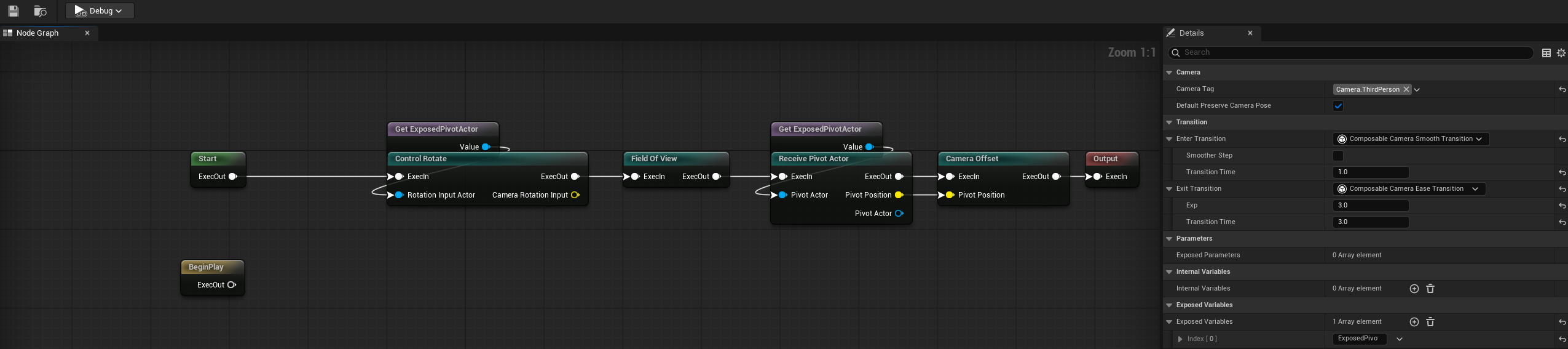
The two exec chains
Every camera graph has two execution chains, each rooted at its own sentinel:
- Camera chain — rooted at the main
Startsentinel, terminating atOutput. Runs every frame, producing the pose for this camera. - BeginPlay compute chain — rooted at the
BeginPlay Startsentinel, with no terminator. Runs exactly once at camera activation and publishes results that camera-chain nodes consume each frame.
The two sentinels are always present (they're spawned by CreateDefaultNodesForGraph and cannot be deleted). Camera nodes belong to the camera chain; compute nodes (subclasses of UComposableCameraComputeNodeBase) belong to the compute chain. The schema refuses exec wires that would cross between the two.
Variable Set nodes are the one exception — they classify themselves dynamically based on whichever exec chain they're wired into, and Variable Get nodes are pure data conduits without exec pins so they can be read from either chain.
Node visuals
Each node on the canvas carries:
- Title bar — the resolved display name (e.g. "Receive Pivot Actor") plus an enable/disable toggle. Hover for a one-line tooltip describing the node's purpose.
- Exec pins — white triangles on the top-left (in) and top-right (out). One per node, one line, no branches.
- Data pins — coloured circles on the left (input) and right (output). One per pin declared by the node, coloured by type.
- Exposed pins — input pins that have been exposed as camera parameters. They render with a muted grey connector, ignore hover highlights, and refuse wire connections. Right-click and pick Unexpose Parameter to turn them back into wireable pins.
- Error/warning badges — if the most recent build produced validation issues for this node, a warning or error icon appears in the top-right corner of the node title bar. Hovering the node shows the aggregated build messages as a tooltip. Badges are updated automatically after every
SyncToTypeAssetround-trip (including the silent tail pass that runs on each graph edit), so they stay current without requiring a manual toolbar Build click.
Pin colour legend
The schema assigns a colour per pin type, roughly following UE's Blueprint conventions:
| Type | Colour |
|---|---|
| Bool | Dark red |
| Int32 | Teal |
| Float | Green |
| Double | Light green |
| Vector2D | Gold |
| Vector3D | Yellow |
| Vector4 | Orange |
| Rotator | Blue-violet |
| Transform | Orange-red |
| Actor | Blue |
| Object | Cyan |
| Struct | Dark magenta |
Float and Double are interchangeable — you can wire a Float output into a Double input without casting, and vice versa.
Palette and context menu
Right-click on the canvas to open the context menu. Entries are grouped:
- Camera Nodes — every non-abstract
UComposableCameraCameraNodeBasesubclass. Includes built-in nodes and any Blueprint-authored nodes in the project. - Compute Nodes — the BeginPlay chain counterparts. Built-ins include
ComputeDistanceToActorNode,ComputePositionBetweenActorsNode, andBeginPlaySetRotationNode. - Variables → Get → Internal / Exposed → {var} — one entry per declared variable.
- Variables → Set → Internal / Exposed → {var} — one entry per declared variable, with the additional exec pins Set nodes carry.
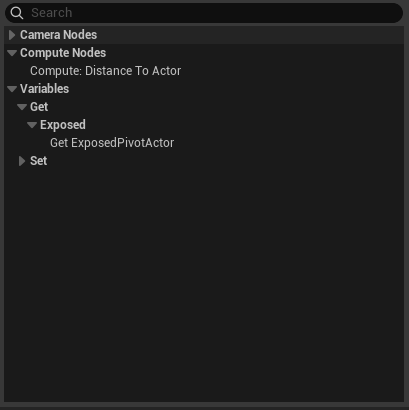 If the context menu was opened by dragging off a pin, the menu filters to only nodes that can accept (or produce) a compatible wire, and auto-wires the new node to the dragged pin on placement.
Wiring rules
The schema's CanCreateConnection enforces, in order:
- Output → input only. Output-to-output and input-to-input are rejected.
- Exec to exec, data to data. No mixing.
- One exec chain per node. A camera-chain exec wire cannot connect to a compute-chain node.
- One source per input pin. Wiring a new output into an already-connected input breaks the old wire first.
- Many consumers per output. An output pin can fan out to any number of inputs.
- Type compatibility. Same pin category; structs must share
UScriptStruct; object pins follow inheritance. - Exposed pins refuse wires. An input pin that's exposed as a camera parameter cannot be wired until you unexpose it.
- Variable-to-variable wires are rejected. Variable Get/Set nodes must connect to camera-node pins, not to each other.
When a wire is rejected, the cursor shows a red circle and the reason appears in a tooltip.
The Details panel
The Details panel has two modes, toggled by graph selection:
Node selected. Shows the node's UPROPERTY fields. For a node with Instanced subobjects (e.g. CollisionPushNode's PushInterpolator and PullInterpolator), the subobject's class picker is shown but individual child properties are hidden — those flow through the subobject pin system instead. See the Concepts → Subobject Pins note for why.
Nothing selected. Shows the type asset itself:
- Exposed Parameters — the list of currently-exposed pins. The array is
EditFixedSize(no Add/Remove buttons) because the only legal way to add an entry is to expose a pin in the graph. You can edit the per-entryDisplayName,Category,Tooltip, andbRequireddirectly here. - Internal Variables — the array of internal variables. Add, rename, retype, or delete entries inline. Typed value editing uses a widget matching each variable's type (checkboxes for Bool, numeric spinners for Float/Double, multi-component editors for vectors, a structure view for USTRUCT types). Renaming or retyping propagates to every Get/Set node referencing the variable via the variable's stable
FGuid. - Exposed Variables — same as internal variables, but callers can override the initial value at activation.
- Default Transition — the
EnterTransition(instancedUComposableCameraTransitionBase*) used when this camera type is activated without a caller-supplied override.
Keyboard and mouse
- Select — click a node.
Ctrl+Aselects all. - Move — left-click drag.
- Delete —
Deletekey, or right-click → Delete. Start/Output sentinels refuse deletion. All removals are undoable viaCtrl+Z. - Wire — click an output pin, drag onto an input pin. Drop on empty canvas to open the filtered context menu.
- Break wire —
Alt+clickthe target end of a wire, or right-click the pin → Break All Pin Links. - Duplicate —
Ctrl+D, or right-click → Duplicate. Wires are not preserved across duplication. - Expose / Unexpose pin — right-click an input pin → Expose as Camera Parameter / Unexpose Parameter.
Every mutation (node add/delete, wire add/break, detail-panel edit) is wrapped in an FScopedTransaction, so Ctrl+Z and Ctrl+Shift+Z cover the full editing surface.
Canvas order and unwired graphs
Exec wires are the authoritative order when the camera chain is wired from Start to Output. In that mode, the graph follows the wire path, and any camera node left outside the chain is reported as a build warning.
When a camera type or patch has no camera-chain exec wires, the runtime falls back to ticking camera nodes in their serialized NodeTemplates order. The editor now derives that order from canvas position: top-to-bottom first, then left-to-right, with creation index only as a tie-breaker. For small patch graphs, this means dragging a node above another node changes the fallback tick order without having to delete and recreate nodes.
Build pane
Saving the asset (Ctrl+S) runs the Build pass. Results appear in the Build Messages tab at the bottom. Errors block nothing (the asset still saves), but they indicate configuration that will fail at runtime:
- Required exposed parameters with no
DisplayNameset. - Internal / exposed variables with no
InitialValueStringthat will default-construct. - Data pins whose wire has been invalidated (e.g. a node was deleted after the wire was drawn).
- Compute nodes with no incoming exec wire (will never run at BeginPlay).
- Camera nodes outside a non-empty camera exec chain. Fully unwired camera chains are allowed and use the canvas-order fallback described above.
Clicking a message jumps selection to the offending node, so the "find and fix" loop is Alt+Tab between Build Messages and Node Graph.
Round-trip: why the graph is the source of truth
The type asset stores two kinds of data:
- Durable fields —
NodeTemplates,ExposedParameters,InternalVariables,ExposedVariables,PinConnections,FullExecChain, layout metadata. These are serialized with the asset and are what the runtime reads at activation. - The EdGraph —
Transient, rebuilt every time the editor opens the asset. It is a pure derived view.
SyncToTypeAsset writes from the graph into the durable fields whenever the graph changes. RebuildFromTypeAsset reconstructs the graph from the durable fields on editor open. The invariant is that any graph state that isn't captured in the durable fields will not survive a close-and-reopen — so if you find yourself asking "where is this stored?", the answer is always "somewhere in the durable fields, or it's ephemeral".
The practical effect: edits inside the editor are safe to experiment with (the graph is the live working copy), saves flush into the asset, and reopening reconstructs the graph from the asset. Collaborators working from version control see the serialized asset — no .uasset merge pain from graph layout.