Camera actions are lightweight, fire-and-forget behaviors that hook into a camera's pre- or post-tick delegates. They sit outside the node chain — an action doesn't produce or transform a pose the way a node does. Instead, it reads the current pose, runs arbitrary logic, and optionally writes back a modified pose. Use them for transient effects that don't belong in the permanent node composition: smooth one-shot moves, timed rotations, pitch resets, or any gameplay-triggered behavior that should expire on its own.
When to use an action vs. a node or modifier
Actions fill the gap between nodes and modifiers:
- A node is always part of the camera's chain and runs every frame for the camera's lifetime. You can't easily add one at runtime or have it expire after two seconds.
- A modifier overrides a node's parameters conditionally. It doesn't run its own per-frame logic — it changes how an existing node behaves.
- An action runs its own per-frame logic, can be added and removed at runtime, and has built-in expiration. It's the right tool when you need a temporary, self-contained behavior that operates on the pose.
The action contract
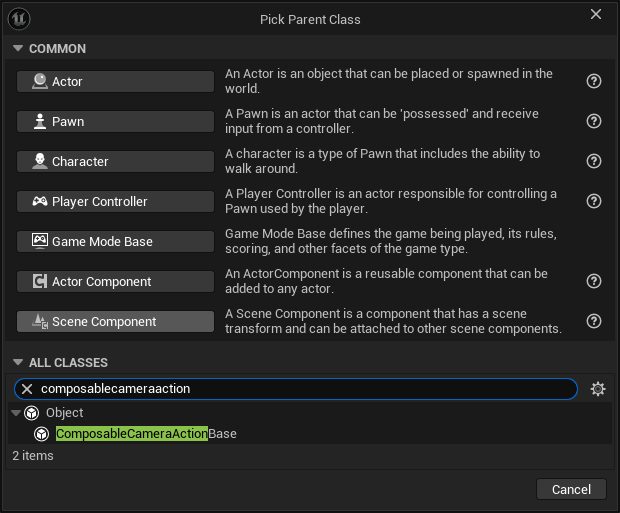
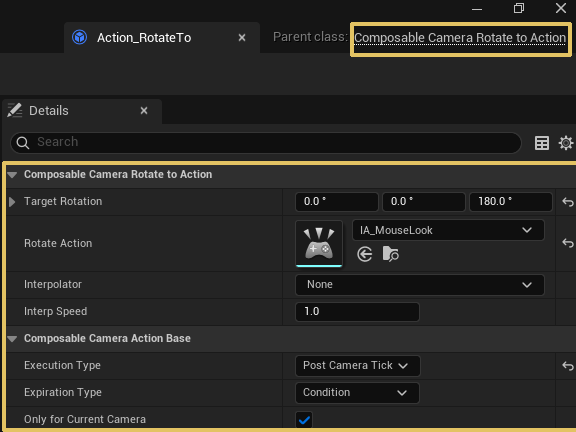
Every action is a UComposableCameraActionBase subclass (Blueprintable). It exposes two overridable hooks:
CanExecute(DeltaTime, CurrentPose)— a predicate called each frame when the action'sExpirationTypeincludesCondition. Returnfalseto expire the action.OnExecute(DeltaTime, CurrentPose, OutPose)— the main logic. Reads the current camera pose, does its work, and writesOutPose. Called every frame the action is alive.
Both are BlueprintNativeEvents, so you can implement them in C++ or Blueprint.
Execution timing
Each action declares when it runs relative to the camera tick via ExecutionType:
| Value | When it runs |
|---|---|
PreCameraTick |
Before the camera's node chain evaluates |
PreNodeTick |
Immediately before a specific node evaluates (see below) |
PostNodeTick |
Immediately after a specific node evaluates (see below) |
PostCameraTick |
After the camera's node chain evaluates |
PreCameraTick and PostCameraTick apply to the entire camera pose. PreNodeTick and PostNodeTick are node-scoped — they bracket one specific node in the chain. This gives you surgical control: you can, for example, intercept the pose right before PivotDampingNode runs to inject an override, or read the post-damping pose right after it.
Node-scoped execution (PreNodeTick / PostNodeTick)
When ExecutionType is PreNodeTick or PostNodeTick, you must also set TargetNodeClass — a TSubclassOf<UComposableCameraCameraNodeBase> that names which node to target. The match is exact class (same rule as the Modifier system): the action fires only when Node->GetClass() == TargetNodeClass, not for subclasses.
Two things to know about registration:
- Null
TargetNodeClassis silently ignored. If you add aPreNodeTickaction without settingTargetNodeClass,RegisterNodeActiondiscards it — the action is never fired. Always set the class. - Node must exist on the camera. If the camera's node chain contains no node of that exact class, the action is registered but never invoked. It will still expire according to its
ExpirationType.
Pose mutation order. Node-scoped actions receive the pose in-place — CurrentCameraPose and OutCameraPose reference the same slot. This means:
- A
PreNodeTickaction's writes are visible to the node that follows it. - A
PostNodeTickaction sees the node's output and its writes carry forward to the next node in the chain. - If multiple actions target the same node and timing, they fire in registration order.
Setting TargetNodeClass in Blueprint. The field is hidden in the Details panel unless ExecutionType is PreNodeTick or PostNodeTick (controlled by EditConditionHides). Switch the execution type first, then the class picker appears.
Typical use cases:
- Override a parameter mid-chain without permanently changing a node's configuration (e.g. force
FieldOfViewNodeto a specific FOV for one second after a hit). - Read the pose at a known point in the chain for debug overlays or game logic without modifying it.
- Apply an additive impulse to the pivot right before
PivotDampingNodeso the damper absorbs it naturally.
Expiration types
Actions expire through one or more of these modes (combinable as a bitmask):
| Flag | Behavior |
|---|---|
Instant |
Runs for exactly one frame, then expires |
Duration |
Runs for Duration seconds, then expires |
Manual |
Runs indefinitely until you call ExpireAction() from code |
Condition |
Runs until CanExecute() returns false |
You can combine flags — for example, Duration | Condition means the action expires when either the timer runs out or the condition fails, whichever comes first.
Camera-scoped vs. persistent
The bOnlyForCurrentCamera flag (default true) controls lifetime across camera switches:
- Camera-scoped (
true): the action is automatically expired when the running camera changes. A "smooth rotate" action targeting the current camera won't linger after a transition. - Persistent (
false): the action survives camera switches. Use this for effects that should span the entire gameplay session or context, like a slow cinematic drift.
Adding and removing actions
From Blueprint, use the nodes exposed by UComposableCameraBlueprintLibrary:
Add Action— creates and registers the action on the PCM.Expire Action— manually expires a specific action (or callExpireAction()on the action object itself).
Actions are managed as a TSet on the PCM and ticked during UpdateActions(DeltaTime) in the per-frame loop.
Shipped actions
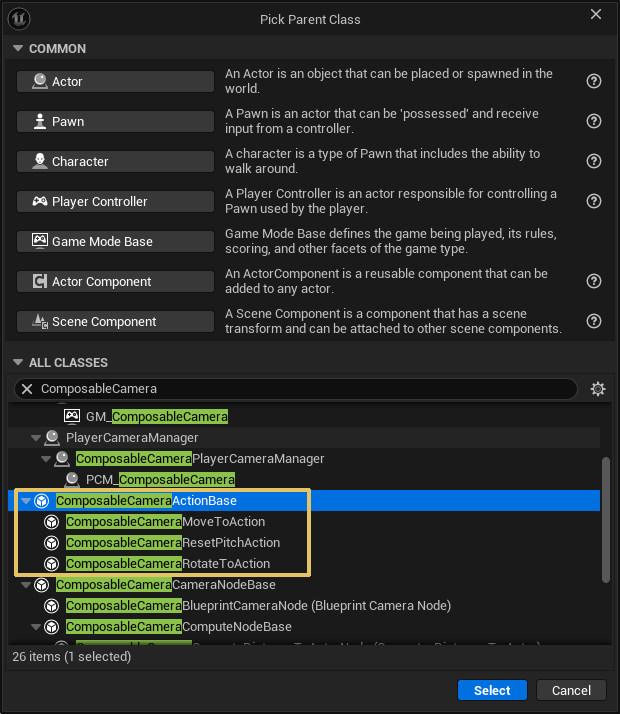
The plugin ships three concrete actions:
| Action | What it does |
|---|---|
MoveToAction |
Smoothly moves the camera to a target world position over the action's duration |
RotateToAction |
Smoothly rotates the camera to a target rotation over the action's duration |
ResetPitchAction |
Smoothly resets the camera's pitch to zero over the action's duration |
 |
|
All three are PostCameraTick by default — they apply their effect after the node chain, so they layer on top of whatever the camera normally does. |
Writing a custom action
Subclass UComposableCameraActionBase in C++ or Blueprint. Set ExecutionType and ExpirationType as defaults, override OnExecute, and optionally override CanExecute if you're using condition-based expiration. The action receives the PCM reference (PlayerCameraManager) automatically when added.
See Custom Actions for the full authoring recipe with a worked look-at-target example, and the Actions API reference for the class interface. If you decide the behavior is better expressed as a parameter override on an existing node, see Custom Modifiers instead.