Everything you can do at runtime — activate cameras, pop contexts, switch between type assets, add and remove modifiers, attach actions — is reachable from Blueprint. Most of it goes through either the custom Activate Camera K2 node or through UComposableCameraBlueprintLibrary.
Activate Camera (K2 node)
This is the primary way gameplay code starts a camera. Right-click in any Blueprint graph and search Activate Camera — the node is registered under ComposableCameraSystem.
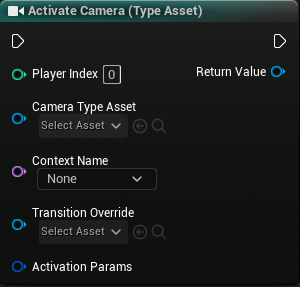 At compile time this K2 node expands into a call to
 UComposableCameraBlueprintLibrary::ActivateComposableCameraFromTypeAsset. The library entry point itself is hidden from the palette (BlueprintInternalUseOnly) because the K2 node provides a strictly better, typed-parameter-pin authoring experience.
Pin layout
The node has a fixed set of always-visible pins:
| Pin | Type | Purpose |
|---|---|---|
| Exec in / out | — | Standard flow-of-control |
| Player Index | int32 |
Which player the camera belongs to (default 0) |
| Camera Type | UComposableCameraTypeAsset* |
The type asset to activate — asset picker |
| Context Name | FName |
Which context to activate into; dropdown sourced from Project Settings → ComposableCameraSystem → Context Names. Leave None to activate in the current top context. If the named context isn't yet on the stack, activation auto-pushes it — there is no separate "Push Camera Context" function. |
| Transition Override | UComposableCameraTransitionDataAsset* |
Optional — wins over every other transition tier |
| Activation Params | FComposableCameraActivateParams |
Struct covering pose preservation, transient-ness, lifetime |
| Return Value | AComposableCameraCameraBase* |
The activated camera actor |
Below those, the node generates dynamic pins based on the selected Camera Type Asset.
Dynamic pins — opt-in, not "show everything"
The dynamic-pin set works on an opt-in model:
- Required exposed parameters (
bRequired == trueon the asset) are always present. You cannot remove them — missing a required parameter is a fatal activation error. - Non-required parameters and exposed variables are hidden by default. You opt in per-name via the node's right-click context menu → Add Override Pin → {name}. Each opted-in pin appears under an Overrides advanced-pin section.
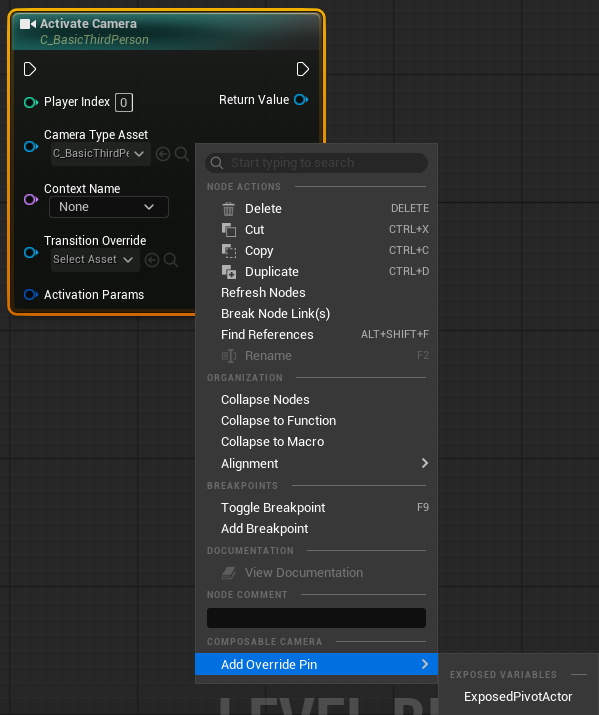 This means a camera type with 15 exposed knobs doesn't spam your Blueprint graph with 15 pins. You surface only the ones you actually want to set; the rest fall back to the asset's authored default.
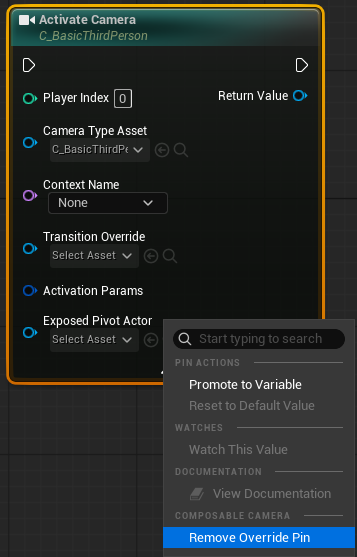
Opted-in pins can be removed at any time via right-click on the pin → Remove Override Pin. Required pins don't offer that option.
Pin value resolution at activation
For each dynamic pin, the K2 node's compiled output reads the pin's current value (connected wire or unconnected default), writes it into the FComposableCameraParameterBlock, and passes the block to the runtime. The runtime then walks ExposedParameters → InternalVariables → ExposedVariables in order and applies each value to the right slot.
Anything the author didn't opt in and didn't override is absent from the block — the runtime sees "no value for FieldOfView" and falls back to the type asset's DefaultValueString (for exposed parameters) or InitialValueString (for exposed variables). Nothing extra is required on the K2 node or at the call site.
Auto-refresh when the asset changes
If you edit the underlying type asset (add a new exposed parameter, flip one to required, rename an entry) while the Blueprint that references it is open, the K2 node reconstructs itself live — subscribing to OnObjectPropertyChanged keeps the node's pin set in sync with the asset without needing to reopen the Blueprint. Orphans (override names that no longer exist on the asset) are automatically removed during refresh.
Activate from DataTable
For data-driven camera configuration — AI selection tables, preset-driven cinematic triggers, designer-tunable camera libraries without Blueprint edits — the plugin ships a second K2 node: Activate Camera From Data Table.
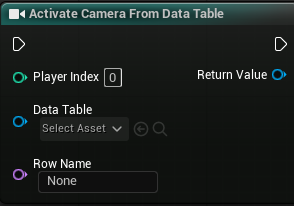 Each DataTable row is a
 FComposableCameraParameterTableRow carrying:
CameraType— soft reference to the type asset to activate.ContextName— which context to push into (orNAME_Nonefor the current top).TransitionOverride— optionalUComposableCameraTransitionDataAsset.ActivationParams— pose preservation, transient flag, lifetime.ParameterValues— aTMap<FName, FString>of serialized values covering both exposed parameters and exposed variables, using each field's own default (DefaultValueString/InitialValueString) as the row-omission fallback.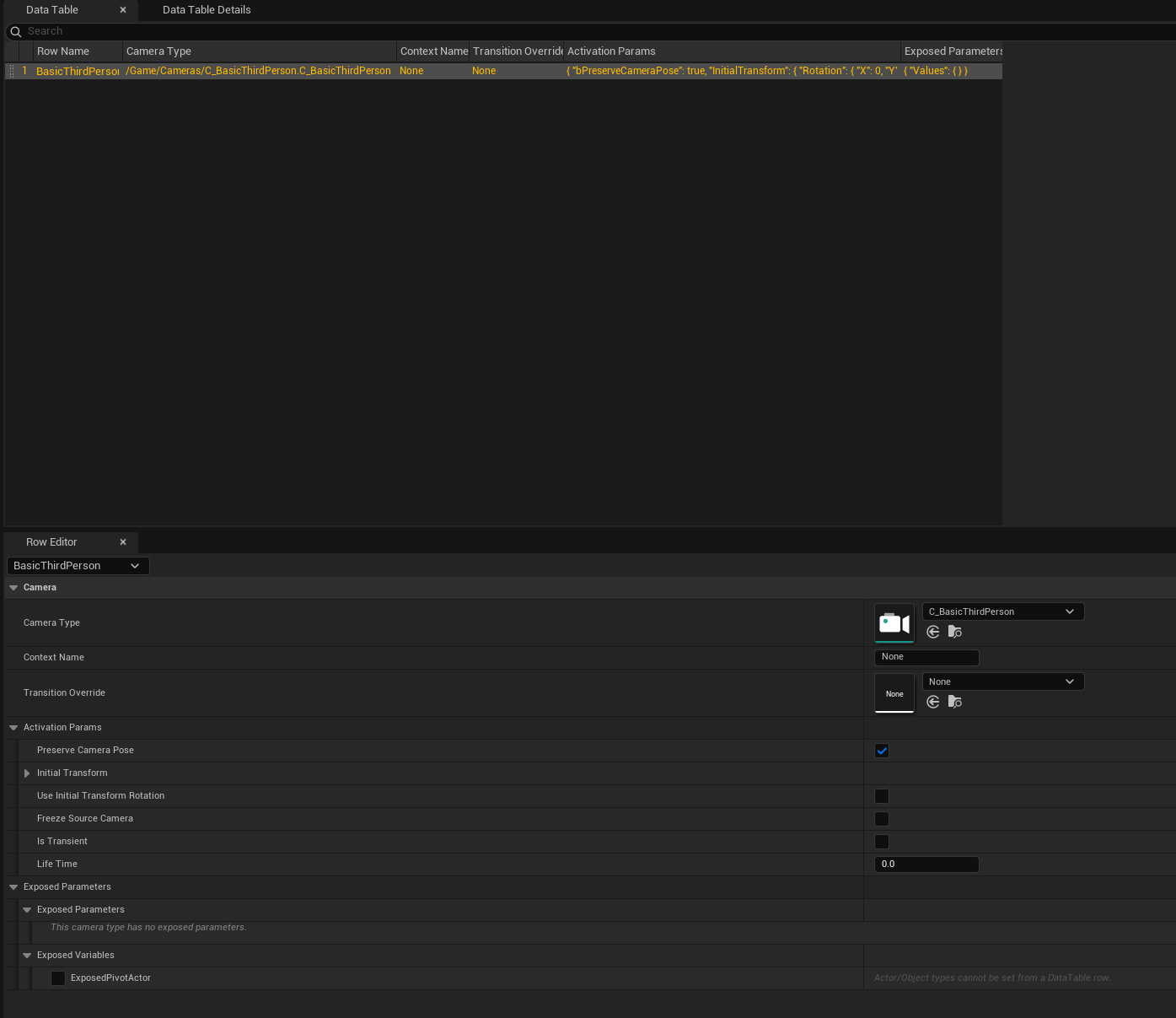 The K2 node takes a DataTable and a row name (both driven by specialized pin widgets — the DataTable picker filters to row structs of type
 FComposableCameraParameterTableRow, and the row-name pin refreshes live as you edit the selected DataTable). At compile, it calls through toActivateComposableCameraFromDataTableon the library.
Designers can edit rows inline in the DataTable editor with a typed per-parameter UI — each row renders with typed value widgets for every exposed parameter and every exposed variable of the selected camera type, so you get numeric spinners, vector field rows, checkboxes, and struct detail views rather than a raw string map.
Override pins — per-call-site adjustments
The DataTable K2 node supports the same opt-in override pin model as the regular Activate Camera node. The DataTable row provides the base configuration, and override pins on the K2 node let you adjust individual values at each call site without modifying the row.
- Required exposed parameters (
bRequired == trueon the type asset) are always present as pins on the node — just like the regular activation node. - Non-required parameters and exposed variables are hidden by default. Opt in per-name via the node's right-click context menu → Add Override Pin → {name}. Each opted-in pin appears under an Overrides advanced-pin section.
- Override values take precedence over row values. If you connect a value to an override pin, that value replaces the row's string-map entry for that parameter entirely. If you don't override a parameter, the row's authored value is used as-is.
- Opted-in pins can be removed at any time via right-click on the pin → Remove Override Pin. Required pins don't offer that option.
This is useful when a DataTable defines the base camera preset (camera type, context, transition, default parameters) but one particular call site needs a tweak — for example, a specific trigger that activates the same cinematic row but with a different FocusActor or a tighter FieldOfView. Rather than duplicating the row, add an override pin for just that parameter.
Auto-refresh when the asset changes
If you edit the underlying type asset (add a new exposed parameter, flip one to required, rename an entry) while the Blueprint that references it is open, the DataTable K2 node reconstructs itself live — just like the regular activation node. Override names that no longer exist on the asset are automatically cleaned up. You can also manually trigger this via right-click → Clean Up Orphan Overrides.
Blueprint function library
UComposableCameraBlueprintLibrary collects the rest of the runtime API. All functions are static with a WorldContextObject parameter — callable from anywhere you have a world context (Actor, Component, GameMode, etc.).
Activation uses Player Index; everything else uses the PCM pointer
The activation K2 node takes a Player Index and resolves the PCM internally. The functions below instead take a resolved AComposableCameraPlayerCameraManager*. Fetch it once via GetComposableCameraPlayerCameraManager(WorldContextObject, PlayerIndex) and cache it on your gameplay object — cheaper than resolving the PCM per call, and explicit about which player you're driving.
Resolving the PCM

AComposableCameraPlayerCameraManager* PCM =
    UComposableCameraBlueprintLibrary::GetComposableCameraPlayerCameraManager(
        WorldContextObject, /*PlayerIndex*/ 0);
Returns nullptr if the player index is out of range or the PCM isn't a AComposableCameraPlayerCameraManager (the plugin wasn't enabled correctly on the GameMode/PlayerController).
Context control
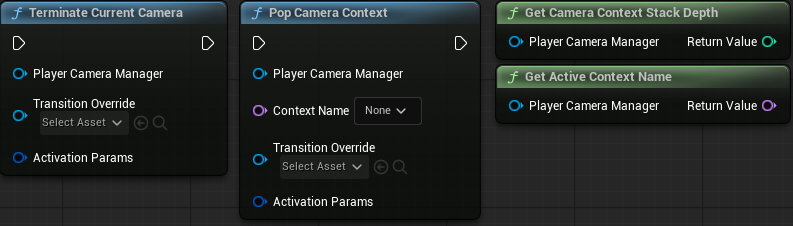
| Function | Signature | Purpose |
|---|---|---|
TerminateCurrentCamera |
(WorldContextObject, PCM, TransitionOverride?, ActivationParams?) |
Pops the active top context back to whatever's below it, blending out. The base context is protected — pop of the last remaining context is a no-op. |
PopCameraContext |
(WorldContextObject, PCM, ContextName, TransitionOverride?, ActivationParams?) |
Pops a specific named context. If it's the active top, the previous context resumes with the transition. If it's not the top, it's removed from the stack immediately (no transition runs — there was no blend to perform). |
GetCameraContextStackDepth |
(WorldContextObject, PCM) → int32 |
Current depth of the stack (1 = base only). |
GetActiveContextName |
(WorldContextObject, PCM) → FName |
Name of the top context. |
There is no separate Push Camera Context function — pushes happen implicitly through Activate Camera when you pass a ContextName that isn't currently on the stack.
Modifiers
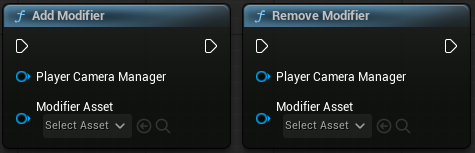
| Function | Signature | Purpose |
|---|---|---|
AddModifier |
(WorldContextObject, PCM, ModifierAsset) |
Adds a UComposableCameraNodeModifierDataAsset to the PCM's modifier manager. Matching assets either reactivate the current camera or mutate checked values in place, depending on ApplyMode. |
RemoveModifier |
(WorldContextObject, PCM, ModifierAsset) |
Removes a previously-added modifier asset and uses the matching camera-pose or value transition for that apply mode. |
Modifiers target a node class — see Concepts → Modifiers for the full semantics, including priority and tag scoping.
Actions
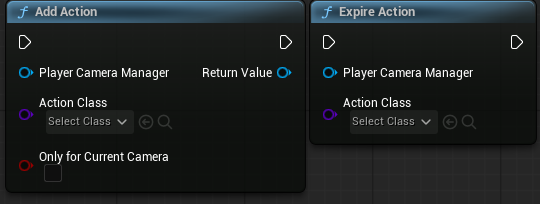
| Function | Signature | Purpose |
|---|---|---|
AddAction |
(WorldContextObject, PCM, ActionClass, bOnlyForCurrentCamera = false) → UComposableCameraActionBase* |
Attaches a UComposableCameraActionBase subclass to the PCM. If bOnlyForCurrentCamera is true, the action auto-expires when the current camera blends out. |
ExpireAction |
(WorldContextObject, PCM, ActionClass) |
Removes a persistent action by class. Camera-scoped actions auto-expire — no manual removal needed. |
Built-in actions include MoveToAction, RotateToAction, and ResetPitchAction. Only one instance of a given action class can be active at a time.
Context name dropdowns
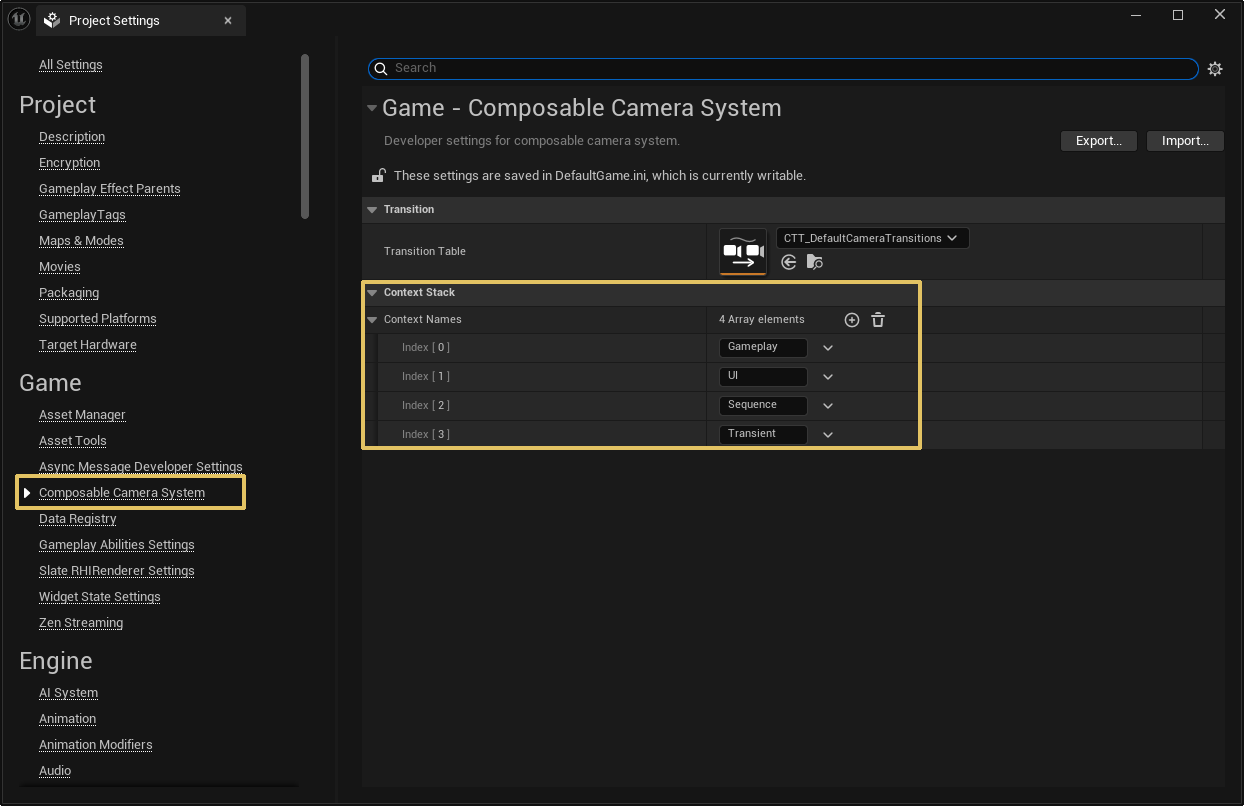 The
The ContextName pin on the Activate Camera K2 node and the ContextName parameter on PopCameraContext use UPARAM(meta=(GetOptions="ComposableCameraSystem.ComposableCameraProjectSettings.GetContextNames")) — Blueprint's dropdown is sourced live from Project Settings → ComposableCameraSystem → Context Names. Adding a new context in project settings makes it available in the dropdown without recompiling anything.
Typical patterns
Activate a gameplay camera on BeginPlay
Event BeginPlay
  └─> Activate Camera
        Player Index: 0
        Camera Type:  CT_ThirdPersonFollow
        Context Name: None                (activates in base context)
        Pivot Actor:  Self
Because the base context (index 0 in Project Settings → Context Names) is initialized by the PCM in InitializeFor (before any actor's BeginPlay), it's always safe to activate into it on BeginPlay.
Push a cinematic
On Trigger Entered
  └─> Activate Camera
        Player Index:        0
        Camera Type:         CT_Cinematic_HeroIntro
        Context Name:        Cutscene                 (a declared context)
        Transition Override: None
Because Cutscene wasn't on the stack before, activation auto-pushes it. The previous gameplay camera is suspended but kept evaluating (see reference leaf nodes). When the cutscene ends, call TerminateCurrentCamera and the stack pops back with whatever transition the five-tier resolution picks for the pop.
On Cutscene Finished
  └─> Get Composable Camera Player Camera Manager (Index 0) ─┐
  └─> Terminate Current Camera (PCM: ↑, TransitionOverride: None)
Sprint FOV modifier
On Sprint Started
  └─> Get Composable Camera Player Camera Manager (Index 0) ─┐
  └─> Add Modifier (PCM: ↑, Modifier Asset: DA_SprintFOVModifier)

On Sprint Ended
  └─> Get Composable Camera Player Camera Manager (Index 0) ─┐
  └─> Remove Modifier (PCM: ↑, Modifier Asset: DA_SprintFOVModifier)
The modifier data asset wraps one or more UComposableCameraModifierBase entries targeting FieldOfViewNode. In Node Type mode, check FieldOfView and set the sprint value on the node template. ApplyMode = ReactivateCamera blends through a camera transition; ApplyMode = ModifyExistingInstance keeps the same camera and blends the FOV value through the asset's value transition.
Calling from C++
All the library functions are also usable from C++. The include path is:
#include "Utils/ComposableCameraBlueprintLibrary.h"

AComposableCameraPlayerCameraManager* PCM =
    UComposableCameraBlueprintLibrary::GetComposableCameraPlayerCameraManager(this, 0);

UComposableCameraBlueprintLibrary::AddModifier(this, PCM, MyModifier);
For gameplay activation the recommended entry point is the K2 node, not the library (the parameter block would have to be assembled by hand otherwise). The PCM also exposes CreateNewCamera / ActivateNewCamera as C++-only entry points for internal subsystems like the MixingCameraNode that need to spawn auxiliary cameras — these bypass the type asset layer and are not recommended for gameplay code.
Most gameplay code should never reach below the library — the type-asset pipeline is the supported surface.