A custom camera node is a C++ class derived from UComposableCameraCameraNodeBase that runs on the camera chain every frame to produce or mutate the pose. This is the densest extension recipe — start here if you want a general feel for the authoring model, even if you're ultimately writing a transition or modifier instead.
When to write a node
Write a node when the effect is always part of this camera's behavior and operates per frame on the pose. Examples: reading input to drive rotation, resolving collision, applying an offset, snapping to a screen-space bound.
If the effect is conditional on runtime gameplay state (sprint FOV bump, aim pitch damping) or needs to reach into an existing node's parameters, write a modifier instead. If the effect is pose-to-pose blending (easing, physics-plausible recovery), write a transition.
The two-method contract
Every camera node implements two BlueprintNativeEvent-style hooks. The base class provides non-virtual Initialize() / TickNode() wrappers — you override the _Implementation methods.
OnInitialize_Implementation()— runs once after pin resolution and subobject pin value application, before the first tick. Read static configuration, preallocate buffers, cache references.OnTickNode_Implementation(float DeltaTime, const FComposableCameraPose& CurrentPose, FComposableCameraPose& OutPose)— runs every frame on the camera chain. ReadsCurrentPose, writesOutPose. Must not allocate.
A third hook, GetPinDeclarations_Implementation(TArray<FComposableCameraNodePinDeclaration>& OutPins), declares the node's pin schema. You only need to override this if your node has pins that aren't picked up automatically from UPROPERTY reflection (most don't).
A minimal example
// MyOffsetNode.h
#pragma once

#include "CoreMinimal.h"
#include "Nodes/ComposableCameraCameraNodeBase.h"
#include "MyOffsetNode.generated.h"

UCLASS(ClassGroup = ComposableCameraSystem, meta = (DisplayName = "My Offset"))
class MYPROJECT_API UMyOffsetNode : public UComposableCameraCameraNodeBase
{
    GENERATED_BODY()

public:
    UPROPERTY(EditAnywhere, BlueprintReadWrite, Category = "Offset")
    FVector Offset = FVector::ZeroVector;

protected:
    virtual void OnInitialize_Implementation() override;
    virtual void OnTickNode_Implementation(
        float DeltaTime,
        const FComposableCameraPose& CurrentPose,
        FComposableCameraPose& OutPose) override;
};
// MyOffsetNode.cpp
#include "MyOffsetNode.h"
void UMyOffsetNode::OnInitialize_Implementation()
{
// One-time setup. Nothing to do here for a pure offset.
}
void UMyOffsetNode::OnTickNode_Implementation(
float DeltaTime,
const FComposableCameraPose& CurrentPose,
FComposableCameraPose& OutPose)
{
OutPose = CurrentPose;
OutPose.Location += Offset;
}That's a working node. Drop it into a camera type asset, wire the pin (Offset auto-exposes because it's a UPROPERTY), and it participates in the chain.
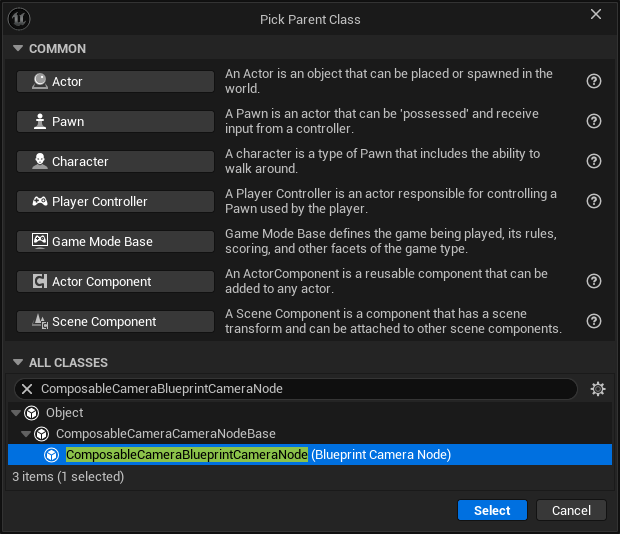
You can do this in blueprint following the same process above.
Pins — what gets exposed, and how
Pins are how a node talks to the rest of the graph. There are two kinds of pin sources:
Reflection-driven pins. Every UPROPERTY on the node becomes an input pin whose type is derived from the UProperty via TryMapPropertyToPinType. Supported types: bool, int32, float, double, FVector2D, FVector, FVector4, FRotator, FTransform, AActor*, UObject*, and authored USTRUCTs and Delegates. This is the path for 95% of pins — you don't write any pin declaration code.
Custom output pins (via GetPinDeclarations). If your node produces values other nodes consume (a computed pivot position, a resolved aim direction), declare them with GetPinDeclarations_Implementation:
void UMyNode::GetPinDeclarations_Implementation(
    TArray<FComposableCameraNodePinDeclaration>& OutPins) const
{
    FComposableCameraNodePinDeclaration Pin;
    Pin.PinName = TEXT("ResolvedPivot");
    Pin.DisplayName = TEXT("Resolved Pivot");
    Pin.Direction = EComposableCameraPinDirection::Output;
    Pin.PinType = EComposableCameraPinType::Vector3D;
    OutPins.Add(Pin);
}
At runtime, read inputs with GetInputPinValue<T>(PinName) and write outputs with SetOutputPinValue<T>(PinName, Value) — both are templated on the pin type.
Pin name must match the UPROPERTY FName exactly
For reflection-driven pins, the pin's name is the UPROPERTY field name verbatim, including the b prefix on bools. Mismatches between pin declarations and property names cause the Details panel to double-render the row — the UPROPERTY entry plus a plain-text fallback. If you find yourself writing a pin declaration that shadows an existing UPROPERTY, delete the declaration.
Subobject pins — Instanced subobjects auto-expose their fields
If your node has an Instanced UPROPERTY (e.g. an interpolator), TryMapPropertyToPinType intentionally skips it — the subobject's own fields are exposed as pins on the parent node instead, via the subobject-pin machinery. This is how nodes like PivotDampingNode surface Interpolator.Speed and Interpolator.DampTime directly on the node.
UPROPERTY(EditAnywhere, Instanced, Category = "Damping")
TObjectPtr<UComposableCameraInterpolatorBase> Interpolator;
No extra code required — the editor walks the subobject tree, generates pins for each reflected field, and the runtime applies their values via ApplySubobjectPinValues before OnInitialize runs.
Subobject refs across different Outers must be Transient
If your Instanced UPROPERTY can end up pointing to a subobject whose Outer is not your node, mark the field Transient. Auto-promoted cross-outer references silently corrupt on save/load. This bites cross-asset wiring patterns specifically — within a single node asset you're fine.
The hot-path rule (repeated because it matters)
OnTickNode_Implementation runs once per camera per frame, often for multiple cameras during a blend. It must not allocate. Concretely, inside tick:
- no
new/MakeShared/MakeUnique - no
TArray::Addthat can trigger reallocation, noTMap::Add, noTSet::Add - no
FString::PrintforFString::Format - no
UObjectconstruction (NewObject,CreateDefaultSubobject) - no blocking I/O, no logging at
Display/Warningunless gated by aWITH_EDITOR-only debug flag
Preallocate in OnInitialize_Implementation. If you need a scratch buffer, store it as a UPROPERTY(Transient) with Reserve() called once during init, then SetNumUninitialized() in tick.
Which input comes from where — default values, graph wiring, context parameters
A pin's actual value at tick time is resolved through a chain:
- If the pin is wired to another node's output in the graph, that wins.
- Otherwise, if the pin is bound to a camera context variable (e.g.
PlayerPawnflowing through the whole chain), the context value wins. - Otherwise, the pin's authored default value (from the node's Details panel) is used.
- If none of the above, the pin holds the
UPROPERTY's C++ default.
You don't handle this in your node — GetInputPinValue<T> always returns the resolved value. But know the chain exists so you can reason about "why is this node seeing this value at runtime".
Compute nodes — the other flavor
If your work only needs to happen once at camera activation (a measured distance, an initial pose seed, setup data that should not run every frame), derive from UComposableCameraComputeNodeBase instead of UComposableCameraCameraNodeBase. Compute nodes run on the BeginPlay chain, override ExecuteBeginPlay, read inputs, write outputs, and their outputs are cached for the camera's lifetime.
UCLASS()
class MYPROJECT_API UMyComputeNode : public UComposableCameraComputeNodeBase
{
    GENERATED_BODY()

public:
    virtual void ExecuteBeginPlay() override;
};
Compute nodes are the right choice when the result is stable across the camera's lifetime — "where did I spawn relative to the target", "which of these two spawn points should I use". If the value needs to recompute each frame, use a camera node.
Folder placement
| File | Location |
|---|---|
| Header | Source/ComposableCameraSystem/Public/Nodes/MyNode.h |
| Source | Source/ComposableCameraSystem/Private/Nodes/MyNode.cpp |
Placement isn't cosmetic — the editor's palette and context menu walk the class hierarchy under Nodes/, and misplaced classes don't appear. If you're extending the plugin from a separate project module, follow the same Public/Nodes / Private/Nodes layout inside that module.
Editor palette category
The camera graph editor groups nodes in the Add Node palette by a sub-menu category. Every node has a PaletteCategory field inherited from UComposableCameraCameraNodeBase:
// UComposableCameraCameraNodeBase — inherited field
UPROPERTY(EditDefaultsOnly, Category = "Node Metadata", meta = (NoPinExposure))
FName PaletteCategory = TEXT("Misc");
The default is "Misc". Set it to anything meaningful in your node's inline constructor — the schema reads the CDO at palette-build time and nests the menu entry under Camera Nodes | <YourCategory> automatically (UE honors | in FEdGraphSchemaAction::Category as a path delimiter):
UCLASS(ClassGroup = ComposableCameraSystem, meta = (DisplayName = "My Offset"))
class MYPROJECT_API UMyOffsetNode : public UComposableCameraCameraNodeBase
{
    GENERATED_BODY()

public:
    UMyOffsetNode() { PaletteCategory = TEXT("Position"); }  // ← appears under "Camera Nodes | Position"
    // ...
};
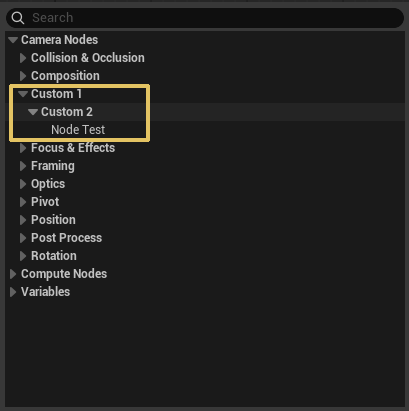
The built-in nodes use these categories (pick whichever fits, or invent your own):
| Category | What lives there |
|---|---|
Pivot |
Nodes that establish or move the pivot point |
Position |
Camera position / offset operators |
Rotation |
Camera rotation operators (control rotate, auto-rotate, pivot-rotate) |
Framing |
Screen-space / look-at / framing constraints |
Optics |
FOV, filmback, lens, orthographic |
Focus & Effects |
Focus pull, post-process, filmgrain |
Collision & Occlusion |
Collision push, occlusion fade |
Post Process |
Full post-process override nodes |
Composition |
Mixing / blending camera sub-trees |
Math |
Compute nodes that produce numeric outputs for downstream wiring |
Misc |
Default — anything that doesn't fit the above |
Blueprint subclasses use Class Defaults, not the constructor
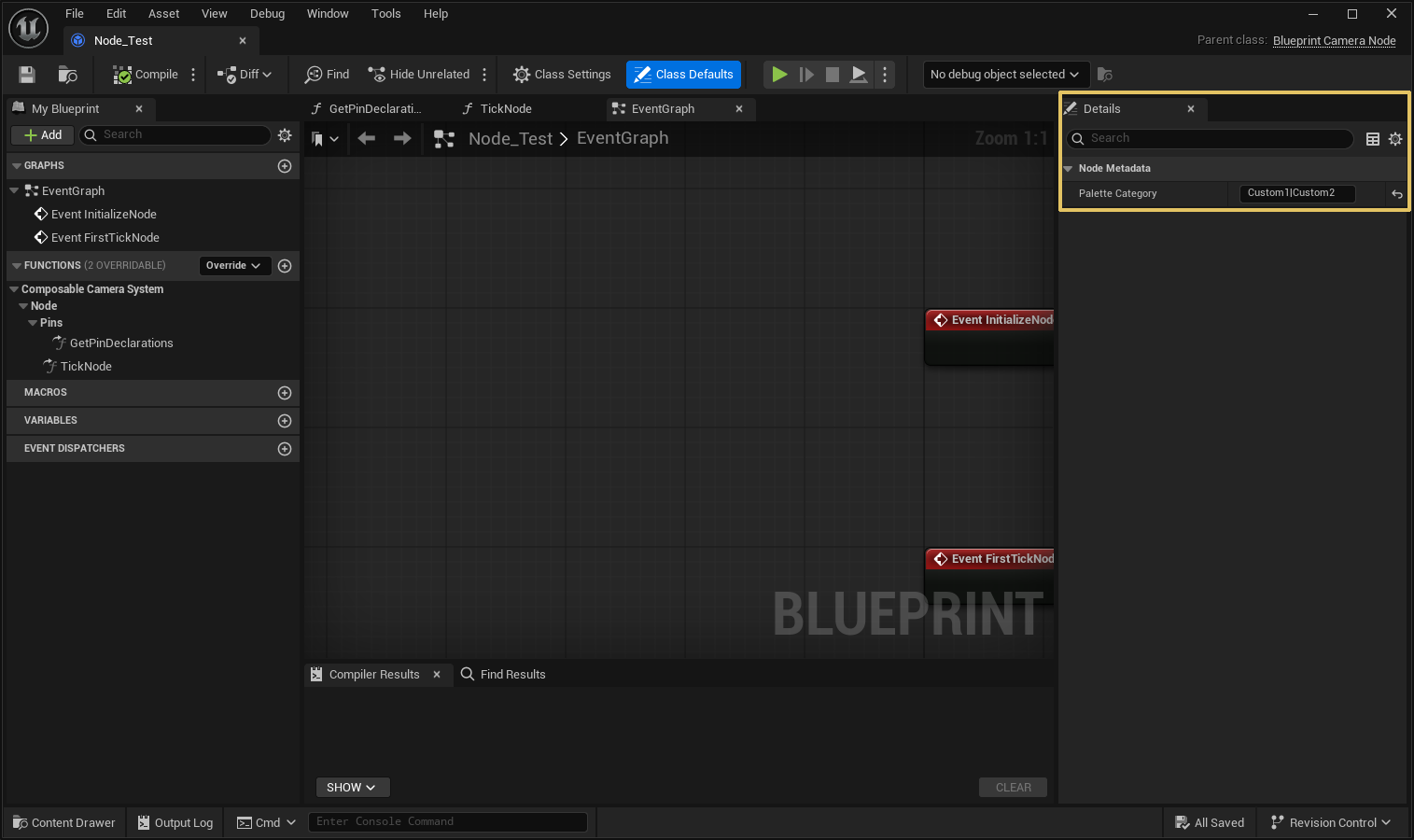
C++ nodes set PaletteCategory in the constructor because that initialises the CDO. Blueprint-derived nodes (from UComposableCameraBlueprintCameraNode) cannot set UCLASS meta at all — instead, open the Blueprint's Class Defaults panel and set the Palette Category property there. The schema reads the CDO either way.
NoPinExposure keeps it off the graph
PaletteCategory is tagged meta = (NoPinExposure), so it never appears as a pin in the camera graph even though it's a UPROPERTY. You never need to wire it.
Node vs modifier — when to pick which
The question comes up often enough to restate: is the effect always on, or is it gameplay-conditional?
- Always on → node. You're adding an operator to the camera's chain.
- Conditional (sprint, aim, stun, debug) → modifier. You're tweaking an existing node's parameters when some predicate is true.
A modifier can only mutate an existing node's parameters. If the effect requires new per-frame work (a new kind of collision trace, a new kind of input reading), no modifier will do — write the node.
See Custom Modifiers if you decide the answer is "modifier".
Testing in isolation
A new node is straightforward to unit-test:
- Construct a
UMyNodeviaNewObject. - Set any
UPROPERTYinputs directly. - Call
Initialize()(the non-virtual wrapper) once. - Construct an
FComposableCameraPoseinput, callTickNode(DeltaTime, Input, Output)repeatedly. - Assert on
Output.
No PCM, no camera tree, no context stack required. Nodes are intentionally isolated.
See also: Nodes Catalog for the shipped set and what each does; Custom Transitions and Custom Modifiers for the other two extension points; Editor Hooks if you need more than the reflection-driven Details panel.