Camera Patches are time-bounded, additively-composable overlays that layer on top of the running camera's output pose. The camera's evaluation tree runs first (producing the base pose for this frame); the PatchManager then iterates active Patches in layer order, ticking each one's node graph with the upstream pose and blending the result back in at the Patch's current envelope alpha.
This page covers everything from asset creation to runtime management to Sequencer-timeline authoring.
Creating a Patch asset
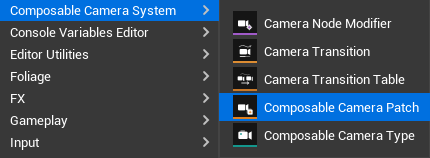
In the Content Browser, right-click → ComposableCameraSystem → Camera Patch Type Asset. A UComposableCameraPatchTypeAsset is created — it opens in the same visual graph editor as a regular camera type asset.
The graph works identically to a regular camera graph: wire nodes, set parameters, expose parameters or variables as pins. The key difference is how the root node receives its input: in a regular camera the root synthesizes a pose from scratch; in a Patch the root receives the upstream pose from the running camera as its starting point and modifies it. Nodes that synthesize a pose from scratch (e.g. RelativeFixedPoseNode, MixingCameraNode, ViewTargetProxyNode) will compile but produce incorrect results as Patch nodes — you'll see a build warning on those nodes in a future validation pass.
Patch-specific asset settings
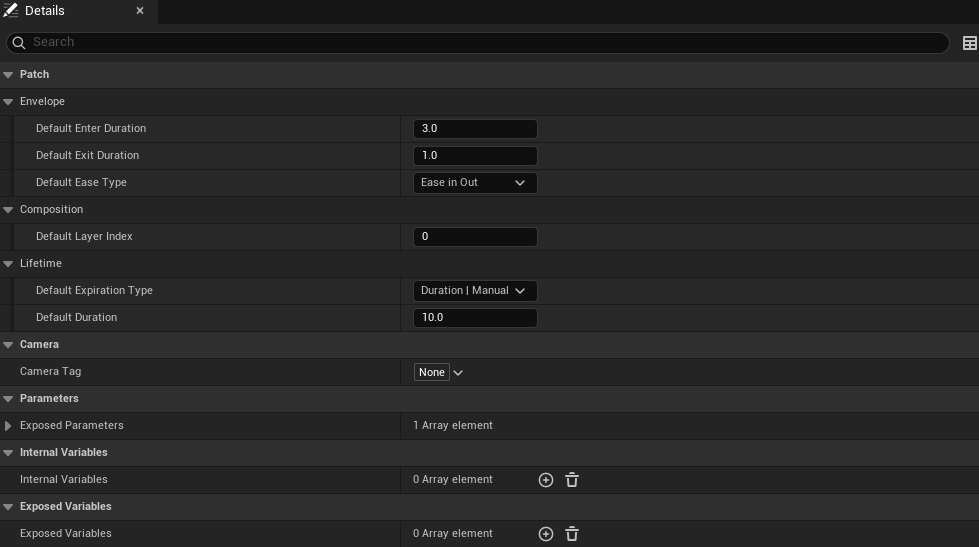
Open the asset's Class Defaults. Under the Patch|Envelope, Patch|Composition, and Patch|Lifetime categories:
| Field | Effect |
|---|---|
DefaultEnterDuration |
Fade-in time when no per-call override is set. |
DefaultExitDuration |
Fade-out time when no per-call override is set. |
DefaultEaseType |
Easing curve applied symmetrically to both the enter and exit ramps. |
DefaultLayerIndex |
Composition order (lower index runs first, same convention as GameplayCameras' StackOrder). |
DefaultExpirationType |
Which expiration channels are active by default (Duration, Manual, Condition, or any combination). |
DefaultDuration |
Seconds in Active phase before auto-expiry (only consulted when the Duration channel is enabled). |
All of these are defaults — every field can be overridden per-call via FComposableCameraPatchActivateParams.
Runtime path (Blueprint / C++)
The runtime path is driven by gameplay events and resolves patches through the active PCM Director.
Adding a Patch
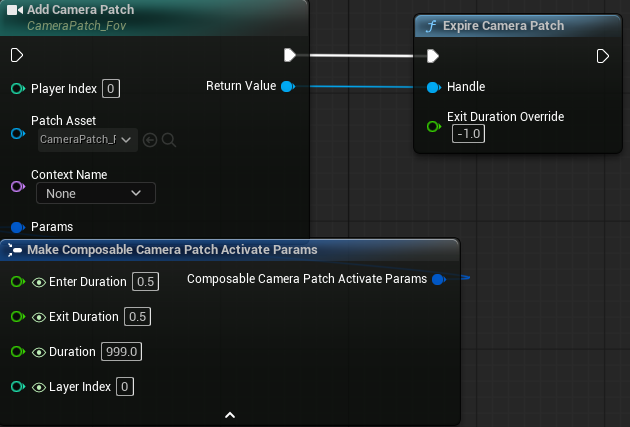
From Blueprint, use the Add Camera Patch node from UComposableCameraBlueprintLibrary:
AddCameraPatch(PlayerIndex, PatchAsset, Params, [exposed parameter pins])
→ UComposableCameraPatchHandlePlayerIndex— which player controller's PCM to target (0 for single-player).PatchAsset— aUComposableCameraPatchTypeAssetreference.Params— aFComposableCameraPatchActivateParamsstruct for per-call overrides.- Exposed parameter pins — if the Patch asset has exposed parameters or variables,
UK2Node_AddCameraPatchgenerates typed input pins for each one, so you set them inline without building a separate parameter bag.
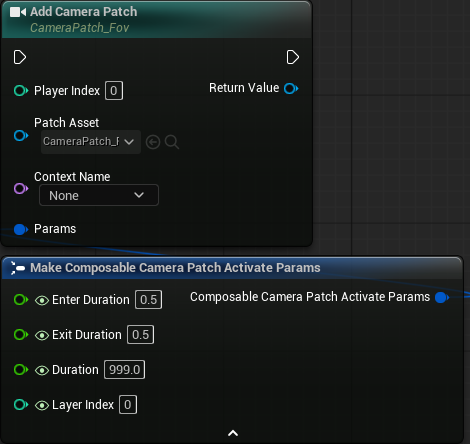
The function returns a UComposableCameraPatchHandle. Store this in a Blueprint variable — it is your only handle to the live Patch, and you need it to manually expire, query phase, or check alpha.
Keep the handle alive
The handle holds a weak reference to the underlying Patch instance. If you don't store it in a UPROPERTY (C++) or a Blueprint variable, the GC may collect it. Once the handle is gone, you can still add new Patches, but Manual-channel expiry on the original Patch becomes impossible — it will only expire through Duration or Condition.
Per-call parameter overrides (FComposableCameraPatchActivateParams)
Each overridable field in FComposableCameraPatchActivateParams is paired with a bOverride* bool:
| Override toggle | Field | Description |
|---|---|---|
bOverrideEnterDuration |
EnterDuration |
Replace the asset's DefaultEnterDuration. Pass 0 for an instant fade-in. |
bOverrideExitDuration |
ExitDuration |
Replace the asset's DefaultExitDuration. Pass 0 for an instant cut on expiry. |
bOverrideExpirationType |
ExpirationType |
Override the expiration channel bitmask. |
bOverrideDuration |
Duration |
Override the Active-phase duration in seconds. |
bOverrideLayerIndex |
LayerIndex |
Override the composition layer index for this call. |
| (always used) | bExpireOnCameraChange |
Set to true to auto-expire when the Director's running camera changes. |
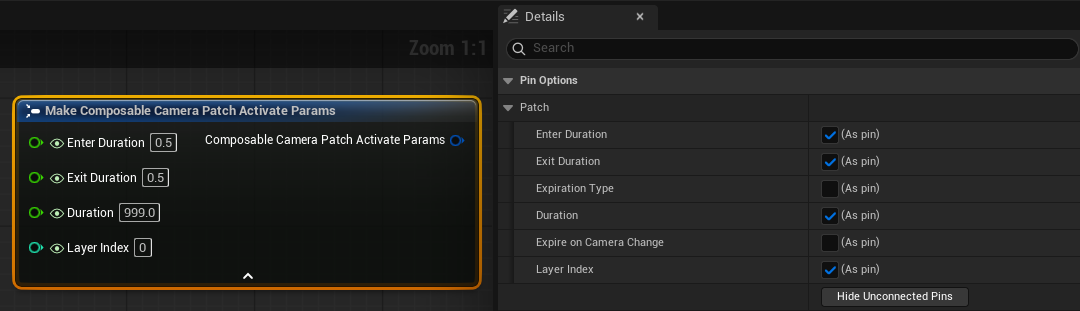
Blueprint MakeStruct tip. The "Show Pin For X" checkboxes in the MakeStruct node's Details panel (not the per-pin eye icon) control whether the corresponding bOverride* flag is set to true. Hiding a pin via the eye icon only visually collapses it — the override flag stays true. To use the asset default for a field, open the MakeStruct node's Details panel and uncheck "Show Pin For [FieldName]".
Patch lifecycle and expiration
Once added, a Patch is owned by the Director's PatchManager and runs in the Director's evaluation pass each frame, just after the evaluation tree. You do not need to tick it manually.
Expiration channels. The ExpirationType bitmask on each instance controls when the Patch transitions to Exiting:
Duration— the Patch automatically flips to Exiting afterDurationseconds in the Active phase. Useful for any timed effect.Manual— the Patch runs indefinitely until you call Expire Camera Patch (Blueprint) /PatchManager->ExpirePatch(Handle)(C++) explicitly. Useful when the effect's lifetime is controlled by game state (e.g. "stay active while the player is aiming down sights").Condition— the Patch callsCanRemain(DeltaTime, UpstreamPose)on the asset every frame while in Active phase. Override this in a Blueprint subclass to implement per-frame gating: returnfalseto begin the exit ramp. TheUpstreamPoseparameter lets you inspect the actual camera pose to make decisions like "stop the zoom overlay when FOV drops below 30°".bExpireOnCameraChange— a per-call flag (not part of the bitmask). Set it inFComposableCameraPatchActivateParamsto auto-expire the Patch when the Director switches to a different running camera.
Channels combine: Duration | Manual expires on whichever fires first. Multiple patches can be active simultaneously at different layers.
Manual expiry. Call Expire Camera Patch (Blueprint) and pass the handle. An optional ExitDurationOverride lets you shorten or lengthen the fade-out relative to the asset's default — pass 0.0 for an instant cut.
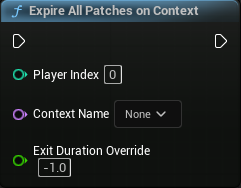
Soft expire-all. Call PatchManager->ExpireAll(ExitDurationOverride) to begin the exit ramp on every active Patch. Each one fades out individually according to its own exit duration (or your override). This is different from DestroyAll(), which tears everything down instantly without a fade.
Layer ordering
Multiple simultaneous Patches are evaluated in (LayerIndex ascending, push order ascending) order. Lower layer indices run earlier — their output becomes the upstream pose for higher-layer Patches. The final output of the last Patch becomes the frame's output pose from the Director.
This means Patches compose additively in a defined order, not in a random pile. A recoil Patch at layer 0 and a scope-zoom Patch at layer 1 will always apply recoil first, then zoom on top of the recoiled pose.
Sequencer timeline path
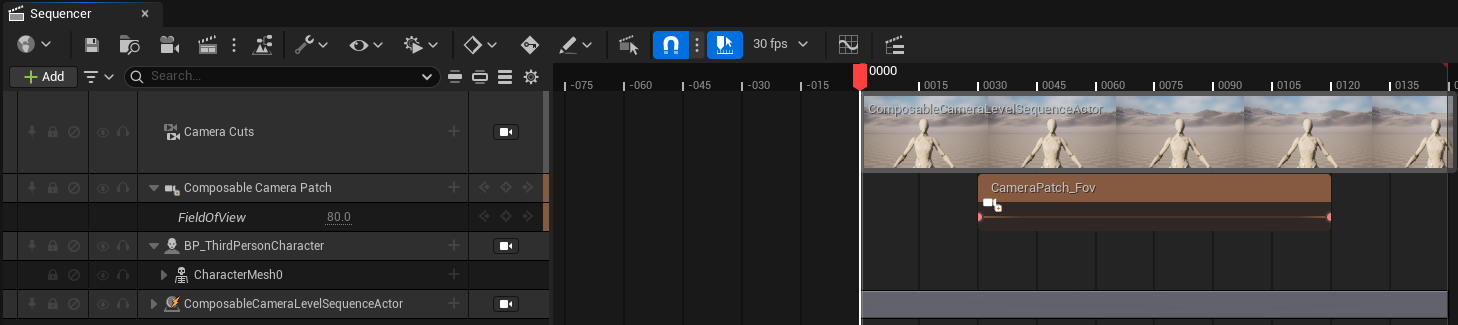
The Sequencer path is suited for authored cinematic overlays: you know the timing ahead of time, you want to key parameters in the Sequencer UI, and you want the result to preview live in the editor viewport.
Setup
- Open a Level Sequence that contains (or spawns) an
AComposableCameraLevelSequenceActorwith aUComposableCameraLevelSequenceComponent. - In the Sequencer toolbar, click + Track → Camera Patch Track (under the ComposableCameraSystem group). This adds a
UMovieSceneComposableCameraPatchTrackat the root level — it is not bound to any object binding. - The track starts empty. Click + Section to add a
UMovieSceneComposableCameraPatchSection.
Configuring a section
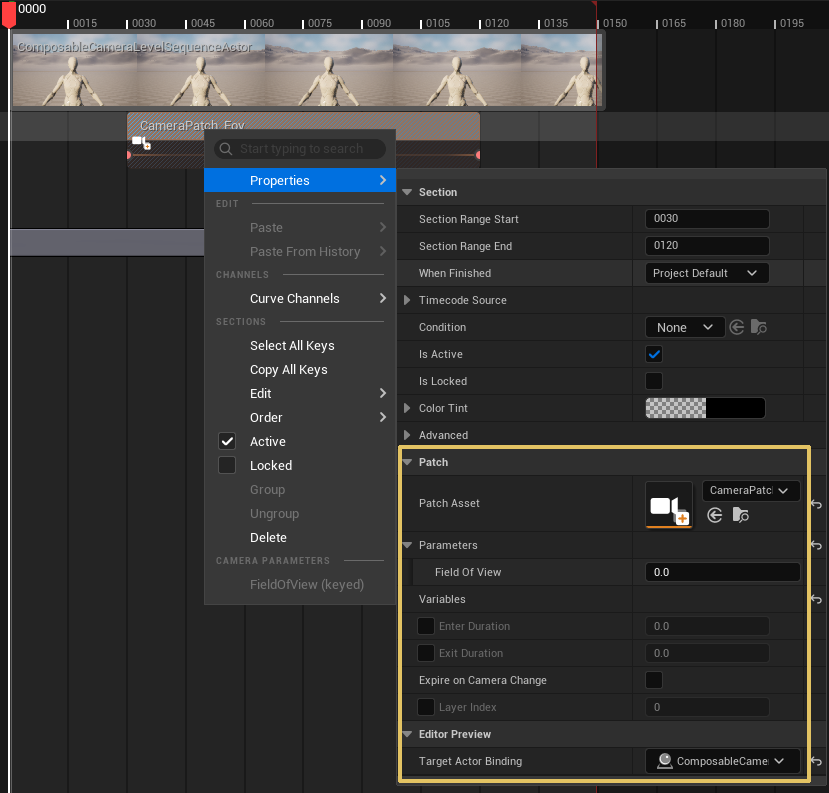
Select the section and open its Details panel:
- Patch Asset — assign a
UComposableCameraPatchTypeAsset. The Parameters and Variables bags in the section update automatically to reflect the asset's exposed surface. - Params — the same
FComposableCameraPatchActivateParamsstruct as the runtime path. For Sequencer-driven patches the section's TrueRange is the authoritative lifetime, so Duration / Manual / Condition expiration channels are advisory; leaving them at defaults is recommended. - Parameters / Variables — static default values for each exposed parameter or variable. These are the fallback when no keyframe channel exists for a parameter.
- Target Actor Binding — bind to the
AComposableCameraLevelSequenceActorin this sequence. Drag the binding row from the Sequencer tracks list onto this field, or use the picker. The section uses this binding for editor preview (the Patch applies on the LS Actor's CineCamera while you scrub the Sequencer). Without a binding the Patch is invisible in the editor viewport — it still works in PIE.
Envelope from section easing
The section's built-in Easing handles (the triangular fade handles at each end of a section) feed directly into the Patch envelope. When bOverrideEnterDuration / bOverrideExitDuration are not set on the section's Params, the section's own easing durations (Easing.GetEaseInDuration() / GetEaseOutDuration()) are used. This means you can visually reshape the Patch fade by dragging the section easing handles without touching any property.
Keying parameter channels
Exposed parameters on the Patch asset can be promoted to keyable channels:
- Right-click the section row in Sequencer.
- Under Camera Parameters (or Camera Variables), click the parameter you want to key.
- The parameter is promoted to a channel — it now appears as a sub-row under the section, just like a material parameter on a Material Parameter Track.
- Set keyframes normally. The channel takes priority over the bag default value for that parameter on every frame.
Parameters that are not promoted to a channel continue to use the bag default value from the Details panel. This lets you set most parameters once in the Details panel and key only the ones that need to animate.
Editor preview vs. PIE
Editor preview (Sequencer scrubbing in the editor viewport) applies the Patch's effect on the LS Actor's bound CineCamera by calling SetSequencerPatchOverlay on its UComposableCameraLevelSequenceComponent. Alpha is computed statelessly via PatchEnvelope::ComputeStatelessAlpha — scrubbing backwards correctly shows the fade-out because alpha is a pure function of playhead position, enter/exit durations, and easing. No stateful phase machine is involved in editor scrub, so drag-to-anywhere is always accurate.
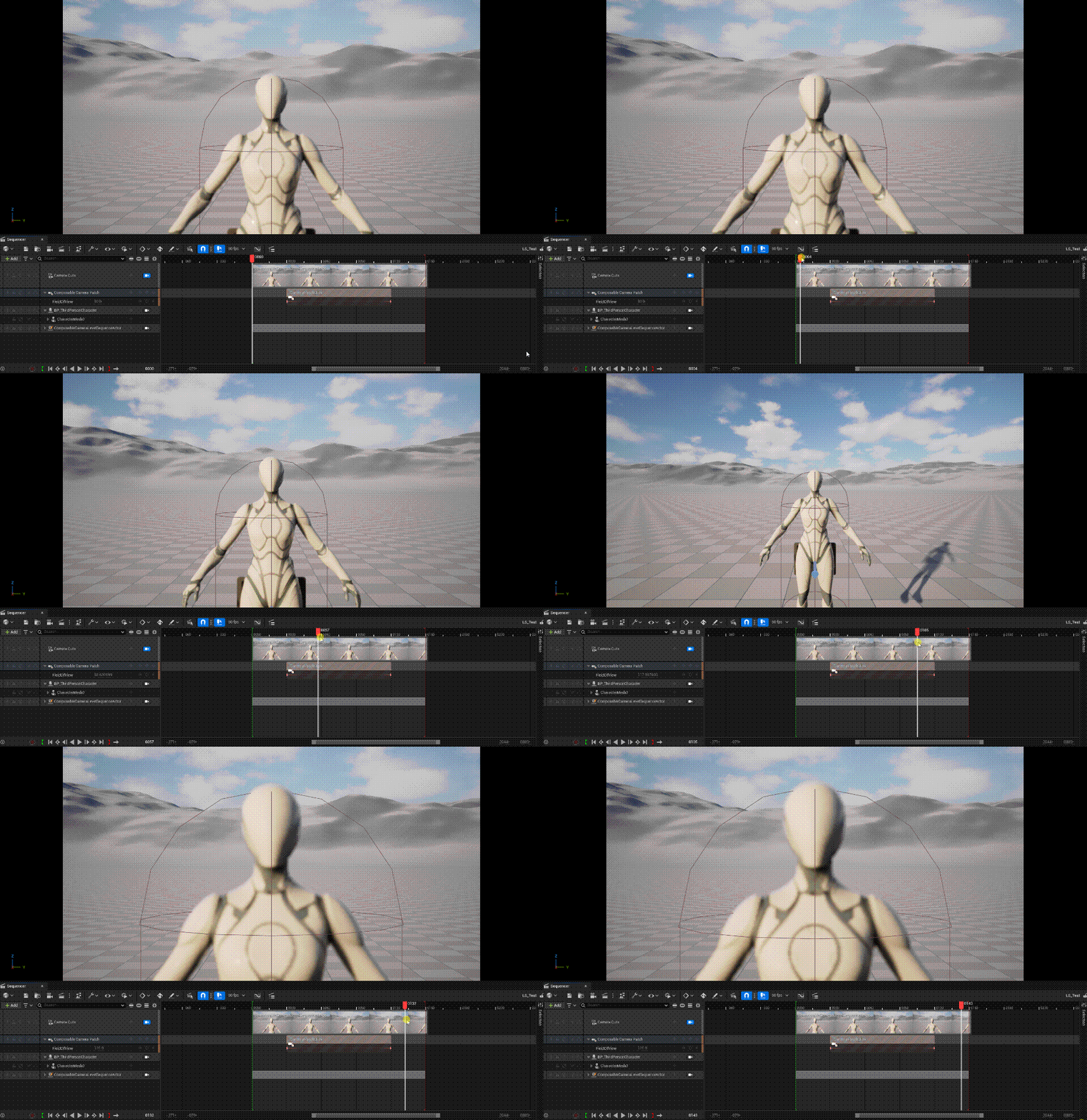
PIE uses the same LS component path. The active UMovieSceneComposableCameraPatchTrackInstance calls SetSequencerPatchOverlay each frame with the current parameter block and the statelessly computed alpha. The LS component applies all registered overlays in its TickComponent, sorted by Params.LayerIndex, before projecting the final pose to the CineCamera.
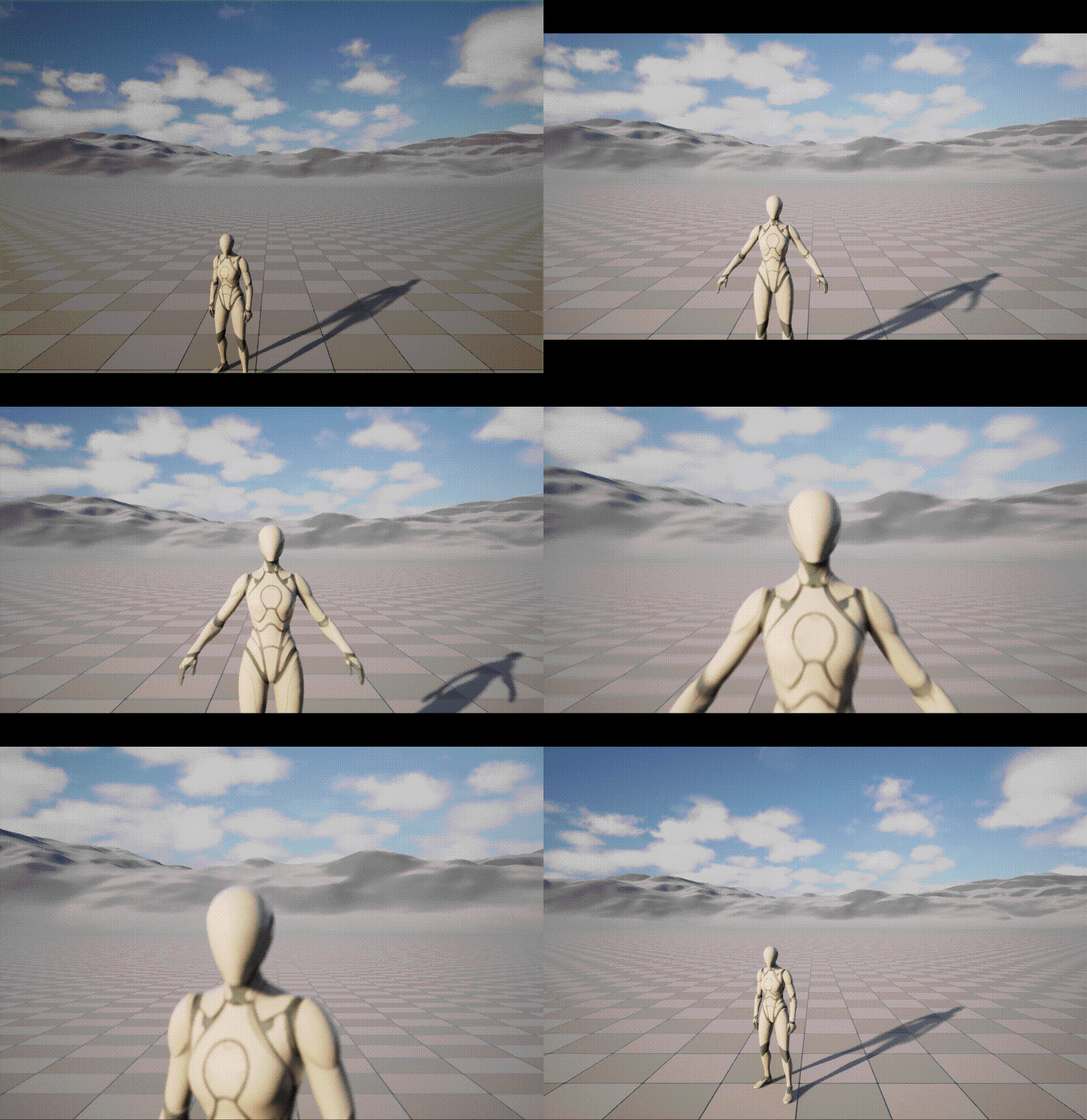
The Camera Cut Track in the same sequence can target the LS Actor — when it does, the Patch overlays apply only while the LS Actor is the active camera, which is the expected behavior for cutscenes.
Debug observability
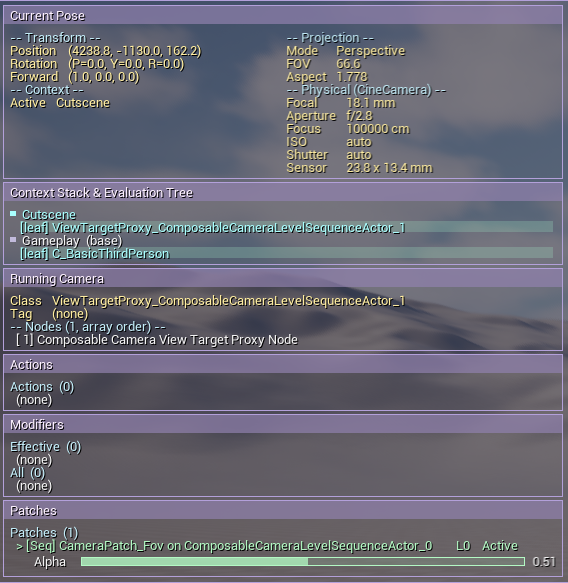
Both paths are visible in the debug HUD. Run:
ccs.debug.panel 1The debug panel shows a Patches section per Director listing each active Patch by asset name, layer index, phase, current alpha, elapsed time, and expiration config. The stat CCS command adds PatchManager Apply and Patch TickEvaluator cycle counters so you can measure per-frame overhead.
Common patterns
Hit reaction. Duration-expiring Patch, EnterDuration ≈ 0 (instant snap), ExitDuration ≈ 0.2s. Triggered by a gameplay event. No handle storage needed.
ADS zoom overlay. Manual-expiring Patch, bExpireOnCameraChange = true. Store the handle in a component variable. Call AddCameraPatch on ADS enter, ExpirePatch on ADS exit. The bExpireOnCameraChange flag is a safety net — if the player dies mid-ADS the Patch expires cleanly without leaking.
Condition-gated effect. Condition-expiring Patch. Override CanRemain(DeltaTime, UpstreamPose) in a Blueprint subclass to inspect the pose — return false when the FOV, position, or game state no longer warrants the effect. The exit ramp begins automatically.
Cinematic lens push. Sequencer track section. Assign a Patch asset that runs a LensNode or FieldOfViewNode variant. Set EnterDuration / ExitDuration via the section's easing handles. Key the FOV parameter channel for a timed push. Bind TargetActorBinding to the LS Actor for live viewport preview.
Stacked overlays. Two or more simultaneous Patches at different layer indices. The lower layer's output is the upper layer's input — the overlay composition is well-defined and deterministic.
For the full C++ API reference, see Reference → Camera Patch Catalog. For the enum / struct API pages, see UComposableCameraPatchManager, UComposableCameraPatchHandle, and UComposableCameraPatchTypeAsset.